
SSH Server
A powerful SSH/SFTP Server to open terminal, sftp, enable port forwarding
- Installs
- 5.97K
- Measured
- Rating
- 4.32
- Ratings
- 182
- 21 reviews
- Version
- 0.13.0
- Updated 20 Oct 2026
- Released
- 9 Feb 2019
- Tracked since 13 May 2026
- Size
- 6 MB
- Needs 5.0
Screenshots


About SSH Server
The description on the store listing
A powerful application allows you to run SSH/SFTP Server on your Android device with full functional terminal.
<b>APPLICATION FEATURES</b>
√ <b>Use any network interfaces</b> in your device including: Wi-Fi, Ethernet, Tethering...
- Tap on the addresses to generate the QR code
√ <b>Multiple users</b> (anonymous user included: username=ssh without password)
• <b>Support Public key authentication</b>
• [SFTP feature] Allow each user to show hidden files or not
√ <b>[SFTP feature] Multiple access paths for each user</b>: Any folders in your internal storage or external sdcard
• [SFTP feature] Can set read-only or full write access on each path
√ <b>Automatically start SSH/SFTP …
Read the full description
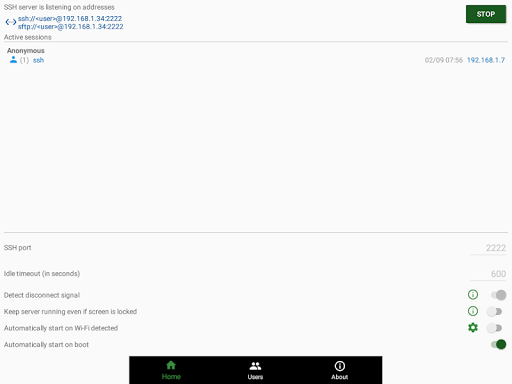
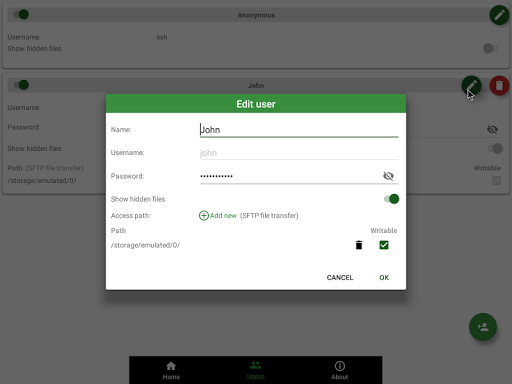
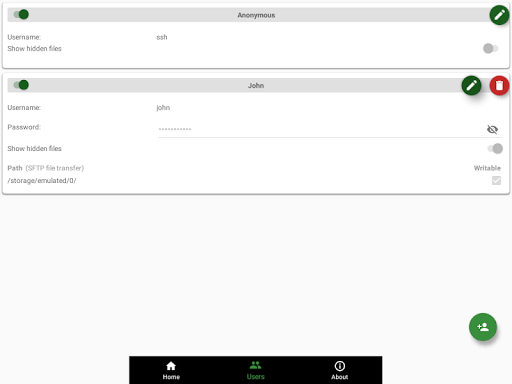
A powerful application allows you to run SSH/SFTP Server on your Android device with full functional terminal. <b>APPLICATION FEATURES</b> √ <b>Use any network interfaces</b> in your device including: Wi-Fi, Ethernet, Tethering... - Tap on the addresses to generate the QR code √ <b>Multiple users</b> (anonymous user included: username=ssh without password) • <b>Support Public key authentication</b> • [SFTP feature] Allow each user to show hidden files or not √ <b>[SFTP feature] Multiple access paths for each user</b>: Any folders in your internal storage or external sdcard • [SFTP feature] Can set read-only or full write access on each path √ <b>Automatically start SSH/SFTP Server when certain WiFi is connected</b> √ <b>Automatically start SSH/SFTP Server on boot</b> √ <b>Has public intents to support scripting</b> For Tasker integration: Add new Task Action (choose System -> Send Intent) with the following information: • Package: net.xnano.android.sshserver.tv • Class: net.xnano.android.sshserver.receivers.CustomBroadcastReceiver • Actions: either one of following actions: - net.xnano.android.sshserver.START_SERVER - net.xnano.android.sshserver.STOP_SERVER <b>APPLICATION SCREENS</b> √ <b>Home</b>: Control the server configurations such as • Start/stop server • Monitor the connected clients • Change port - Ability to use the port 22 (only available on some ROMs) • Enable automatically start on boot • ... √ <b>User management</b> • Manage users and access paths for each user • Add public key authentication for each user • Enable or disable user √ <b>About</b> • Information about SSH/SFTP Server <b>NOTICES</b> - Doze mode: Application may not work as expected if doze mode is activated. Please go to Settings -> Search for Doze mode and add this application to the white list. <b>PERMISSIONS NEEDED</b> √ <i>WRITE_EXTERNAL_STORAGE</i> and <i>MANAGE_EXTERNAL_STORAGE</i> (Android R+): Mandatory permission for SSH/SFTP Server to access files in your device. √ <i>INTERNET, ACCESS_NETWORK_STATE, ACCESS_WIFI_STATE</i>: Mandatory permissions to allow user to connect to SSH/SFTP Server. √ <i>Location (Coarse location)</i>: Only required for user who wants to automatically start server on Wi-Fi detect on Android P and above. Please read Android P restriction about getting Wifi's connection info here: https://developer.android.com/about/versions/pie/android-9.0-changes-all#restricted_access_to_wi-fi_location_and_connection_information <b>What SSH/SFTP Clients are supported?</b> √ You can use any SSH/SFTP clients on Windows, Mac OS, Linux or even browser to access this SSH/SFTP Server. Tested clients: • FileZilla • WinSCP • Bitvise SSH client • Finder (MAC OS) • Any terminal/File manager on Linux • Total Commander (Android) • ES File Explorer (Android) <b><u>SUPPORT</u></b> If you're facing any problems, want new features or have feedback to improve this application, don't hesitate to send it to us via the support email: [email protected]. NEGATIVE COMMENTS can't help the developer solve the problems! <b><u>Privacy Policy</u></b> https://xnano.net/privacy/privacy_policy.html
Installs since 29 Aug 2026 Measured
Exact Google Play install counts, collected daily
Ratings
182 ratings, 21 reviews
- 5 ★77%
- 4 ★8.7%
- 3 ★8.7%
- 2 ★0.0%
- 1 ★5.8%
Recent reviews
Latest public reviews from the store
No reviews in our sample for this app yet.
Top chart positions
Latest Google Play chart ranks by country, last 10 days
Not in any tracked top chart in the last 10 days.
SSH Server history
Release, install milestones, listing and store changes
- Reached 5,000+ installs 11 Nov 2025
- First released on the store 9 Feb 2019
Update frequency
How often SSH Server ships a new version, month by month
1 updates in the last 12 months. More often than most similar apps: they shipped a median of 0 updates in the same year.
Recent versions
Current version 0.13.0
- Version 0.13.020 Oct 2026
• Security: the SSH shell now sees only the folders you set for each user, exactly like SFTP. A user with one folder sees it as "/"; your other files are out of reach • Read-only folders and the "Show hidden files" setting now apply in the shell too • Fixed: SFTP no longer disconnects when you open a path outside your folders • Fixed: the Users and SFTP Logs screens no longer slide under the status bar on Android 15 and later • Bug fixes
- Version 0.11.2520 Apr 2024
New feature: You can disable Shell access for a specific user in the screen User editing
- Version 0.11.245 Jan 2024
- Version 0.11.2213 Oct 2023
Listing keywords
Words and phrases SSH Server repeats most in its store listing
Top phrases: ssh sftp (10), ssh sftp server (8), sftp server (8), net xnano android (4), xnano android sshserver (4).
Highlighted words also appear in the title. Counts cover the title, short description and description.
Business model and tech
From the store listing and declared permissions
- Business model
- Paid, $1.99In-app purchases
- Sensitive access
- No sensitive permission declared
Compliance
What the listing and the app package show
- Store status
- Live
- Upkeep
- Updated 20 Oct 2026
- Registered in
- Vietnam
- Privacy policy
- Linked on the listing
- Advertising
- No ads declared
- In-app purchases
- Offered
- Age rating
- Everyone
Apps like SSH Server
My India VPNAppPulse Tech42.2K installs★ 4.42
Light Bulb Security CameraRockyTeach63.1K installs★ 2.88
TCL Smart TV Screen mirroringTech-Tools95.2K installs★ 3.85
Easy Schedule Notebookoxdb.net51.5K installs★ 5.0
Land Parcels Areas CalculatorGeoZidan46K installs★ 1.73
Gallery Vault - Hide PhotoMerryblue51K installs★ 4.2
Heat Index Calculator - How toVnMobileSolutions Inc.3.7K installs★ 4.24
2D OwnerTechnologyGateway46K installs★ 4.8
3D Print Cost CalculatorReme Le Hane38.5K installs★ 3.95
SSH Server: questions and answers
How many downloads does SSH Server have?
SSH Server has 5,975 installs on Google Play, measured from the store's own count on 14 Nov 2026.
Who makes SSH Server?
SSH Server is published by Banana Studio, a developer based in VN.
When was SSH Server last updated?
The latest version (0.13.0) was released on 20 Oct 2026.
Is SSH Server free?
No. SSH Server is a paid app priced at $1.99.
Is SSH Server still available?
Yes. SSH Server is live on Google Play as of 14 Nov 2026.
Track SSH Server and its competitors
Watch any app for new versions, rating drops, chart moves and removals. Free plan, no card.