
StampMemo
StampMemo is a very cute and funny application!
- Installs
- 71.11K
- Measured
- Rating
- 4.1
- Ratings
- 164
- Version
- Varies with device
- Updated 6 Jan 2020
- Released
- 16 Sep 2011
- Tracked since 13 May 2026
- Size
- 16 MB
- Needs 4.2
Screenshots


About StampMemo
The description on the store listing
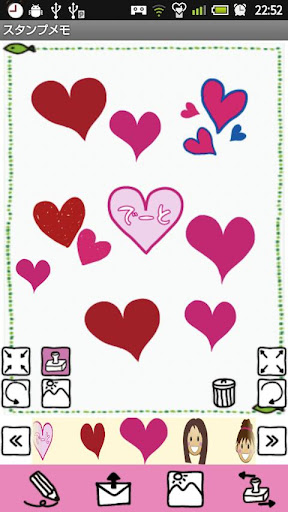
StampMemo is a very cute and funny application that you can create memos by selecting a background image and icons!
You can save a text message and send it by email to your friends! You can even save your memo as the background image of your mobile!
Keep on creating cute memos and let's send it to everyone!
The Initial Window is the grid style List Window.
*From the left.
1.「Add」button: You can create a new memo.
2.「List」button ( Three rectangle ): Display the memo list with normal style.
3.「Grid」button ( 9 squares ): Display the memo list with grid style.
4.「Search」button: You can save the memo with a tag name and then search them by the tag name.
1. First, press …
Read the full description
StampMemo is a very cute and funny application that you can create memos by selecting a background image and icons! You can save a text message and send it by email to your friends! You can even save your memo as the background image of your mobile! Keep on creating cute memos and let's send it to everyone! The Initial Window is the grid style List Window. *From the left. 1.「Add」button: You can create a new memo. 2.「List」button ( Three rectangle ): Display the memo list with normal style. 3.「Grid」button ( 9 squares ): Display the memo list with grid style. 4.「Search」button: You can save the memo with a tag name and then search them by the tag name. 1. First, press 「Add」button of the List Window (the Initial Window). 2. Then move to the Canvas Window. ***Buttons of the Canvas Window*** Left Top:「Shrinking」button: You can shrink the icons. Left Bottom: 「Rotate Left」button: Rotate the icons to the left. Left Right Top:「Stamp」button: You can add icons from the list below when it is 「On」. Left Right Bottom:「Background」button: You can change the background image when it is 「On」. Right: 「Delete」button: You can delete icons. Drag the icon to the trash can. Right Top: 「Enlarging」button: You can enlarge the icons. Right Bottom: 「Rotate Right」button: Rotate the icons to the right. *From the left. 1. 「Text」button: Press this button to write the text. Keyboard will be displayed. 2. 「Email」button: You can send the memo by email. 3. 「Mobile Background」button: You can save the memo as the mobile background. 4. 「Move Icon」button: When you want to move the icons that you added on the canvas, press this button. *When you press this button, the icons will be danced up and down! 3. When you move to the Canvas Window, 「Stamp」button is 「On」. When it is 「On」, the list of icons will be displayed below. 4. Tap any icon you want to add on the canvas. 5. Press 「Move Icon」button to move the icon you have added on the canvas. 6. Press 「Background」button to change the background image. 7. Select a background image from the list below. 8. Edit Icons by using 「Shrinking」「Enlarge」「Rotate Left」「Rotate Right」buttons. 9. After creating the memo, Press 「Menu」→ Select 「Tag」→ Enter the name of the tag. 10. Press 「Back」button of the mobile to go back to the List Window. The memo is automatically saved. 11. You can confirm the memo you created is saved in the grid style list. ※Pay version:No ads display
Installs since 27 Aug 2026 Measured
Exact Google Play install counts, collected daily
Ratings
164 ratings
- 5 ★0.0%
- 4 ★0.0%
- 3 ★0.0%
- 2 ★0.0%
- 1 ★0.0%
Recent reviews
Latest public reviews from the store
- 10 Dec 2016
Not much good a bit
- 29 Oct 2016
I liked it very much
- 20 Aug 2016
BEST DAIRY EVER.WE CAN LOOK WITH THE PASSWORD.
- 27 Sep 2015
Cooooool very nice app
What reviewers bring up
Topics mentioned in the latest 50 reviews, by how many reviews mention them
Liked in good reviews (31 reviews)
- cute 12
- diary 5
- icons 4
- password 3
- looking 3
- sticker 3
- note 3
- interesting 2
Raised in bad reviews (12 reviews)
- confusing 2
Top chart positions
Latest Google Play chart ranks by country, last 10 days
Not in any tracked top chart in the last 10 days.
StampMemo history
Release, install milestones, listing and store changes
- Reached 50,000+ installs 4 May 2013
- Reached 10,000+ installs 24 Feb 2012
- Reached 5,000+ installs 13 Nov 2011
- Reached 1,000+ installs 3 Oct 2011
- First released on the store 16 Sep 2011
Update frequency
How often StampMemo ships a new version, month by month
0 updates in the last 12 months. Less often than most similar apps: they shipped a median of 1 updates in the same year.
Recent versions
Current version Varies with device
- Version 1.1.196 Jan 2020
- Version 1.1.189 Oct 2018
- Version 1.1.174 Mar 2017
- Version 1.1.143 Aug 2015
Listing keywords
Words and phrases StampMemo repeats most in its store listing
Top phrases: background image (5), press this button (3), background button (3), canvas press (3), canvas window (3).
Highlighted words also appear in the title. Counts cover the title, short description and description.
Business model and tech
From the store listing, the SDKs in the app package and its declared permissions
- Business model
- Free to downloadShows ads
- Built with
- No cross-platform framework or game engine detected
- Ad networks (7)
- AdMobAdlantisAdstirInMobiMediba AdmakerNendmediba ad
- Analytics and crash reports
- Google Analytics
- Sensitive access
- Photos, videos and files
8 ad, attribution and analytics SDKs detected. SDKs are read from the app package and permissions from the store listing, so code that loads later is not seen.
Technology
16 SDKs found in the app package
Development tools
Ad networks
Advertising and install-attribution SDKs found in the app package
- AdMob
- Adlantis
- Adstir
- InMobi
- Mediba Admaker
- Nend
- mediba ad
7 permissions
0 special access, 2 sensitive, 5 standard
- Change or delete shared storageSensitive
- Read shared storageSensitive
- Control vibrationStandard
- Keep the phone awakeStandard
- Set the wallpaperStandard
- Full internet accessStandard
- See network connectionsStandard
Compliance
What the listing and the app package show
- Store status
- Live
- Upkeep
- No update since 6 Jan 2020
- Registered in
- Japan
- Privacy policy
- Linked on the listing
- Advertising
- Shows ads
- In-app purchases
- None declared
- Age rating
- Everyone
- Sensitive permissions
- 2 sensitive of 7
- Location access
- No
- Camera and microphone
- Neither
Apps like StampMemo
HomiQGolden Vision6.2K installs★ 4.45
UU WorshipWeb LibraryUnitarian Universalist Association17.2K installs★ 3.94
Catch ItThe University of Liverpool113K installs★ 3.45
The Upper RoomThe Upper Room40.3K installs★ 3.86
Bell LivingYardi Systems3.7K installs★ 4.61
JægerDanmarks Jægerforbund32.7K installs★ 3.6
eCookATEC Australia-International Ltd.31.5K installs★ 3.2
Safety App for Silent BeaconSilent Beacon54.3K installs★ 3.7
New York Comic Con 2025ReedPop Mobile77.7K installs★ 2.94
StampMemo: questions and answers
How many downloads does StampMemo have?
StampMemo has 71,108 installs on Google Play, measured from the store's own count on 19 Nov 2026.
Who makes StampMemo?
StampMemo is published by 株式会社GalleryApp, a developer based in JP.
When was StampMemo last updated?
The latest version (Varies with device) was released on 6 Jan 2020.
Is StampMemo free?
Yes. StampMemo is free to download, and it shows ads.
Is StampMemo still available?
Yes. StampMemo is live on Google Play as of 19 Nov 2026.
Track StampMemo and its competitors
Watch any app for new versions, rating drops, chart moves and removals. Free plan, no card.