Study Log
Save and manage study hours with Study Log! Save as much as subjects you want!
- Installs
- 15.50K
- Measured
- Rating
- 5.0
- Ratings
- 54
- 4 reviews
- Version
- 1.1.2
- Updated 1 Aug 2026
- Released
- 26 Oct 2012
- Tracked since 13 May 2026
- Size
- 6 MB
- Needs 4.2
Screenshots


About Study Log
The description on the store listing
Save and manage study hours with Study Log! Save as much as subjects you want!
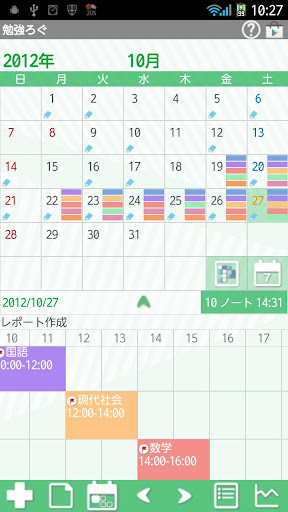
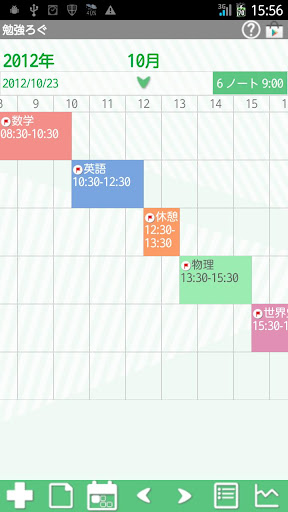
Display up to 5 subjects each day! Saved subjects and study hours are displayed in timeline below the calendar! Drag and move in all direction!
There is a timer to time your study hours. You can set an alarm to let you know how long time passed while you are studying.
*Study Log do not sync with Google Calendar. When the mobile is manner mode, the alarm may not work properly by the model.
corresponded to Pomodoro.
*Menu button of the mobile*
Tap Menu button.
1. Calendar Mail:Send your shift by email with the image.
2. Alarm: Set sound and volume.
3. Setting:Select a background color and set basic …
Read the full description
Save and manage study hours with Study Log! Save as much as subjects you want! Display up to 5 subjects each day! Saved subjects and study hours are displayed in timeline below the calendar! Drag and move in all direction! There is a timer to time your study hours. You can set an alarm to let you know how long time passed while you are studying. *Study Log do not sync with Google Calendar. When the mobile is manner mode, the alarm may not work properly by the model. corresponded to Pomodoro. *Menu button of the mobile* Tap Menu button. 1. Calendar Mail:Send your shift by email with the image. 2. Alarm: Set sound and volume. 3. Setting:Select a background color and set basic functions of the app. 4. Backup: ---Import SD card: Import data from SD card. ---Export SD card: Export data to SD card. ---Export Cloud:You can backup data to Google Drive and Dropbox.*Please install either software from the market. 5. Password: Set the password. 6. More: ---Copy to SD card: Copy the data to internal and external SD card. ---Recovery: Use this function when you want to return to the previous data. *Please note that the current data will be deleted when you use this function. *How to use* Opening screen is a calendar. Let's save subjects or study contents first! 1.Tap + button of the calendar. 2.Tap again + button on the next screen. 3.Enter a subject or study content, select text and background color. Check the color with the preview. Save a memo and tap "Save". Create as much as subjects you need in the same way! *Start and End of studying* 1.After saving all the subjects, tap again + button of the calendar. 2.The list of the subjects appears. Tap one to start studying. 3.Move to Start window. Notice is to set an alarm for while you are studying. Select an interval then tap "Start". 4.Launch the timer. Tap "End" button to stop counting the study hours. 5.When you tap End button, the results appear in the time line of the calendar. 6.You can drag and move the time line in all directions! *Calendar* 1.You can display up to five subjects on each date. Saving subjects is unlimited but you can display up to five on the calendar. 2.You can save a short memo in a day. <How To> a)Tap "Note" button (The second button of the calendar). b)Enter the content of the memo and Save. 3.The short memo will be displayed above the time line. *Calendar's buttons* Upper right 1.「Help」:Move to GalleryApp's Study Log web site page. 2.「Market」:Recommendation of other GalleryApp's apps. Middle right 1.「Select Study」:Select a subject to switch the calendar display. 2.「Weekly Display」:Switch the calendar to weekly display. Middle under「elect Study」「Weekly Display」 1.「Full Screen」:Tap arrow to see the time line in a full screen. 2.「Sum」:It shows a total study subjects and hours. Lower from Left 1.「Add」:Add and save subjects or study contents. After saving subjects, tap again here to select a subject and start the study. 2.「Note」:Save a memo in a day. 3.「Today」:Go back to today's date. 4.「Left」「Right」:Move dates right and left. 5.「List」:Switch to the List display. 6.「Graph」:You can see graphs of your study hours of each subject. *Export Cloud* You can backup data to Google Drive and Dropbox. Without saving data to SD card, you can transfer data via the Internet. 1.Press「Menu」button→Select「Backup」. 2.From「Backup」Select「Export Cloud」→「OK」. 3.NetBackup description screen(Export Cloud)appears→「OK」. 4.Select an app from the list to save the data. Select GoogleDrive for example,→ 5.Document Title screen appears→「OK」. 6.Proceed to upload. After uploading, exit from Study Log then launch Google Drive. 7.From My Drive of GoogleDrive, select the document title. 8.NetRecover screen appears→「OK」. 9.Transfered data to Study Log. Support Android Wear Vibration
Installs since 29 Aug 2026 Measured
Exact Google Play install counts, collected daily
Ratings
54 ratings, 4 reviews
- 5 ★100%
- 4 ★0.0%
- 3 ★0.0%
- 2 ★0.0%
- 1 ★0.0%
Recent reviews
Latest public reviews from the store
- 5 May 2015
So easy to use! My favorite!
- 3 Nov 2013
Easy to use
- 22 Jun 2012
Nice way to log health into on my phone.
- 5 Apr 2012
I would like to have the ability to keep a list if medications I take daily and simply check mark that I took them. A handy alarm option reminding me to take them would be even better. Also would like the ability to add additional BP readings.
Top chart positions
Latest Google Play chart ranks by country, last 10 days
Not in any tracked top chart in the last 10 days.
Study Log history
Release, install milestones, listing and store changes
- Reached 10,000+ installs 27 Mar 2014
- Reached 5,000+ installs 10 Jul 2013
- Reached 1,000+ installs 4 Jan 2013
- Reached 500+ installs 25 Dec 2012
- First released on the store 26 Oct 2012
Update frequency
How often Study Log ships a new version, month by month
1 updates in the last 12 months. More often than most similar apps: they shipped a median of 0 updates in the same year.
Recent versions
Current version 1.1.2
- Version 1.1.21 Aug 2026
Android Sdk 36
- Version 1.0.323 Jan 2020
Support Android10
- Version 1.0.3019 Dec 2019
- Version 1.0.2820 Sep 2019
Listing keywords
Words and phrases Study Log repeats most in its store listing
Top phrases: sd card (7), study log (7), study hours (6), export cloud (4), sd card export (3).
Highlighted words also appear in the title. Counts cover the title, short description and description.
Business model and tech
From the store listing, the SDKs in the app package and its declared permissions
- Business model
- Free to downloadShows ads
- Built with
- No cross-platform framework or game engine detected
- Ad networks (3)
- AdMobAdstirNend
- Analytics and crash reports
- Google Analytics
- Sensitive access
- Photos, videos and files
4 ad, attribution and analytics SDKs detected. SDKs are read from the app package and permissions from the store listing, so code that loads later is not seen.
Technology
9 SDKs found in the app package
Ad networks
Advertising and install-attribution SDKs found in the app package
- AdMob
- Adstir
- Nend
9 permissions
0 special access, 2 sensitive, 7 standard
- Change or delete shared storageSensitive
- Read shared storageSensitive
- Ask to skip battery optimisationREQUEST_IGNORE_BATTERY_OPTIMIZATIONSStandard
- Control vibrationStandard
- Keep the phone awakeStandard
- Full internet accessStandard
- See network connectionsStandard
- See Wi-Fi connectionsStandard
- Set an alarmStandard
Compliance
What the listing and the app package show
- Store status
- Live
- Upkeep
- Updated 1 Aug 2026
- Registered in
- Japan
- Privacy policy
- Linked on the listing
- Advertising
- Shows ads
- In-app purchases
- None declared
- Age rating
- Everyone
- Sensitive permissions
- 2 sensitive of 9
- Location access
- No
- Camera and microphone
- Neither
Apps like Study Log
Thần số học PILOGYSMARTGO VIETNAM .,JSC105K installs★ 4.3
세명대학교 모바일 신분증wiseneosco31.4K installs★ 3.5
Prayers to Blessed SacramentRMX Studio18.5K installs★ 4.2
Lancaster Baptist ChurchLancaster Baptist Church3K installs★ 4.92
My Will: TestamentNovaPrisma11.3K installs★ 3.06
Tie Helper Prolinux777523 installs★ 5.0
Talk To TuckerF.C. Tucker Company15.3K installs★ 3.47
- Tasbeeh Digital CounterTED Soft1.1K installs★ 4.9
Rigveda(ऋग्वेद) - HindiTransalationApps90K installs★ 3.8
Study Log: questions and answers
How many downloads does Study Log have?
Study Log has 15,504 installs on Google Play, measured from the store's own count on 16 Nov 2026.
Who makes Study Log?
Study Log is published by 株式会社GalleryApp, a developer based in JP.
When was Study Log last updated?
The latest version (1.1.2) was released on 1 Aug 2026.
Is Study Log free?
Yes. Study Log is free to download, and it shows ads.
Is Study Log still available?
Yes. Study Log is live on Google Play as of 16 Nov 2026.
Track Study Log and its competitors
Watch any app for new versions, rating drops, chart moves and removals. Free plan, no card.