
Timed screen-lock
Utility to allow user to set a timer to lock phone and screen
- Installs
- 77.22K
- Measured
- Rating
- 3.75
- Ratings
- 356
- 17 reviews
- Version
- 4.7
- Updated 3 Jan 2026
- Released
- 24 Dec 2018
- Tracked since 11 May 2026
- Size
- 2 MB
- Needs 5.0
Screenshots

About Timed screen-lock
The description on the store listing
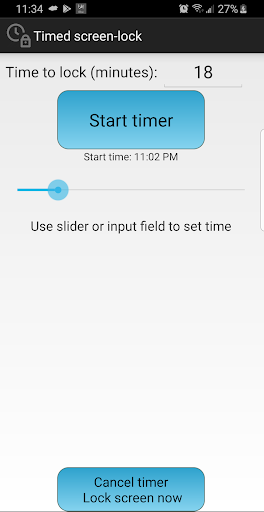
Do you hand your smartphone to your child, then set this timer which force-locks when it runs out. So your child has to hand it you back because the phone and screen are lock.
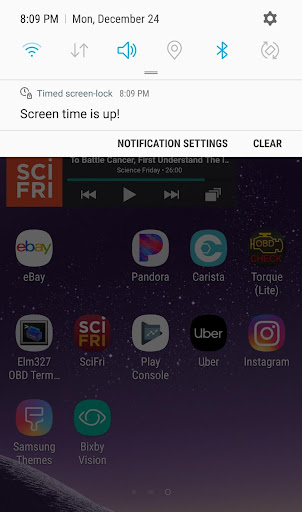
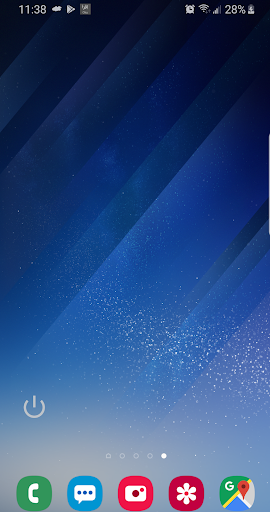
This light utility app allows users to set a timer to lock phone and screen regardless of default system setting and whether user actively using or not. It will enforce entering password when the time is out.
To start, cancel or modify are protected by the default password to prevent "smart kids" to overwrite it.
This app uses the Device Administrator permission. This permission is required to allow app to lock the screen when the time runs out.
App widget added allows screen-lock at the touch of finger. …
Read the full description
Do you hand your smartphone to your child, then set this timer which force-locks when it runs out. So your child has to hand it you back because the phone and screen are lock. This light utility app allows users to set a timer to lock phone and screen regardless of default system setting and whether user actively using or not. It will enforce entering password when the time is out. To start, cancel or modify are protected by the default password to prevent "smart kids" to overwrite it. This app uses the Device Administrator permission. This permission is required to allow app to lock the screen when the time runs out. App widget added allows screen-lock at the touch of finger. Try adding widget to your shortcuts. UNINSTALL INSTRUCTIONS: v3.7+ Tap "Uninstall the app" from the app's menu Old version: 1-When you tap uninstall you will receive a "Uninstalling .. unsuccessful" notification from "package installer" 2-Tap on down arrow on the notification 3-Tap on "Manage device admin apps". 4-Un-check this app from "Device administrator" list 5-Tap on "deactivate" on the new page comes in 4- 6-Then go back to app icon, and uninstall the app as usual.
Installs since 29 Aug 2026 Measured
Exact Google Play install counts, collected daily
Ratings
356 ratings, 17 reviews
- 5 ★62%
- 4 ★4.7%
- 3 ★4.7%
- 2 ★9.5%
- 1 ★19%
Recent reviews
Latest public reviews from the store
- 30 Dec 2018
her gün çocuklarla okuyoruz.
Top chart positions
Latest Google Play chart ranks by country, last 10 days
Not in any tracked top chart in the last 10 days.
Timed screen-lock history
Release, install milestones, listing and store changes
- Reached 50,000+ installs 9 Jul 2022
- Reached 10,000+ installs 2 Jun 2020
- Reached 5,000+ installs 25 Feb 2020
- Reached 1,000+ installs 23 Aug 2019
- Reached 500+ installs 9 Aug 2019
- Reached 100+ installs 28 Jun 2019
- Reached 10+ installs 29 Apr 2019
- Reached 5+ installs 30 Mar 2019
Update frequency
How often Timed screen-lock ships a new version, month by month
1 updates in the last 12 months. About as often as similar apps, which shipped a median of 1 updates in the same year.
Recent versions
Current version 4.7
- Version 4.72 Jan 2026
notification fix
- Version 4.52 Dec 2024
- Version 4.431 Aug 2023
- Version 4.228 Aug 2023
Listing keywords
Words and phrases Timed screen-lock repeats most in its store listing
Top phrases: phone and screen (3), timer to lock (2), device administrator (2), lock phone (2), screen lock (2).
Highlighted words also appear in the title. Counts cover the title, short description and description.
Business model and tech
From the store listing and declared permissions
- Business model
- Free to downloadShows ads
- Sensitive access
- Draws over other appsAdvertising ID
15 permissions
2 special access, 1 sensitive, 12 standard
- Ask to uninstall appsREQUEST_DELETE_PACKAGESSpecial access
- Draw over other appsSpecial access
- Show notificationsPOST_NOTIFICATIONSSensitive
- Ad attribution (Privacy Sandbox)ACCESS_ADSERVICES_ATTRIBUTIONStandard
- Ad topics (Privacy Sandbox)ACCESS_ADSERVICES_TOPICSStandard
- Read the advertising IDAD_IDStandard
- Read the advertising ID (Privacy Sandbox)ACCESS_ADSERVICES_AD_IDStandard
- Keep the phone awakeStandard
- Run a foreground serviceFOREGROUND_SERVICEStandard
- Start when the phone turns onStandard
- Turn off the screen lockStandard
- Full internet accessStandard
Compliance
What the listing and the app package show
- Store status
- Live
- Upkeep
- Updated 3 Jan 2026
- Privacy policy
- Linked on the listing
- Advertising
- Shows ads
- In-app purchases
- None declared
- Age rating
- Everyone
- Sensitive permissions
- 1 sensitive, 2 special access of 15
- Location access
- No
- Camera and microphone
- Neither
Apps like Timed screen-lock
Cash Calculator -Money CounterBibhu Man Rajbhandari123K installs★ 3.92
iPro Habit Tracker - ProIntelliPro5.1K installs★ 4.0
DevDuo IDE: AI Code EditorDevDuo Apps11K installs★ 4.21
VIP NotesOgroman3K installs★ 4.43
Simple Progress TrackerQookie Games44.8K installs★ 3.68
Linas MatkasseCheffelo75.1K installs★ 1.7
PanoptoPanopto242K installs★ 2.02
GESC StudentGESC74.3K installs★ 4.0
AutoApp For Pebblejoaomgcd32.5K installs★ 3.93
Timed screen-lock: questions and answers
How many downloads does Timed screen-lock have?
Timed screen-lock has 77,222 installs on Google Play, measured from the store's own count on 17 Nov 2026.
Who makes Timed screen-lock?
Timed screen-lock is published by Afakan.
When was Timed screen-lock last updated?
The latest version (4.7) was released on 3 Jan 2026.
Is Timed screen-lock free?
Yes. Timed screen-lock is free to download, and it shows ads.
Is Timed screen-lock still available?
Yes. Timed screen-lock is live on Google Play as of 17 Nov 2026.
Track Timed screen-lock and its competitors
Watch any app for new versions, rating drops, chart moves and removals. Free plan, no card.