
TimetableCalendar
Timetable is an easy-to-use application for you to manage your
- Installs
- 114K
- Measured
- Rating
- 3.9
- Ratings
- 138
- Version
- Varies with device
- Updated 8 Oct 2018
- Released
- 2 May 2011
- Tracked since 13 May 2026
- Size
- 9 MB
- Needs 4.2
Screenshots
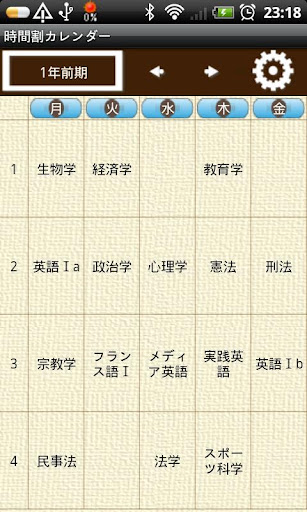


About TimetableCalendar
The description on the store listing
Timetable is an easy-to-use application for you to manage your or your children's school timetable!
You can make your own timetable patterns, select a theme to customize your timetable. It is very easy to set your own timetable pattern. Pattern setting is to tap "Pattern Setting" button above the timetable, then you can make your own patterns you need. You can save maximum 5 patterns and after saving your patterns, just flip the screen or tap the "Left" and "Right" buttons above the timetable to change patterns.
Press "Menu" button, tap "Setting" and select a calendar design from "Theme" for your timetable. There are 4 different themes (calendar design) to choose from.
After saving …
Read the full description
Timetable is an easy-to-use application for you to manage your or your children's school timetable! You can make your own timetable patterns, select a theme to customize your timetable. It is very easy to set your own timetable pattern. Pattern setting is to tap "Pattern Setting" button above the timetable, then you can make your own patterns you need. You can save maximum 5 patterns and after saving your patterns, just flip the screen or tap the "Left" and "Right" buttons above the timetable to change patterns. Press "Menu" button, tap "Setting" and select a calendar design from "Theme" for your timetable. There are 4 different themes (calendar design) to choose from. After saving your timetable and then go back to the calendar, you can see the contents of the timetable displayed in the below list of the calendar. Tap each saved subject in the list then select and save "attendance", "absence", "tardiness" , "recess" and memo. Those saved information will be displayed in the list of the calendar so you can see everything at one view on the calendar. <menu> ①Mark: You can add 2 marks on each date. ②Setting: Select a theme (calendar design) from 4 different designs and select a starting week of the calendar etc… ③Password: Set a password. *From the left button of the below calendar. ① "Timetable" button: Tap this button to move to the timetable. ② "Today" button: Go back to today's date. ③ "Left" & "Right" buttons: Move the date right and left. ④ "List" button: You can see the contents of saved timetable in the list. ⑤ "Note&Pencil" mark on the date of the calendar: When you save both timetable and memo, this mark will be displayed on the date. ⑥ "Note" mark on the date of the calendar: When you only save timetable, this mark will be displayed on the date. ⑦ "Pencil" mark on the date: When you only save memo, this mark will be displayed on the date. ⑧ Display of lower part of the calendar: *When there is no saved timetable: Select a date → tap "Memo" then Memo Entering window appears. *When there is saved timetable: Select a date → The contents of the saved timetable will be displayed here. Tap one of the subjects → another popup window appears then you can select and save " Attendance", "Absence", "Tardiness", "Recess" and Memo. Select a category then go back to the calendar. You can see saved information here. *Buttons ① "Pattern Display" button: You can see the name of the current pattern. Tap here to change the name of pattern. ② "Move Pattern" button: You can move patterns by tapping those arrow buttons. ③ "Pattern Setting" button: Pattern Setting window appears. You can make your own patterns and name them as you like. ④ After pattern setting, select a pattern in the Timetable screen then tap the screen to enter subjects and classroom etc… (Subject Entering window appears.) ※Pay ver No ads</menu>
Installs since 29 Aug 2026 Measured
Exact Google Play install counts, collected daily
Ratings
138 ratings
- 5 ★0.0%
- 4 ★0.0%
- 3 ★0.0%
- 2 ★0.0%
- 1 ★0.0%
Recent reviews
Latest public reviews from the store
- 25 Feb 2013
Aplikacion shume i dobishem dhe praktik per mesimdhenesit, nxenesit si dhe per prinderit per regjistrimin orarit te oreve mesimore. Ron Reci, Gostivar
- 16 Sep 2012
Helpful
- 22 Aug 2012
The best time table for school
- 6 May 2012
This app is awesome! I just type in my weeks schedual, and voila!:-):-):-):-):-):-):-):-):-):-)
Top chart positions
Latest Google Play chart ranks by country, last 10 days
Not in any tracked top chart in the last 10 days.
TimetableCalendar history
Release, install milestones, listing and store changes
- Reached 100,000+ installs 27 Aug 2013
- Reached 50,000+ installs 6 Mar 2012
- Reached 10,000+ installs 6 Jun 2011
- Reached 5,000+ installs 19 May 2011
- Reached 1,000+ installs 9 May 2011
- Reached 500+ installs 6 May 2011
- Reached 100+ installs 5 May 2011
- First released on the store 2 May 2011
Update frequency
How often TimetableCalendar ships a new version, month by month
0 updates in the last 12 months. Less often than most similar apps: they shipped a median of 1 updates in the same year.
Recent versions
Current version Varies with device
- Version 1.0.177 Oct 2018
- Version 1.0.1512 Mar 2017
- Version 1.0.142 May 2015
- Version 1.0.1011 Nov 2013
Listing keywords
Words and phrases TimetableCalendar repeats most in its store listing
Top phrases: pattern setting (5), saved timetable (4), window appears (4), calendar design (3), above the timetable (2).
Highlighted words also appear in the title. Counts cover the title, short description and description.
Business model and tech
From the store listing, the SDKs in the app package and its declared permissions
- Business model
- Free to downloadShows ads
- Built with
- No cross-platform framework or game engine detected
- Ad networks (3)
- AdMobAdstirNend
- Analytics and crash reports
- FirebaseGoogle Analytics
- Sensitive access
- Photos, videos and files
5 ad, attribution and analytics SDKs detected. SDKs are read from the app package and permissions from the store listing, so code that loads later is not seen.
Technology
12 SDKs found in the app package
Ad networks
Advertising and install-attribution SDKs found in the app package
- AdMob
- Adstir
- Nend
8 permissions
0 special access, 2 sensitive, 6 standard
- Change or delete shared storageSensitive
- Read shared storageSensitive
- Control vibrationStandard
- Keep the phone awakeStandard
- Start when the phone turns onStandard
- Full internet accessStandard
- See network connectionsStandard
- Receive push messagesStandard
Compliance
What the listing and the app package show
- Store status
- Live
- Upkeep
- No update since 8 Oct 2018
- Registered in
- Japan
- Privacy policy
- Linked on the listing
- Advertising
- Shows ads
- In-app purchases
- None declared
- Age rating
- Everyone
- Sensitive permissions
- 2 sensitive of 8
- Location access
- No
- Camera and microphone
- Neither
Apps like TimetableCalendar
Revelation ClassesEducation Media2.5K installs★ 4.7
العمرةMkarm Soft36.5K installs★ 4.5
ISG OMANIndian School, Al Ghubra11.1K installs★ 3.17
الصف الرابع العلميتعلم وانجح109K installs★ 3.67
Future ManagersFuture Managers (Pty) Ltd81.6K installs★ 1.0
TT Math 5Teaching Textbooks, LLC34.5K installs★ 4.1
Aibrary: AI Learning CompanionOuraca lnc.5.9K installs★ 4.75
English portuguese dictionary50000word5K installs★ 4.5
GodKänt teoriprov på svenskaScandic Company21.9K installs★ 4.14
TimetableCalendar: questions and answers
How many downloads does TimetableCalendar have?
TimetableCalendar has 113,970 installs on Google Play, measured from the store's own count on 14 Nov 2026.
Who makes TimetableCalendar?
TimetableCalendar is published by 株式会社GalleryApp, a developer based in JP.
When was TimetableCalendar last updated?
The latest version (Varies with device) was released on 8 Oct 2018.
Is TimetableCalendar free?
Yes. TimetableCalendar is free to download, and it shows ads.
Is TimetableCalendar still available?
Yes. TimetableCalendar is live on Google Play as of 14 Nov 2026.
Track TimetableCalendar and its competitors
Watch any app for new versions, rating drops, chart moves and removals. Free plan, no card.