
Update All Apps: System Update
System update allows the user to update system as well as installed apps.
- Installs
- 2.16M
- Measured
- Rating
- 4.37
- Ratings
- 10.2K
- 162 reviews
- Version
- 2.2.1
- Updated 7 Nov 2026
- Released
- 18 Oct 2022
- Tracked since 13 May 2026
- Size
- —
Screenshots



About Update All Apps: System Update
The description on the store listing
Software Update / update software 2021 permits the user to update software installed in their devices. Using this app, one can determine the necessary updates of installed as well as system apps. Software update 2022 lets the user improve the performance of overall applications installed in the device as they can enjoy a responsive yet faster system.
If a person is using an older version of the software, then it can be said that he/she is more facing any errors in specific app. The software update app / software update for my phone is helpful for the user since it provides more efficient and faster new features to the user. The software update 2021 has six main features including; …
Read the full description
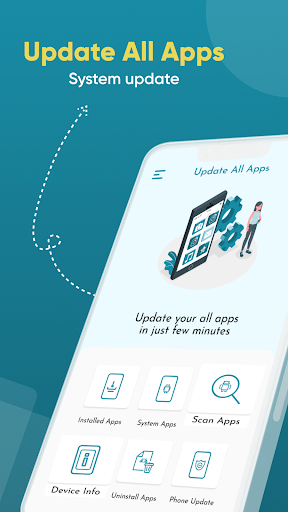
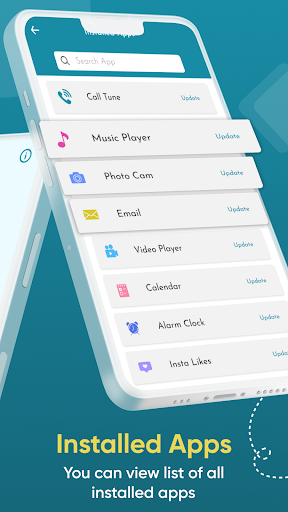
Software Update / update software 2021 permits the user to update software installed in their devices. Using this app, one can determine the necessary updates of installed as well as system apps. Software update 2022 lets the user improve the performance of overall applications installed in the device as they can enjoy a responsive yet faster system. If a person is using an older version of the software, then it can be said that he/she is more facing any errors in specific app. The software update app / software update for my phone is helpful for the user since it provides more efficient and faster new features to the user. The software update 2021 has six main features including; installed apps, system apps, scan apps, device info, uninstalled apps, and phone update. The UI of the updated latest app is easy to navigate and it requires no professional guidance. <b>Features of Update All Apps: System Update </b> The updates / new version allows the user to update device software using their device. The update software latest includes six main features; installed apps, system apps, scan apps, device info, uninstalled apps, and phone update. The installed apps feature of the updater app permits the user to check updates of all the apps installed on the device. The user can easily check updates of installed apps by simply clicking on check update. Moreover, the user can also search for any particular app by simply clicking on the search bar at the top. The system apps feature of updating app lets the user check updates of all the system apps. The user can easily check updates of system apps by simply clicking on check update. Moreover, the user can also search for any particular app by simply clicking on the search bar at the top. The scan apps feature of the phone update software app authorizes the user to scan all the apps collectively. This feature takes some time in scanning and provides the user with information regarding updates. Users can select the apps they want to update. The device info feature of the up-date app allows the user to determine information regarding the device they are using, such as OS version, API level, device, model, product, version, etc. The uninstall apps feature of update new permits the user to delete or uninstall the apps directly from the app. In addition, the user can also search for any particular app by simply clicking on the search bar at the top. Finally, the phone update feature of the ready all apps lets the user look for the available system updates. <b> How to Use Update All Apps: System Update </b> The interface of recent updates / تحديث includes six main tabs; installed apps, system apps, scan apps, device info, uninstalled apps, and phone update. Scan apps, user apps, system apps, scan apps, device info, uninstall apps, and phone update. If the user wants to check updates of the installed or system apps, they are required to click on the installed and system apps tab on the home screen. A list of apps will appear and the user can check updates by simply clicking on the check update tab. By clicking the scan apps tab, the user can scan the apps on phone all at once. If there are any updates to the app available, the screen will generate a check update text. By clicking on uninstall apps tab of update apps / update software latest, users can easily uninstall apps installed on the device. They simply need to click on the uninstall app tab to make it happen. By clicking on the phone updates tab of up gradation user can easily determine if there are any updates available for the system. <b>✪ Disclaimers</b> All copyrights reserved. We have kept this app absolutely free by showing non-personalized ads. Update All Apps: System Update is not keeping any sort of data without user permission neither it is saving any data secretly for itself. If you found any content in our app that violates copyrights than please inform us.
Installs, last 30 days Measured
Exact Google Play install counts, collected daily
Ratings
10,160 ratings, 162 reviews
- 5 ★77%
- 4 ★6.8%
- 3 ★3.0%
- 2 ★3.0%
- 1 ★10%
Recent reviews
Latest public reviews from the store
No reviews in our sample for this app yet.
Top chart positions
Latest Google Play chart ranks by country, last 10 days
Not in any tracked top chart in the last 10 days.
Update All Apps: System Update history
Release, install milestones, listing and store changes
- Reached 1,000,000+ installs 9 Jun 2024
- Reached 500,000+ installs 15 Sep 2023
- Reached 100,000+ installs 7 Feb 2023
- Reached 50,000+ installs 27 Dec 2022
- Reached 10,000+ installs 15 Nov 2022
- Reached 5,000+ installs 5 Nov 2022
- First released on the store 18 Oct 2022
Update frequency
How often Update All Apps: System Update ships a new version, month by month
1 updates in the last 12 months. Less often than most similar apps: they shipped a median of 2 updates in the same year.
Recent versions
Current version 2.2.1
- Version 2.2.17 Nov 2026
* Improved performance and stability * Bug fixes for a smoother experience * Minor UI enhancements
- Version 1.1.810 Sep 2025
* Improved performance and stability * Bug fixes for a smoother experience * Minor UI enhancements
- Version 1.1.79 Sep 2025
- Version 1.1.630 Aug 2025
Listing keywords
Words and phrases Update All Apps: System Update repeats most in its store listing
Top phrases: check updates (6), phone update (6), device info (5), software update (5), system update (5).
Highlighted words also appear in the title. Counts cover the title, short description and description.
Business model and tech
From the store listing, the SDKs in the app package and its declared permissions
- Business model
- Free to downloadShows ads
- Built with
- No cross-platform framework or game engine detected
- Ad networks (3)
- AdMobAppLovinChartboost
- Sensitive access
- Advertising ID
3 ad, attribution and analytics SDKs detected. SDKs are read from the app package and permissions from the store listing, so code that loads later is not seen.
Technology
18 SDKs found in the app package
Ad networks
Advertising and install-attribution SDKs found in the app package
- AdMob
- AppLovin
- Chartboost
16 permissions
2 special access, 0 sensitive, 14 standard
- Ask to uninstall appsREQUEST_DELETE_PACKAGESSpecial access
- See every installed appQUERY_ALL_PACKAGESSpecial access
- Ad attribution (Privacy Sandbox)ACCESS_ADSERVICES_ATTRIBUTIONStandard
- Ad topics (Privacy Sandbox)ACCESS_ADSERVICES_TOPICSStandard
- Read how it was installed (install referrer)BIND_GET_INSTALL_REFERRER_SERVICEStandard
- Read the advertising IDAD_IDStandard
- Read the advertising ID (Privacy Sandbox)ACCESS_ADSERVICES_AD_IDStandard
- Control vibrationStandard
- Keep the phone awakeStandard
- Run a foreground serviceFOREGROUND_SERVICEStandard
- Full internet accessStandard
- See network connectionsStandard
Compliance
What the listing and the app package show
- Store status
- Live
- Upkeep
- Updated 7 Nov 2026
- Registered in
- Pakistan
- Privacy policy
- Linked on the listing
- Advertising
- Shows ads
- In-app purchases
- None declared
- Age rating
- Everyone
- Sensitive permissions
- 0 sensitive, 2 special access of 16
- Location access
- No
- Camera and microphone
- Neither
Apps like Update All Apps: System Update
Tree Capitator ModMaps Mods Addons1M installs★ 3.46
Simple Clock - Alarm & TimerSimple Mobile Tool2M installs★ 4.22
Basic Web BrowserAPG Solutions, LLC12.6M installs★ 3.59
USB OTG CHECKERbubble shooter game2.2M installs★ 4.38
5G 4G FORCE LTE MODERK AppZia4.1M installs★ 3.84
ALFAISAL vpnALFAISALVPN2.1M installs★ 3.45
Simple Auto ClickerXIAOYANG3.7M installs★ 4.04
zFont Tool - Android Font ToolKhun Htetz Naing9.2M installs★ 3.04
analiti - Speed & WiFianaliti Networking Experts4.3M installs★ 4.27
Update All Apps: System Update: questions and answers
How many downloads does Update All Apps: System Update have?
Update All Apps: System Update has 2,160,230 installs on Google Play, measured from the store's own count on 19 Nov 2026.
Who makes Update All Apps: System Update?
Update All Apps: System Update is published by Techry Apps, a developer based in PK.
When was Update All Apps: System Update last updated?
The latest version (2.2.1) was released on 7 Nov 2026.
Is Update All Apps: System Update free?
Yes. Update All Apps: System Update is free to download, and it shows ads.
Is Update All Apps: System Update still available?
Yes. Update All Apps: System Update is live on Google Play as of 19 Nov 2026.
Track Update All Apps: System Update and its competitors
Watch any app for new versions, rating drops, chart moves and removals. Free plan, no card.