VirtualTablet Lite (S-Pen)
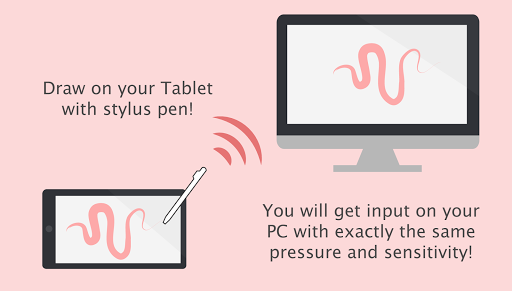
Draw on your PC with your tablet! Turn your tablet into wireless digitizer!
- Installs
- 2.18M
- Measured
- Rating
- 2.47
- Ratings
- 6.1K
- 372 reviews
- Version
- Varies with device
- Updated 25 Apr 2026
- Released
- 13 Dec 2012
- Tracked since 13 May 2026
- Size
- 5 MB
- Needs 4.0.3
Screenshots


About VirtualTablet Lite (S-Pen)
The description on the store listing
*** If you have a tablet/phone device, you can draw on your PC with VirtualTablet!***
*** If you have Galaxy Note Series with S-Pen, you can draw with pressure sensitivity!***
*** Additional server program(can be downloaded from http://www.sunnysidesoft.com/virtualtablet) should be running on your PC(support both Windows & Mac) to use this app***
** VirtualTablet Lite version with AD is also available in store **
** You can buy the full version of VirtualTablet with no Ad in the store **
Turn your tablet device into wireless digitizer!
Run this app on the tablet device with stylus pen support. If VirtualTablet Server program is running on your PC, you can seamlessly transfer …
Read the full description
*** If you have a tablet/phone device, you can draw on your PC with VirtualTablet!*** *** If you have Galaxy Note Series with S-Pen, you can draw with pressure sensitivity!*** *** Additional server program(can be downloaded from http://www.sunnysidesoft.com/virtualtablet) should be running on your PC(support both Windows & Mac) to use this app*** ** VirtualTablet Lite version with AD is also available in store ** ** You can buy the full version of VirtualTablet with no Ad in the store ** Turn your tablet device into wireless digitizer! Run this app on the tablet device with stylus pen support. If VirtualTablet Server program is running on your PC, you can seamlessly transfer your input to your PC like you use real digitizer H/W. You can download the VirtualTablet Server program free of charge from http://www.sunnysidesoft.com/virtualtablet You don't need to buy real digitizer (such as Wacom Tablet) for your desktop anymore. If you wanna draw with your stylus pen, download VirtualTablet now! Turn your tablet device into cool wireless digitizer with this app. [Detail Features] - USB & Bluetooth & WiFi connection mode - Left/Right handed mode - Tablet size adjustment - Support all input mode of S-Pen like stylus.(in-range hover movement, barrel button, eraser tip, and etc.) - Support drawing with finger or capacitive stylus as well. - Automatic server discovery in the same WiFi network. [Things You Can Do with this App] - Draw with your stylus pen on canvas of any graphics applications in your PC. Enjoy drawing with brush tools using your stylus! (Works well with Adobe Photoshop, Illustrator, Animate, Sketchbook Pro, and etc). - Remotely control your PC with stylus pen or finger (same as remote mouse). - Make a hand writing annotation on your PC's PDF viewer.
Installs, last 30 days Measured
Exact Google Play install counts, collected daily
Ratings
6,082 ratings, 372 reviews
- 5 ★23%
- 4 ★13%
- 3 ★6.0%
- 2 ★8.0%
- 1 ★50%
Recent reviews
Latest public reviews from the store
- 8 Mar 2026
Allah bless you Alhamdulillah ma sha Allah
- 19 Feb 2026
Alhamdulillah i learned a lot of this app 🫀
- 18 Jan 2026
nice beautiful looking app
- 18 Jan 2026
Superb app, must add some more functions.
What reviewers bring up
Topics mentioned in the latest 11 reviews, by how many reviews mention them
Liked in good reviews (10 reviews)
- alhamdulillah 2
- extremely 2
- superb 2
Raised in bad reviews (1 reviews)
No topic comes up twice.
Top chart positions
Latest Google Play chart ranks by country, last 10 days
Not in any tracked top chart in the last 10 days.
VirtualTablet Lite (S-Pen) history
Release, install milestones, listing and store changes
- Reached 1,000,000+ installs 14 Feb 2021
- Reached 500,000+ installs 2 Nov 2019
- Reached 100,000+ installs 20 Oct 2015
- Reached 50,000+ installs 24 Oct 2014
- Reached 10,000+ installs 11 Jul 2013
- Reached 5,000+ installs 29 Apr 2013
- Reached 1,000+ installs 13 Feb 2013
- Reached 500+ installs 21 Jan 2013
Update frequency
How often VirtualTablet Lite (S-Pen) ships a new version, month by month
2 updates in the last 12 months. More often than most similar apps: they shipped a median of 0 updates in the same year.
Recent versions
Current version Varies with device
- Version 3.1.225 Apr 2026
- Version 3.1.115 Apr 2026
- Version 3.1.012 Nov 2025
- Version 3.0.1326 Aug 2025
Listing keywords
Words and phrases VirtualTablet Lite (S-Pen) repeats most in its store listing
Top phrases: stylus pen (4), turn your tablet (3), server program (3), tablet device (3), wireless digitizer (3).
Highlighted words also appear in the title. Counts cover the title, short description and description.
Business model and tech
From the store listing, the SDKs in the app package and its declared permissions
- Business model
- Free to downloadShows ads
- Built with
- No cross-platform framework or game engine detected
- Ad networks (1)
- AdMob
- Analytics and crash reports
- Firebase
- Sensitive access
- LocationPhotos, videos and filesNearby devicesAdvertising ID
2 ad, attribution and analytics SDKs detected. SDKs are read from the app package and permissions from the store listing, so code that loads later is not seen.
Technology
40 SDKs found in the app package
Ad networks
Advertising and install-attribution SDKs found in the app package
- AdMob
23 permissions
0 special access, 6 sensitive, 17 standard
- Change or delete shared storageSensitive
- Read shared storageSensitive
- Precise locationSensitive
- Connect to paired Bluetooth devicesBLUETOOTH_CONNECTSensitive
- Find nearby Bluetooth devicesBLUETOOTH_SCANSensitive
- Show notificationsPOST_NOTIFICATIONSSensitive
- Ad attribution (Privacy Sandbox)ACCESS_ADSERVICES_ATTRIBUTIONStandard
- Ad topics (Privacy Sandbox)ACCESS_ADSERVICES_TOPICSStandard
- Read how it was installed (install referrer)BIND_GET_INSTALL_REFERRER_SERVICEStandard
- Read the advertising IDAD_IDStandard
- Read the advertising ID (Privacy Sandbox)ACCESS_ADSERVICES_AD_IDStandard
- Keep the phone awakeStandard
Compliance
What the listing and the app package show
- Store status
- Live
- Upkeep
- Updated 25 Apr 2026
- Registered in
- South Korea
- Privacy policy
- Linked on the listing
- Advertising
- Shows ads
- In-app purchases
- None declared
- Age rating
- Everyone
- Sensitive permissions
- 6 sensitive of 23
- Location access
- Yes, while in use
- Camera and microphone
- Neither
Apps like VirtualTablet Lite (S-Pen)
InConnectQuantumTech Limited516K installs★ 4.1
Afghan Flag Pashto KeyboardNenoSoft Technologies245K installs★ 4.24
List, Copy And InviteManuelitaGG145K installs★ 4.4
Digital Dashboard GPSluozirui628K installs★ 3.44
Recover Deleted Messages AppAllied Clicks126K installs★ 4.3
Battery Health TemperatureSimpleEvo Apps1.1M installs★ 4.09
MyScript Calculator 2MyScript301K installs★ 4.61
StaytrackBossjob13.4K installs★ 4.96
WiFi Extract كشف الواى فاىKharphonk1.9M installs★ 3.79
VirtualTablet Lite (S-Pen): questions and answers
How many downloads does VirtualTablet Lite (S-Pen) have?
VirtualTablet Lite (S-Pen) has 2,177,343 installs on Google Play, measured from the store's own count on 20 Nov 2026.
Who makes VirtualTablet Lite (S-Pen)?
VirtualTablet Lite (S-Pen) is published by Sunnysidesoft, a developer based in KR.
When was VirtualTablet Lite (S-Pen) last updated?
The latest version (Varies with device) was released on 25 Apr 2026.
Is VirtualTablet Lite (S-Pen) free?
Yes. VirtualTablet Lite (S-Pen) is free to download, and it shows ads.
Is VirtualTablet Lite (S-Pen) still available?
Yes. VirtualTablet Lite (S-Pen) is live on Google Play as of 20 Nov 2026.
Track VirtualTablet Lite (S-Pen) and its competitors
Watch any app for new versions, rating drops, chart moves and removals. Free plan, no card.