
- Installs
- —
- Apple does not publish download counts
- Rating
- —
- Ratings
- —
- Version
- 6.1.1
- Updated 24 May 2024
- Released
- 15 Jun 2014
- Tracked since 11 May 2026
- Size
- 4 MB
- Needs 12.0
Screenshots


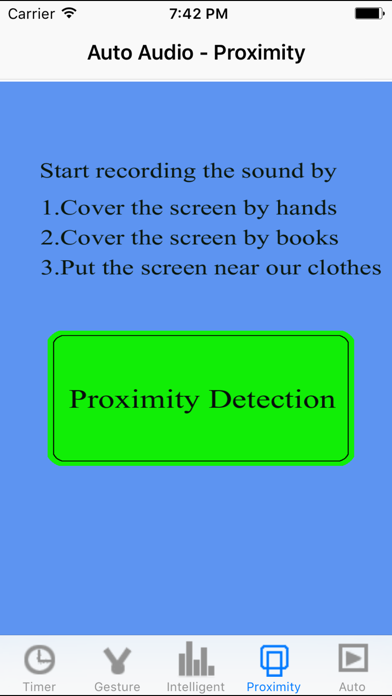


About Auto Audio
The description on the store listing
The app will provide 8 solutions for recording the sound.
1 Record from Apple Watch.
In Watch OS 5, could record the sound when the watch screen is off.
When this App records the sound in the background in Apple Watch, sometime, a red icon of microphone will be displayed at the top middle of Watch Screen. That means, this App is recording the sound in the background status. Just tap this red icon, this App will be displayed again.
After finishing the recording, the record file will be transferred to the iPhone automatically. In iPhone, when we tap the file folder icon on the top left corner in the main tab controller, the file from watch will be displayed. In Watch App, tap the table …
Read the full description
The app will provide 8 solutions for recording the sound. 1 Record from Apple Watch. In Watch OS 5, could record the sound when the watch screen is off. When this App records the sound in the background in Apple Watch, sometime, a red icon of microphone will be displayed at the top middle of Watch Screen. That means, this App is recording the sound in the background status. Just tap this red icon, this App will be displayed again. After finishing the recording, the record file will be transferred to the iPhone automatically. In iPhone, when we tap the file folder icon on the top left corner in the main tab controller, the file from watch will be displayed. In Watch App, tap the table cell, the detail of the record sound will be displayed. We will see a transfer button. If we need to transfer the record file to iPhone again, please tap this button. 2.Auto: When this App is inactive, just tap this App icon, this App could record the sound automatically.When you need to record the sound as soon as possible, you may like this solution. If you need to get this solution, just make the fast tab page appear before you press the home key. 3 Intelligent: this App could start recording the sound when the pitch level of sound is over the indicted level of starting record. It could stop recording when the pitch level of sound is below the indicted level of stopping record. If you need to record the sound when it is higher than some pitch level, just make the intelligent tab page appear. 4 Gesture: gesture double tap or pinch could create the different size sound files. The larger size is more qualified. The smaller size could save the disk space and the sound is also qualified. If you need to use this solution, just make the gesture tab page appear. 5 Proximity: Cover the top part of the iPhone screen , this App will record the sound. Cover the iPhone screen again, this App will stop recording. In some situation, you do not want to tap the device screen, then this solution is yours. For example, you could use one book to cover the top part of the iPhone screen, or use your hands, your clothes,and even use your face.If you need to use this solution, just make the proximity tab page appear. 6 Delay the action : delay the recording after 0 - 30 seconds. In some situations, you want to record the sound after a little time, then this solution may help you.If you need to use this solution, just make the timer tab page appear. 7 Standard recording the sound, if you just want to record the sound by tapping the button directly, this App is yours. Just make the timer tab page appear, ensure the delay is zero second, and tap the button of Record One Audio Clip. 8 Repeat recording. Some times, you may need to record the sound files after the indicted duration. In the timer tab page, tap the button - record the audio by interval. In iPhone or iPad, this App could also continue recording the sound in the background. You could set your preferences. So tap the button at the upper right corner of the main view, you could set your own preferences from the setting view. These preferences includes the max duration of the sound file, the sound pitch level for start record and stopping record. You could also indict whether enable the background record when this App is inactive. After the file is created, you could send the sound file by email account in your device.By using the iTune File Sharing features, you could export the record sound to the iTune computer such as Mac PC. Tap the To iCloud button, the new view will display the item : iCloud Drive, tap this item to export the file to iCloud. In the main view, just tap the upper left button, you could view the file folder, the sound file size and sound duration will be displayed. The user could rename the sound file. You could play the sound file according to your needs.
Installs
Apple does not publish download counts. Estimates are in testing.
We publish iOS estimates only after they pass a back-test against real numbers. Chart history below is measured.
Estimated store revenue Estimated Beta
App Store, worldwide, monthly rate from the last 13 chart days to 20 Nov 2026
Below the top 100 grossing apps in the markets we calibrate. In the United States that usually means under about $6.4M a month. App Store purchases and subscriptions only, before Apple's 15 to 30% fee. Ads and web payments are not included.
Ratings
No rating breakdown published for this app.
Recent reviews
Latest public reviews from the store
No reviews in our sample for this app yet.
Top chart positions
Latest App Store chart ranks by country, last 10 days
Not in any tracked top chart in the last 10 days.
Auto Audio history
Release, install milestones, listing and store changes
- First released on the store 15 Jun 2014
Update frequency
How often Auto Audio ships a new version, month by month
0 updates in the last 12 months. Less often than most similar apps: they shipped a median of 1 updates in the same year.
Recent versions
Current version 6.1.1
- Version 6.1.124 May 2024
Update the following default preferences: 1 For the intelligent sound record feature: the high level will be 138 instead of 130. The default duration of intelligent sound recording will be 2 minutes. 2 For the proximity sound record feature: the default duration of recording will be 7 minutes. From the setting view, we could update the above preferences according to our needs.
Listing keywords
Words and phrases Auto Audio repeats most in its store listing
Top phrases: record the sound (8), tab page (7), tab page appear (6), page appear (6), recording the sound (5).
Highlighted words also appear in the title. Counts cover the title, short description and description.
Compliance
What the listing and the app package show
- Store status
- Live
- Upkeep
- No update since 24 May 2024
- Age rating
- 4+
Apps like Auto Audio
 Library of AviationNazmi Yavuz★ 4.82
 MyNOVECNorthern Virginia Electric Cooperative★ 2.28
 打工人小组件光翔 卓★ 4.96
 TruckbaysTruckbays LLC★ 4.3
 Tornado PRO PlayerMohammed Altam★ 4.44
 VDX - Video ManagerARISEPEAK LP★ 1.74
 TV CastingZeasn Info Technology Co., Ltd.★ 1.86
 Mil-Dot BallisticsTom Holsten★ 3.82
 MySontiqSontiq, Inc.★ 2.4
Auto Audio: questions and answers
Who makes Auto Audio?
Auto Audio is published by 方 沈.
When was Auto Audio last updated?
The latest version (6.1.1) was released on 24 May 2024.
Is Auto Audio free?
No. Auto Audio is a paid app priced at $0.99.
Is Auto Audio still available?
Yes. Auto Audio is live on App Store as of 11 May 2026.
Track Auto Audio and its competitors
Watch any app for new versions, rating drops, chart moves and removals. Free plan, no card.