
- Installs
- —
- Apple does not publish download counts
- Rating
- 4.39
- Ratings
- 6.3K
- 6.3K reviews
- Version
- 6.24.0
- Updated 4 Aug 2026
- Released
- 29 Sep 2010
- Tracked since 10 May 2026
- Size
- 492 MB
- Needs 16.0
Also on Google Play: تعلم AutoCAD (28 ratings)
Screenshots



About AutoCAD
The description on the store listing
The official AutoCAD app. View & edit CAD drawings anytime, anywhere!
Essential drafting and design capabilities for your everyday needs: Autodesk® AutoCAD® Web on mobile is a trusted solution that gives you access to the core AutoCAD commands that you need for light editing and generating fundamental designs, all at an attractive price.
AutoCAD Web subscription plans are available in the following options:
• Monthly for $9.99
• Yearly for $99.99
• Included free with AutoCAD and AutoCAD LT subscriptions
Use familiar AutoCAD drafting tools on your mobile device in a simplified interface, allowing you to access, create, and update DWG™ files anytime, anywhere.
30 day trial: Enjoy a …
Read the full description
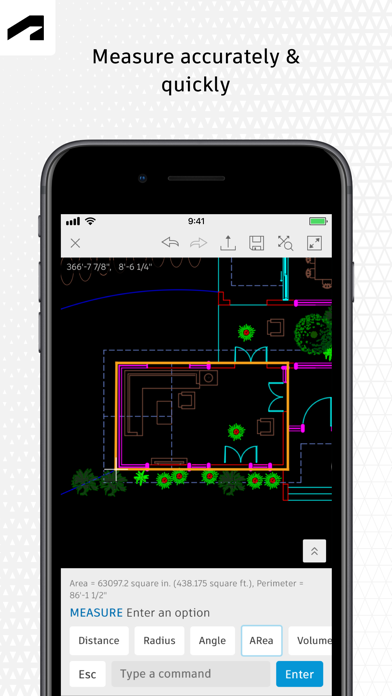
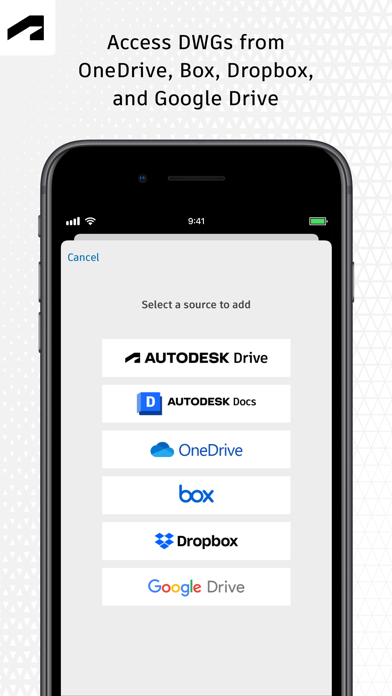
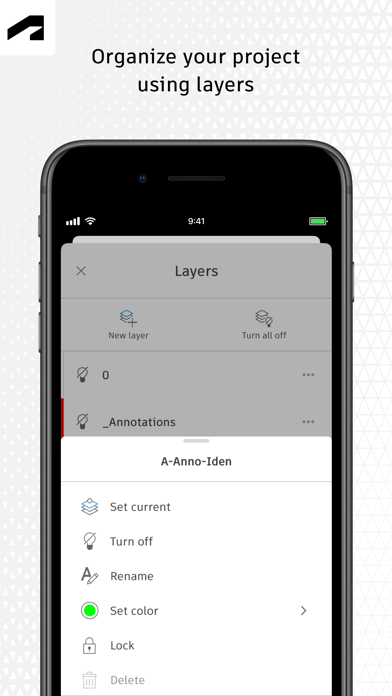
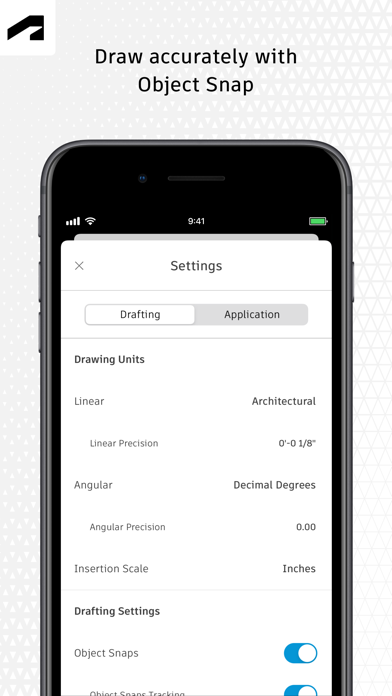
The official AutoCAD app. View & edit CAD drawings anytime, anywhere! Essential drafting and design capabilities for your everyday needs: Autodesk® AutoCAD® Web on mobile is a trusted solution that gives you access to the core AutoCAD commands that you need for light editing and generating fundamental designs, all at an attractive price. AutoCAD Web subscription plans are available in the following options: • Monthly for $9.99 • Yearly for $99.99 • Included free with AutoCAD and AutoCAD LT subscriptions Use familiar AutoCAD drafting tools on your mobile device in a simplified interface, allowing you to access, create, and update DWG™ files anytime, anywhere. 30 day trial: Enjoy a fully functional free trial of AutoCAD Web for 30 days. After the trial is completed, you can access limited read-only functionality without a paid subscription. Current AutoCAD or AutoCAD LT desktop subscribers: Sign in with your Autodesk account to access AutoCAD Web on mobile. Key Benefits: • Work offline on your projects without an Internet connection and sync later • Safeguard drawings in your Autodesk account or with your own external accounts • Collaborate in real time with team members and reduce mistakes • Replace blueprints at job sites with drawings on mobile • Simplify workflows by opening DWG files directly from Autodesk Drive, Autodesk Docs, Microsoft OneDrive, Box, Dropbox, or Google Drive. Features: • 2D file viewing • Create, edit, and share 2D drawings • Work offline and sync your changes once back online • Insert blocks from your DWG drawing • Manage layers and layer visibility • Drafting and geometry editing tools • Annotation and markup tools • Measure distance, angle, area, and radius • View and edit DWG files from your internal storage, email, or from the cloud • View coordinates and properties All new users have access to a free trial of AutoCAD Web for 30 days. Subscriptions will be charged to your credit card through your Apple ID. Subscriptions are automatically renewed unless cancelled at least 24-hours before the end of the current period. You will not be able to cancel a subscription during the active period. Manage your subscriptions in Account Settings after purchase. *Free products and services are subject to the Autodesk Terms of Use at https://www.autodesk.com/company/terms-of-use/en/general-terms Learn more: Autodesk Website: https://www.autodesk.com/products/autocad-web Term of Use: https://www.autodesk.com/company/legal-notices-trademarks/terms-of-service-autodesk360-web-services/autodesk-autocad-mobile-terms-of-service AutoCAD Service is not provided to children under the age of 14, and users under 14 cannot use this Service.
Installs, last 30 days
Apple does not publish download counts. Estimates are in testing.
Estimated store revenue Estimated Beta
App Store, worldwide, monthly rate from the last 12 chart days to 19 Nov 2026
Below the top 100 grossing apps in the markets we calibrate. In the United States that usually means under about $6.4M a month. App Store purchases and subscriptions only, before Apple's 15 to 30% fee. Ads and web payments are not included.
Ratings
6,264 ratings, 6,264 reviews
- 5 ★68%
- 4 ★18%
- 3 ★4.8%
- 2 ★2.4%
- 1 ★6.6%
Recent reviews
Latest public reviews from the store
- 3 Mar 2022
Great evolution put to good use
Having been around AutoCAD for around 30 years, and trying to go from desktop to iPad, this came to be a great move. I have subscribed to autocad last year but i found it the most unused investment in an app. This version is quite satisfying although i have to learn a new logic of command sequence when moving or editing objects. I guess i’ll get the hang of it. The annotations are the best thing that i can use when communicating with the office team and update the modification on the drawings. This part of annotation should be developed by autodesk to be as smart as the markup tool by Apple Pencil. Very happy to be using ACAD again like this.
- 24 Sep 2021
Most worthy of all the cadd prog.
I’ve used more CADD programs than one could expect to self teach an produce at the same time. I was taught the board, pencil, straight edge in HS during the 60’s. As a Seabee I ended up doing the eat, plan, execution work of a few a d in there I was exposed to Auto CADD and a love affair could be resembled, Over the years I’ve used most of the products from other producers and own a MAC based program. From simple sketches, process control designs in plants to the ME&P work on major projects (my last 3 years) I got to turn out quality USABLE work. My only regret is I’m so used to just opening ACAD and putting it to paper or I should say screen. Thanks
- 26 Jan 2020
Should have made it like desktop version. Why change it?
Whoever designed this app needs to understand that AutoCAD users weren’t born in 2000. This app looks very elementary and isn’t the interface most users see on desktop. Why redesign it when experienced users already have had a palette from many years ago. It should have been more seamless transition from desktop to mobile. One of the key features that I am at a loss for is: Ability to type dimensions for line lengths and the use of standard key commands. Point and click is such a waste of time. For any experienced use of Autocad, typing commands from memory is faster than drawing lines. Once it compounds, one will know how much longer it takes to make a drawing. Also, I subscribed, but my Apple Pencil doesn’t even work based on the tutorials about freehand and editing dimensions. None of that is on the paid version. And zero support. Unfortunate that it’s like any other generic drawing tool and not like the original desktop version, which one would think that is where you would would actually begin the design with and not start from scratch. I will try it out, but it is so slow to even just draw a floor plan. I can do it faster on a desktop version. Time is money for Au
- 24 Sep 2019
Could use more functionality but it does work well
There are a couple of things that I really need in my daily usage of this app on my iPad Pro. Being able to easily draw shapes with set dimensions entered via text entry (I thought that I used to be able to do this), and the ability to draw splines. I have to switch back to my Mac in order to accomplish these two tasks and it seems like they should be easy to implement on the iPad. Having those two abilities would greatly increase my productivity. Another caveat is that I haven’t been able to select any objects recently with the Apple Pencil 2 - I have to select the object with my finger and then I can adjust the nodes/handles with the pencil from there. I still enjoy the program, I just find myself thinking that it could be a lot more useful with a few additions or tweaks.
What reviewers bring up
Topics mentioned in the latest 8 reviews, by how many reviews mention them
Liked in good reviews (4 reviews)
- pencil 4
- apple 3
- ipad pro 2
- objects 2
- having 2
- last 2
- tool 2
- acad 2
Raised in bad reviews (3 reviews)
- autodesk 2
- products 2
- support 2
- drives 2
- right 2
- key 2
Top chart positions
Latest App Store chart ranks by country, last 10 days
- Countries ranked
- 20 of 50
- Best rank
- #21
- Top 10 placements
- 0
- of 23 chart placements
- Average rank
- #76.4
Best countries on App Store
- 🇬🇷 Greece · Top grossing, Productivity#21
- 🇳🇬 Nigeria · Top grossing, Productivity#49
- 🇹🇼 Taiwan · Top grossing, Productivity#63
- 🇻🇳 Vietnam · Top grossing, Productivity#63
- 🇧🇪 Belgium · Top grossing, Productivity#64
- 🇰🇷 South Korea · Top grossing, Productivity#66
| Country | Chart | Category | Rank | Best (10 days) | Date |
|---|---|---|---|---|---|
| 🇬🇷 Greece | Top grossing | Productivity | #21 | #21 | 19 Nov 2026 |
| 🇳🇬 Nigeria | Top grossing | Productivity | #49 | #49 | 10 Nov 2026 |
| 🇹🇼 Taiwan | Top grossing | Productivity | #63 | #63 | 16 Nov 2026 |
| 🇻🇳 Vietnam | Top grossing | Productivity | #63 | #63 | 17 Nov 2026 |
| 🇧🇪 Belgium | Top grossing | Productivity | #64 | #64 | 17 Nov 2026 |
| 🇰🇷 South Korea | Top grossing | Productivity | #66 | #66 | 10 Nov 2026 |
| 🇵🇪 Peru | Top free | Productivity | #67 | #56 | 19 Nov 2026 |
| 🇪🇬 Egypt | Top grossing | Productivity | #73 | #44 | 19 Nov 2026 |
| 🇨🇱 Chile | Top grossing | Productivity | #74 | #74 | 17 Nov 2026 |
| 🇭🇺 Hungary | Top grossing | Productivity | #78 | #78 | 19 Nov 2026 |
AutoCAD history
Release, install milestones, listing and store changes
- First released on the store 29 Sep 2010
Update frequency
How often AutoCAD ships a new version, month by month
3 updates in the last 12 months. Less often than most similar apps: they shipped a median of 4 updates in the same year.
Recent versions
Current version 6.24.0
- Version 6.24.04 Aug 2026
This latest release includes the following improvements and fixes: • Add support for loading support files configured for Forma Data Management projects. • Improve sample file experience. The AutoCAD team
- Version 6.23.025 May 2026
This latest release includes the following improvements and fixes: • Show lock status for recent DWG files on Forma Data Management (formerly Autodesk Docs) to avoid editing conflicts. • Add support for European Portuguese. Please note that with this new release, our app will only support iOS 17 and above. The AutoCAD team
- Version 6.22.023 Mar 2026
This latest release includes the following improvements and fixes: • Show lock status for DWG files on Forma Data Management (formerly Autodesk Docs) to avoid editing conflicts. • Make it easier to use Forma Data Management (formerly Autodesk Docs) as file storage. The AutoCAD team
Listing keywords
Words and phrases AutoCAD repeats most in its store listing
Top phrases: autocad web (5), dwg files (3), trial of autocad (2), web on mobile (2), anytime anywhere (2).
Highlighted words also appear in the title. Counts cover the title, short description and description.
Compliance
What the listing and the app package show
- Store status
- Live
- Upkeep
- Updated 4 Aug 2026
- Age rating
- 4+
Apps like AutoCAD
 Galaxy VPN - Fast & SecurityBLUE REV SOAR TECHNOLOGY LIMITED★ 4.61
 Miro: your visual workspaceRealtimeBoard Inc.★ 4.69
 A Cleaner: Storage CleanupHONG KONG LITTLE BEAR INFORMATION TECHNOLOGY CO., LIMITED★ 4.3
 Add Watermark -Batch ProcessSaraswati Javalkar★ 4.84
 PlatoVPN Fast:Super VPN ProxyMogoTech Inc.★ 4.73
 Group Text | Mass MessageMass Text LLC★ 4.34
 ViVi Keyboard: Theme & ChatbotMetaverse Technology LTD★ 4.27
 Drukpa Lunar CalendarLich Viet JSC★ 4.75
 Microsoft 365 AdminMicrosoft Corporation★ 4.65
AutoCAD: questions and answers
Who makes AutoCAD?
AutoCAD is published by Autodesk Inc..
When was AutoCAD last updated?
The latest version (6.24.0) was released on 4 Aug 2026.
Is AutoCAD free?
Yes. AutoCAD is free to download.
Is AutoCAD still available?
Yes. AutoCAD is live on App Store as of 19 Nov 2026.
Track AutoCAD and its competitors
Watch any app for new versions, rating drops, chart moves and removals. Free plan, no card.