
- Installs
- —
- Apple does not publish download counts
- Rating
- 4.62
- Ratings
- 20.5K
- 20.5K reviews
- Version
- 1.6
- Updated 9 Oct 2026
- Released
- 17 Dec 2019
- Tracked since 10 May 2026
- Size
- 21 MB
- Needs 12.0
Also on Google Play: Tinkercad (1.5K ratings)
Screenshots


About Tinkercad
The description on the store listing
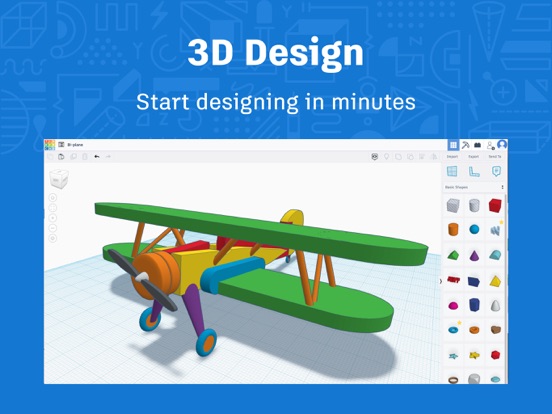
Tinkercad is a free app that equips the next generation of designers and engineers with the foundational skills for innovation: 3D design, electronics, and coding.
• FREE FOR EVERYONE: No strings attached. Start creating from the first click.
• LEARN BY DOING: Build confidence, persistence, and problem-solving skills.
• SAFE FOR ALL AGES: Ad-free. kidSAFE certified. Privacy first.
KEY FEATURES
• Easily build 3D with controls optimized for your device.
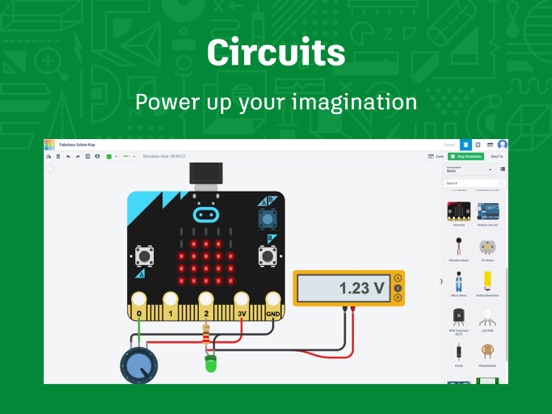
• Connect, code, and simulate circuit components with Arduino and micro:bit microcontrollers.
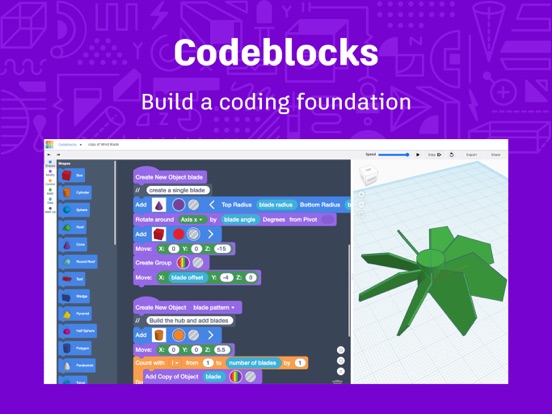
• Make 3D designs from code using Tinkercad Codeblocks.
• Bring your designs into the real world with the Tinkercad AR viewer.
• Import STL, OBJ and …
Read the full description
Tinkercad is a free app that equips the next generation of designers and engineers with the foundational skills for innovation: 3D design, electronics, and coding. • FREE FOR EVERYONE: No strings attached. Start creating from the first click. • LEARN BY DOING: Build confidence, persistence, and problem-solving skills. • SAFE FOR ALL AGES: Ad-free. kidSAFE certified. Privacy first. KEY FEATURES • Easily build 3D with controls optimized for your device. • Connect, code, and simulate circuit components with Arduino and micro:bit microcontrollers. • Make 3D designs from code using Tinkercad Codeblocks. • Bring your designs into the real world with the Tinkercad AR viewer. • Import STL, OBJ and SVG files into the 3D design space to build on an existing design. • Export your files including STL, OBJ, USDZ, and SVG or send them to other programs. • All you need is a device and an internet connection. • Apple Pencil compatible. FOR EDUCATORS • Tinkercad Classrooms allows teachers to assign Activities, send and receive assignments, invite co-teachers, and monitor student progress—all from your dashboard. • Tinkercad Lesson Plans and starters available for students to get started with 3D CAD design, electronics simulation, and block-based programming. • Compatible with Google Classroom. Tinkercad is a free product from Autodesk, a leader in 3D design, engineering, and entertainment software. Tomorrow's innovators start here. Children’s Privacy Statement: https://www.autodesk.com/company/legal-notices-trademarks/privacy-statement/childrens-privacy-statement
Installs, last 30 days
Apple does not publish download counts. Estimates are in testing.
Estimated store revenue Estimated Beta
App Store, worldwide, monthly rate from the last 12 chart days to 19 Nov 2026
Below the top 100 grossing apps in the markets we calibrate. In the United States that usually means under about $6.4M a month. App Store purchases and subscriptions only, before Apple's 15 to 30% fee. Ads and web payments are not included.
Ratings
20,498 ratings, 20,498 reviews
- 5 ★81%
- 4 ★10%
- 3 ★3.8%
- 2 ★1.2%
- 1 ★4.0%
Recent reviews
Latest public reviews from the store
- 22 Feb 2026
*+* Amazing app *+*
This app… this app may be the best cad app ever. I cannot express how much this app has helped out me and my family. I love how simple and humble this cute and friendly app. Not to mention how much this cad has helped me 3d print in one paragraph. You must see that this creation is revolutionary. I bet even the developers don’t know how much this app rocks. I have 3d printed countless designs thanks to this quirky little app. The other cad apps: “I’m so confused! This is impossible to understand!!” Tinkercad: “this is so easy and effective! I could use this all day!” This app is just so amazing I could cry right here right now. Thanks to all creators designers and editors who made this app. 6/5 stars!! Thank you!
- 4 Feb 2026
Amazing product
One of my favorite applications. The app interface is quite intuitive and easy to use, and despite the simplicity of the tool, it still produces good results. Useful for 3D printing objects, among other things. My only issue is that the iOS app is simply some kind of weird PWA of the web version. It worked fine until Safari parental controls stopped it from connecting to Tinkercad’s servers. If the developers could release it as a full-featured app with offline capabilities, I would really appreciate them doing so. Otherwise, it is a great tool, especially for people (and bugdroids) like me that cannot afford to spend thousands of dollars per year on fancy desktop CAD software.
- 26 Apr 2025
Basic 3D CAD Functions - Hard to Use
It’s awesome that this tool is available to help create 3D renderings, but the problem is the controls are basic and not precise. It’s harder than it should be to create a basic 3D image. Navigating around an image by grabbing the cube is not easy. It’s sometimes hard to get the diagram in the right position to made edits. At times the ability to zoom out and move the spot you need to be at to see the change you need to make is impossible, due to zoom maxing out too close to the diagram, so you can really see the corner of your diagram without rotating it 100x to finally land in the right spot. Additionally grabbing handles and adjusting the size of shapes is not easy. It’s hard to tell what handle you’re grabbing and you often change the shape in unintended ways, which makes creating a simple diagram a pain.
- 23 Mar 2024
Worked great for more than a year, then it didn’t.
Love tinkercad and use te web browser all the time now. I recently attempted to log on as normal (so keep in mind I had not been on the app for easily more than a year) but when I try to get on now, it gets stuck in this strange loading page where it’s not quite done with the first loading screen but another screen behind it saying “Connection Lost” is also trying to load at the same time. The then create a weird pulsing screen affect from the blue first loading screen and the second white loading screen that is an infinite cycle and does not appear to ever resolve itself (it was running for more than an hour doing this). Even after uninstalling and reinstalling the app it still does this. Would be a 5 if not for the recent problems above, but overall a really great app and I’ll most likely continue to use the web browser whenever possible.
What reviewers bring up
Topics mentioned in the latest 8 reviews, by how many reviews mention them
Liked in good reviews (5 reviews)
- tinkercad 5
- web 3
- capabilities 2
- developers 2
- connecting 2
- objects 2
- desktop 2
- browser 2
Raised in bad reviews (1 reviews)
No topic comes up twice.
Top chart positions
Latest App Store chart ranks by country, last 10 days
Not in any tracked top chart in the last 10 days.
Tinkercad history
Release, install milestones, listing and store changes
- First released on the store 17 Dec 2019
Update frequency
How often Tinkercad ships a new version, month by month
2 updates in the last 12 months. About as often as similar apps, which shipped a median of 2 updates in the same year.
Recent versions
Current version 1.6
- Version 1.69 Oct 2026
We’ve updated the Tinkercad iPad app with security and reliability improvements to help protect your account and keep the app running smoothly on the latest iPadOS. What’s improved: • More secure storage for your sign-in session • Privacy Policy and Terms of Service in Settings now open the current documents on tinkercad.com • Better compatibility with supported iPadOS versions • Updated security for app data and network connections
- Version 1.525 Aug 2026
We’ve updated the Tinkercad iPad app with security and reliability improvements to help protect your account and keep the app running smoothly on the latest iPadOS. What’s improved: • More secure storage for your sign-in session • Privacy Policy and Terms of Service in Settings now open the current documents on tinkercad.com • Better compatibility with supported iPadOS versions • Updated security for app data and network connections
- Version 1.425 Apr 2022
• Added ability to create and edit Circuit designs. • Improved touch support in the Circuit editor. • Added workflow to join a Tinkercad Class inside the app when following a Class link. • Following Tinkercad collaboration links on the iPad will open the link in the app instead of the browser. • Logged in users may find, edit, and/or delete their profile in app. • Updated App Store for privacy labels.
Listing keywords
Words and phrases Tinkercad repeats most in its store listing
Top phrases: 3d design (3), design electronics (2), stl obj (2).
Highlighted words also appear in the title. Counts cover the title, short description and description.
Compliance
What the listing and the app package show
- Store status
- Live
- Upkeep
- Updated 9 Oct 2026
- Age rating
- 4+
Apps like Tinkercad
 SkyView® LiteTerminal Eleven LLC★ 4.54
 LetMeSpeak – Learn EnglishLetMeSpeak.org AG★ 4.66
 Smart Tales ® Learning GamesMarshmallow Games SRL★ 4.56
 MARU: Learn Japanese HiraganaOverdreamer, LLC★ 4.93
 RaiseMe - College scholarshipsRaise Labs, Inc.★ 4.82
 My Town Airport - Fly & TravelMy Town Games LTD★ 4.47
 Tynker: Coding for KidsTynker★ 4.58
 Vietnamese Dictionary PEnglishPPCLINK Software★ 4.54
 Hooked on Phonics LearningHooked on Phonics★ 4.49
Tinkercad: questions and answers
Who makes Tinkercad?
Tinkercad is published by Autodesk Inc..
When was Tinkercad last updated?
The latest version (1.6) was released on 9 Oct 2026.
Is Tinkercad free?
Yes. Tinkercad is free to download.
Is Tinkercad still available?
Yes. Tinkercad is live on App Store as of 19 Nov 2026.
Track Tinkercad and its competitors
Watch any app for new versions, rating drops, chart moves and removals. Free plan, no card.