- Installs
- —
- Apple does not publish download counts
- Rating
- 4.78
- Ratings
- 9
- 9 reviews
- Version
- 2.12.1
- Updated 31 Aug 2017
- Released
- 10 May 2013
- Tracked since 10 May 2026
- Size
- 4 MB
- Needs 9.0
Screenshots
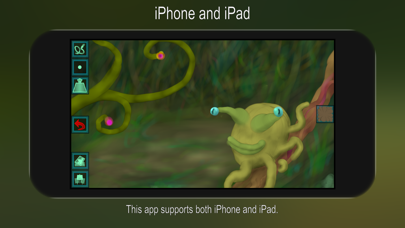
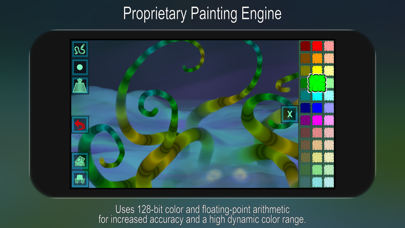
About Chill Paint
The description on the store listing
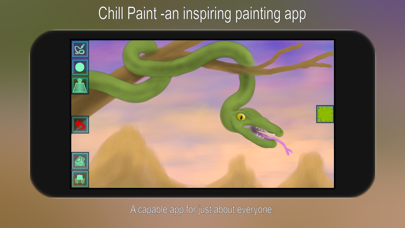
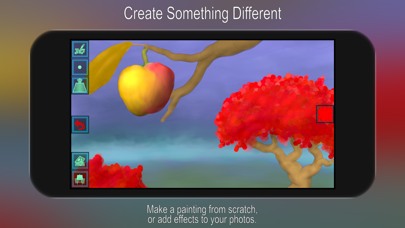
An inspiring and capable drawing/painting app for just about everyone.
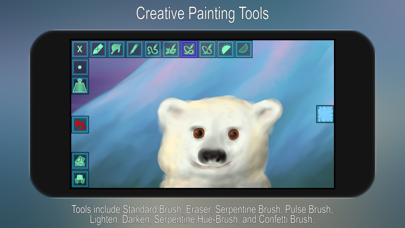
Tools include Standard Brush, Eraser, Serpentine Brush, Pulse Brush, Lighten, Darken, Serpentine Hue-Brush, and Confetti Brush.
APPLE PENCIL SUPPORT
The strokes change characteristics depending on how you use the Pencil (pressure, tilt).
You can also opt to have different functionality for the Apple Pencil and your finger.
Go to 'Settings' -> 'Apple Pencil', and choose from the list of modes.
The most advanced mode even lets your finger have a separate tool/size/color/etc when you select with your finger instead of the Pencil.
The simpler modes permanently assign a tool such as Eraser to the finger, which can be really …
Read the full description
An inspiring and capable drawing/painting app for just about everyone. Tools include Standard Brush, Eraser, Serpentine Brush, Pulse Brush, Lighten, Darken, Serpentine Hue-Brush, and Confetti Brush. APPLE PENCIL SUPPORT The strokes change characteristics depending on how you use the Pencil (pressure, tilt). You can also opt to have different functionality for the Apple Pencil and your finger. Go to 'Settings' -> 'Apple Pencil', and choose from the list of modes. The most advanced mode even lets your finger have a separate tool/size/color/etc when you select with your finger instead of the Pencil. The simpler modes permanently assign a tool such as Eraser to the finger, which can be really useful! PROPRIETARY PAINTING ENGINE We have put years of research and hard work into making our own painting engine from scratch, and we continuously work to improve it. The engine uses 128-bit color and it always utilizes floating-point arithmetic for increased accuracy and a high dynamic color range. FULL SCREEN PAINTING Use a 3-finger tap or shake the device to toggle full screen mode on/off. (You can also flick the toolbar over to the opposite side.) ZOOMING AND PANNING Pinch to zoom in/out. Drag with two fingers to pan. A 2-finger tap will then reset the zoom/pan. LAYERS The app supports layers. To open the Layer Control, use the button that has what looks like a stack of papers and a small symbol (e.g. a mountain) on it. In the Layer Control, use the + button to add layers and the trash can button to delete. You can temporarily toggle a layer on/off using the switch to the right. Tap on the thumbnail to bring up a menu of layer options that includes an opacity slider. To move a layer within the stack, drag it using the handle on its right-hand side (only visible if you have more than one layer). You can also change the color of the paper, beneath the layer(s). COLOR SETS Tap once on a color to select it. Tap a second time to bring up a menu where you can change or adjust the color in a number of ways (this menu also features an Eyedropper tool if you upgrade to Pro). Swipe along the color panel to change between the different color sets. SEAMLESS PATTERN EDITING (PRO FEATURE) In addition to creating normal paintings, you can also use this app to make repeating patterns. Switching on the Pattern Edit Mode (horizontally and/or vertically) will display your painting as tiles next to each other. You're free to paint anywhere on these tiles, so you can easily create seamless patterns for use as website/desktop backgrounds, in print, or for textures in 3d modelling. Toggle this feature on/off in the Picture menu. POPUP HELP For information on what a specific button does, just press it and hold down for a couple of seconds and a short explanation will appear.
Installs
Apple does not publish download counts. Estimates are in testing.
We publish iOS estimates only after they pass a back-test against real numbers. Chart history below is measured.
Estimated store revenue Estimated Beta
App Store, worldwide, monthly rate from the last 12 chart days to 19 Nov 2026
Below the top 100 grossing apps in the markets we calibrate. In the United States that usually means under about $6.4M a month. App Store purchases and subscriptions only, before Apple's 15 to 30% fee. Ads and web payments are not included.
Ratings
9 ratings, 9 reviews
No rating breakdown published for this app.
Recent reviews
Latest public reviews from the store
No reviews in our sample for this app yet.
Top chart positions
Latest App Store chart ranks by country, last 10 days
Not in any tracked top chart in the last 10 days.
Chill Paint history
Release, install milestones, listing and store changes
- First released on the store 10 May 2013
Recent versions
Current version 2.12.1
- Version 2.12.131 Aug 2017
This update from Apple will improve the functionality of this app. No new features are included. [BUG FIX] Some common actions, such as adding a new layer, or changing the background color, could cause the app to crash. Please remember to update your App Store review/rating. We'd love to hear what you think!
Listing keywords
Words and phrases Chill Paint repeats most in its store listing
Top phrases: apple pencil (3), bring up menu (2), color sets (2), finger tap (2), full screen (2).
Highlighted words also appear in the title. Counts cover the title, short description and description.
Compliance
What the listing and the app package show
- Store status
- Live
- Upkeep
- No update since 31 Aug 2017
- Age rating
- 4+
Apps like Chill Paint
 AITSO - Talking AI ChatbotDrum Starz★ 3.18
 李雷和韩梅梅2023:恋爱养成RPG晖 郑★ 4.5
 SoSkillsSoSkills★ 4.58
 Horror Movie ClassicsMacMillan Interactive Communications, LLC★ 4.84
 GranPlayerLuxza★ 2.68
 CineWisenet★ 4.38
 CGR CinémasThe Boxoffice Company France★ 4.82
 Sound Effects!TMSOFT★ 3.4
 Skill Addicts – Play & LearnSKillAddicts s.r.o★ 4.2
Chill Paint: questions and answers
Who makes Chill Paint?
Chill Paint is published by Norbyte.
When was Chill Paint last updated?
The latest version (2.12.1) was released on 31 Aug 2017.
Is Chill Paint free?
Yes. Chill Paint is free to download.
Is Chill Paint still available?
Yes. Chill Paint is live on App Store as of 1 Jul 2026.
Track Chill Paint and its competitors
Watch any app for new versions, rating drops, chart moves and removals. Free plan, no card.