- Installs
- —
- Apple does not publish download counts
- Rating
- 4.65
- Ratings
- 2.2K
- 2.2K reviews
- Version
- 5.6.3
- Updated 21 Dec 2023
- Released
- 17 Dec 2011
- Tracked since 10 May 2026
- Size
- 24 MB
- Needs 12.0
Screenshots
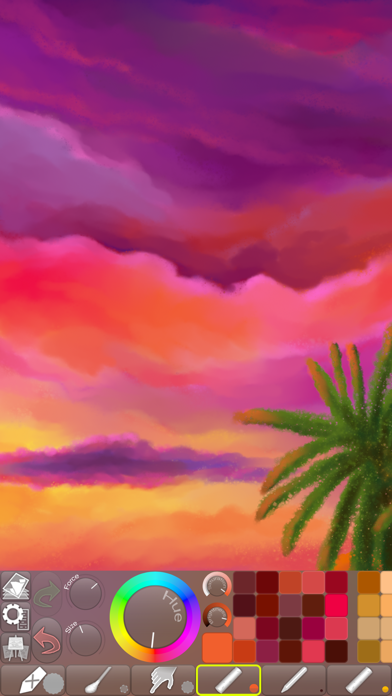
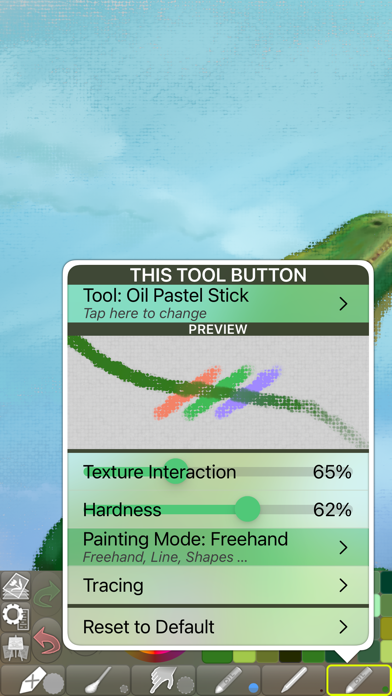
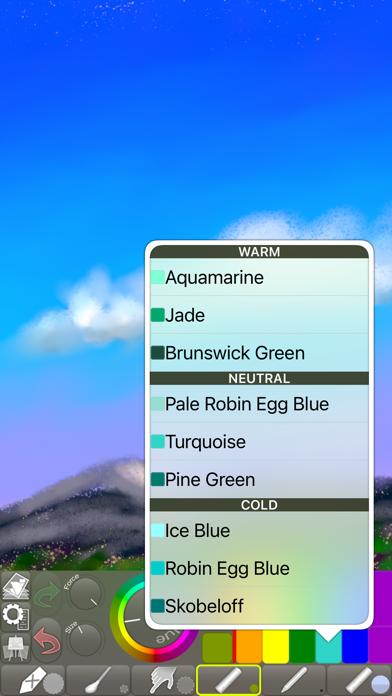


About iPastels
The description on the store listing
A painting app for all artists, whether you’re experienced or just starting out.
Perfect for creating beautiful works of art or a quick sketch whenever and wherever you have a burst of inspiration.
You can also try out ideas and compositions before starting on a new painting in real life, or practise and refine your skills, all without the added cost of art supplies.
• LIFELIKE PASTEL SIMULATION •
The app features live-calculated brushes and strokes, making a realistic pastel simulation possible.
Painting tools include soft pastels, oil pastels, pastel pencils, smudge tool, and more.
• REALISTIC PAPER/CANVAS TEXTURES •
When creating a new picture, a unique, non-repeating paper texture is …
Read the full description
A painting app for all artists, whether you’re experienced or just starting out. Perfect for creating beautiful works of art or a quick sketch whenever and wherever you have a burst of inspiration. You can also try out ideas and compositions before starting on a new painting in real life, or practise and refine your skills, all without the added cost of art supplies. • LIFELIKE PASTEL SIMULATION • The app features live-calculated brushes and strokes, making a realistic pastel simulation possible. Painting tools include soft pastels, oil pastels, pastel pencils, smudge tool, and more. • REALISTIC PAPER/CANVAS TEXTURES • When creating a new picture, a unique, non-repeating paper texture is generated that will interact in real-time with the live-calculated strokes you paint. You can change the default-generated texture to, for example, canvas, which goes great with oil pastels! • PRECISE COLOR BLENDING • When painting, especially with soft pastels, use Smudge or the Cotton Swab to blend and smoothen the colors right on the paper, as you would in real life. With oil pastels, in addition to smudging, the blending is often done by the pastel sticks themselves (for best results, reduce the force or use a similar or lighter color). If you use an Apple Pencil, it will feel incredibly realistic if you use the stylus to draw and use your finger to Smudge (assigned as a 2nd tool)! • FINGERTIP = STROKE SIZE • When you paint, the app measures how much of your finger is touching the screen and changes the stroke size accordingly. Apply just the corner of your fingertip for a thin line, or the whole fingerprint area for a broad stroke. A 2nd tool assigned to your finger will still use this feature, so don’t ignore it just because you have an Apple Pencil! • LEFT-HANDED? • Just swipe the toolbar over to the other side! • PARAMETERS CAN BE CHANGED LIVE • Use any buttons or controls to change/adjust color, size, force, simultaneously while painting. • UNIVERSAL PURCHASE • If you choose to buy the Pro upgrade, this one-time in-app purchase will unlock all Pro features in the app on all available platforms (iPad-iPhone-Mac)! • METAL • The engine is based on Metal, with 128-bit color and floating-point arithmetic. • SWIFT • The app was developed entirely using Swift (earlier versions used C++). • APPLE PENCIL SUPPORT • FULL SCREEN PAINTING • SEAMLESS PATTERN EDITING MODE • • DARK MODE • LANDSCAPE • PORTRAIT • WIDE COLOR • • MULTIPLE LAYERS • PHOTO TRACING MODE (Pro feature) •
Installs, last 30 days
Apple does not publish download counts. Estimates are in testing.
Estimated store revenue Estimated Beta
App Store, worldwide, monthly rate from the last 12 chart days to 19 Nov 2026
Below the top 100 grossing apps in the markets we calibrate. In the United States that usually means under about $6.4M a month. App Store purchases and subscriptions only, before Apple's 15 to 30% fee. Ads and web payments are not included.
Ratings
2,185 ratings, 2,185 reviews
- 5 ★80%
- 4 ★11%
- 3 ★4.3%
- 2 ★1.4%
- 1 ★2.6%
Recent reviews
Latest public reviews from the store
- 19 Jan 2025
Hard to find colors
I found this really good set of colors I liked but I couldn’t find it again. It just sort of messed up my drawing. I think that they should add a button that shows you what colors you used in the past, and you can click on it and have them color ready to go so that we won’t have to worry about find the best shade to go with it, overall I really like this app it is super fun and it has helped me become a better artist since I downloaded! I hope this helps!
- 31 Jul 2024
Great feel of mixing and texture
This is a fun, simple app packing a surprising amount of functionality. I wish it was combined with the developers other drawing apps that all work the same way but with different brushes. Having them separate seems very artificial and weird and I want to use all the brushes together. To put it meanly all these apps from this person work the exact same except for the older Chill Paint, but stop you from using the brushes together to make you buy the same pro features multiple times. To put it nicely, it keeps the apps individually simple and lets people find what they’re searching for on the App Store in specific terms I guess. Still, it’s silly! I want to use all the brushes together! Basically I’m peeved because I like these apps so much. I wouldn't care if they were lame. Definitely give it a download. They pack a punch with a surprising number of features. All these apps are missing some really basic stuff I’d expect of an art app but also have a bunch of features, once you buy pro, that I wish all art apps had. You’ll have to give it a try yourself. The color modulation and colorizer (pro) are awesome. Wish it had lasso select and less clunky layer movement. The
- 6 Feb 2024
Wow very beautiful high quality drawing app
I was looking for the perfect painting app till suddenly I stumbled upon this app the bright paintings in the images caught my eye instantly so I decided I would download this app and it was amazing I made many paintings really my favorite one I made was the drizzled glitter star 💫 I recommend that a lot of professional artists have to use this wonderful painting game and I painted very very well my mom and dad also my friends were impressed so if you want to impress your friends by beautiful pastel drawings and paintings get this app it’s free no ads no trials free
- 6 Mar 2023
𝔾𝕣𝕖𝕒𝕥 𝕓𝕦𝕥 𝕙𝕒𝕣𝕕
When I first got this app it was really fun I made something and it was really cute and then it got hard making more cute stuff because I watch me more cute stuff that were even cuter it’s easy to make the first thing then it is to make the other stuff because if you make some things that’s cool and cute it’s gonna be hard but if you like make a color mixed together and you had sunglasses and cat ears it’s really hard so just make the cool stuff Wall it easy because then you’re not gonna be able to do it
What reviewers bring up
Topics mentioned in the latest 8 reviews, by how many reviews mention them
Liked in good reviews (8 reviews)
- drawing 5
- color 4
- pro 4
- download 3
- painting 3
- feel 3
- beautiful 2
- instantly 2
Raised in bad reviews (0 reviews)
No topic comes up twice.
Top chart positions
Latest App Store chart ranks by country, last 10 days
Not in any tracked top chart in the last 10 days.
iPastels history
Release, install milestones, listing and store changes
- First released on the store 17 Dec 2011
Recent versions
Current version 5.6.3
- Version 5.6.321 Dec 2023
[NEW] Added “Reset to Default” button to the Scrollable Palette Area menu (to open that menu, scroll the palette to its beginning and tap the largest of the three buttons that appear). [FIXED] A couple of rare user interface layout glitches. [FIXED] Some issues when tapping to add to the selection while dragging the thumbnails in Work in Progress (Gallery). [FIXED] Pasting multiple files in Work in Progress (Gallery) did not always select all the imported pics. [IMPROVED] The Apple Pencil menu now has a simplified setting for blocking finger/touch input. [IMPROVED] Some optimizations. [IMPROVED] A few minor things.
Listing keywords
Words and phrases iPastels repeats most in its store listing
Top phrases: apple pencil (3), oil pastels (3), 2nd tool (2), live calculated (2), pastel simulation (2).
Highlighted words also appear in the title. Counts cover the title, short description and description.
Compliance
What the listing and the app package show
- Store status
- Live
- Upkeep
- No update since 21 Dec 2023
- Age rating
- 4+
Apps like iPastels
 Font maker - Keyboard FontsYoussef Jannaj★ 4.23
 Restyle: AI Headshot GeneratorNEOCORTEXT, INC.★ 4.29
 Object Removal Photo Eraser国媚 张★ 4.57
 Deko: AI Home Design & RemodelPIXELCELL.LIMITED★ 4.4
 PixAI - AI Anime Art GeneratorMETANOMALY PTE. LTD.★ 4.64
 Flower Language KeyboardNGUYEN QUY SON★ 4.5
 Gacha life HD wallpaper makerSahil Pirani★ 4.74
 Next Ink: AI Tattoo DesignIdeaLabs★ 4.79
 Clip Studio Paint for iPhoneCELSYS,Inc.★ 4.39
iPastels: questions and answers
Who makes iPastels?
iPastels is published by Norbyte.
When was iPastels last updated?
The latest version (5.6.3) was released on 21 Dec 2023.
Is iPastels free?
Yes. iPastels is free to download.
Is iPastels still available?
Yes. iPastels is live on App Store as of 19 Nov 2026.
Track iPastels and its competitors
Watch any app for new versions, rating drops, chart moves and removals. Free plan, no card.