
- Installs
- —
- Apple does not publish download counts
- Rating
- —
- Ratings
- —
- Version
- 6.2.9
- Updated 29 Feb 2024
- Released
- 19 Oct 2014
- Tracked since 10 May 2026
- Size
- 2 MB
- Needs 12.0
Screenshots
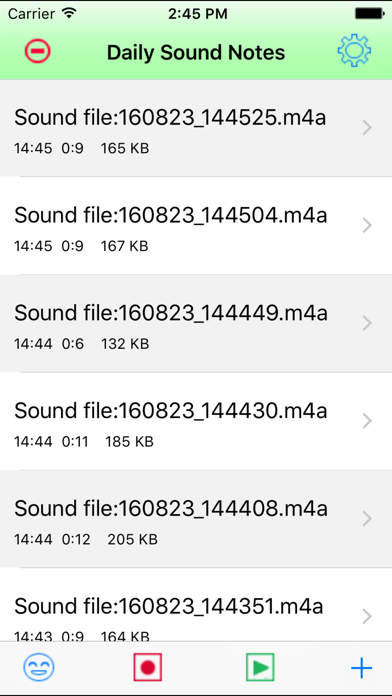
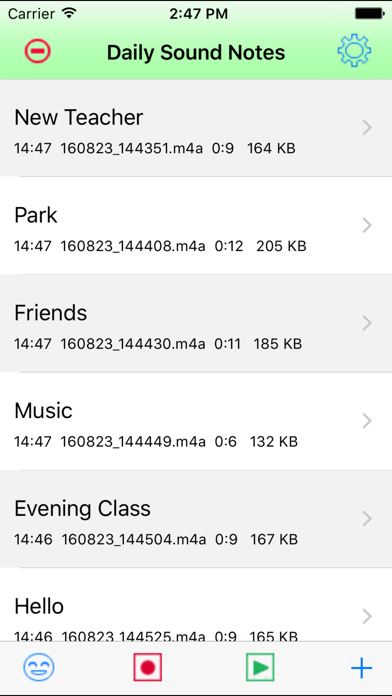


About Daily Sound Notes
The description on the store listing
EASY TO RECORD, SIMPLE TO PLAY
Record the daily sound as soon as possible. Make the note for the sound. Listen the talking of the note. Listen the playback of the sound. Save our wonderful experience in the device.
Long press the table cell of the main view to play the single sound note. Tap the play button of the main view to play all the notes repeatedly.
FEATURES:
1 Record the sound
1.1 Tap the record button to record
1.2 Pinch the screen to record
1.3 Shake the device to record
1.4 Add the new note and tap the record button in the single view. In this case, the user could input the text and record the sound at the same time.
In the 1.1 1.2 1.3 , we will record first and input the …
Read the full description
EASY TO RECORD, SIMPLE TO PLAY Record the daily sound as soon as possible. Make the note for the sound. Listen the talking of the note. Listen the playback of the sound. Save our wonderful experience in the device. Long press the table cell of the main view to play the single sound note. Tap the play button of the main view to play all the notes repeatedly. FEATURES: 1 Record the sound 1.1 Tap the record button to record 1.2 Pinch the screen to record 1.3 Shake the device to record 1.4 Add the new note and tap the record button in the single view. In this case, the user could input the text and record the sound at the same time. In the 1.1 1.2 1.3 , we will record first and input the text later. In the screenshot 1, we only record the sound and do not input the text. In the screenshot 2, we already record the sound and already input the text. 2 Add the text for the sound 2.1 If already record the sound, tap the single table cell, then the single note view will be displayed , so input the text. In the latest iOS 16 devices, when we need to input the text content, we could just long press the text view, the live text scan button will be displayed, so we could input the text by capturing the text content from the camera directly. In iOS 16, The languages currently supported by Live Text include English, French, Chinese, Italian, Spanish, Portuguese, German, Japanese, and Korean. Several old iOS devices may not support this feature. 2.2 If add a new note, tap the + button at the bottom right corner, then the single note view will be displayed, so input the text. 3 Play the sound, talk the text 3.1 Tap the play button at the bottom tool bar in the main view, all of the sound and text note will be played and talked one by one.(Screen shot 3) 3.2 Long press the single cell of the mail list view, the sound and text in this cell will be displayed and talked repeatedly. (Screen shot 4) 3.3 In the single note view, tap the play button to play the sound, tap the talk button to talk the text. 4 Other features: 4.1 Export the sound file by using iTune File Sharing,Email the sound file, or to iCloud Drive. Using the email, need to already set the default email box of the device. 4.2 Rename the sound file 4.3 Share the sound file with iTunes 4.4 Only Talk the text from the main view 4.5 Select the specific language for the text. So different notes could have the different languages. 5 Incoming phone call 5.1 When this App is recording the sound , and a phone call is coming, then the App will stop the recording job and save the sound file automatically. 5.2 About talking in the phone call. First , accept the incoming phone call, then start the talking features, in the main view, tap the first button in the bottom tool bar, or long press the single cell. In the single view, tap the talk button. Both of the sides of the call could hear the same talking content in the same speed. The other side of the phone call could only hear the talking but could not hear the sound from the sound file in this app. 6 Background recording should be used only when it is necessary. 6.1 When the App is recording, then the user press the home key, the recording action could work in the background status. At this time , the user could use other Apps. 6.2 When the App in the background status, the recording action is out of control, the user should let the App reactive as soon as possible. 6.3 If the recording action is in the background, the user use other sound related App, the recording job will be stop and save the sound file automatically.
Installs
Apple does not publish download counts. Estimates are in testing.
We publish iOS estimates only after they pass a back-test against real numbers. Chart history below is measured.
Estimated store revenue Estimated Beta
App Store, worldwide, monthly rate from the last 14 chart days to 21 Nov 2026
Below the top 100 grossing apps in the markets we calibrate. In the United States that usually means under about $6.4M a month. App Store purchases and subscriptions only, before Apple's 15 to 30% fee. Ads and web payments are not included.
Ratings
No rating breakdown published for this app.
Recent reviews
Latest public reviews from the store
No reviews in our sample for this app yet.
Top chart positions
Latest App Store chart ranks by country, last 10 days
Not in any tracked top chart in the last 10 days.
Daily Sound Notes history
Release, install milestones, listing and store changes
- First released on the store 19 Oct 2014
Update frequency
How often Daily Sound Notes ships a new version, month by month
0 updates in the last 12 months. Less often than most similar apps: they shipped a median of 1 updates in the same year.
Recent versions
Current version 6.2.9
- Version 6.2.929 Feb 2024
New feature: Enable to talk in the phone call. First, accept the incoming phone call, then start talking features, the phone owner and the people in the other side of the call could hear the same talking in the same speed.
Listing keywords
Words and phrases Daily Sound Notes repeats most in its store listing
Top phrases: input the text (8), sound file (7), record the sound (5), main view (5), phone call (5).
Highlighted words also appear in the title. Counts cover the title, short description and description.
Compliance
What the listing and the app package show
- Store status
- Live
- Upkeep
- No update since 29 Feb 2024
- Age rating
- 4+
Apps like Daily Sound Notes
 Library of AviationNazmi Yavuz★ 4.82
 MyNOVECNorthern Virginia Electric Cooperative★ 2.28
 打工人小组件光翔 卓★ 4.96
 TruckbaysTruckbays LLC★ 4.3
 Tornado PRO PlayerMohammed Altam★ 4.44
 VDX - Video ManagerARISEPEAK LP★ 1.74
 TV CastingZeasn Info Technology Co., Ltd.★ 1.86
 MySontiqSontiq, Inc.★ 2.4
 Laboratory TimerShazino★ 4.66
Daily Sound Notes: questions and answers
Who makes Daily Sound Notes?
Daily Sound Notes is published by 方 沈.
When was Daily Sound Notes last updated?
The latest version (6.2.9) was released on 29 Feb 2024.
Is Daily Sound Notes free?
No. Daily Sound Notes is a paid app priced at $0.99.
Is Daily Sound Notes still available?
Yes. Daily Sound Notes is live on App Store as of 10 May 2026.
Track Daily Sound Notes and its competitors
Watch any app for new versions, rating drops, chart moves and removals. Free plan, no card.