
- Installs
- —
- Apple does not publish download counts
- Rating
- 5.0
- Ratings
- 1
- 1 reviews
- Version
- 2.4.9
- Updated 18 Jun 2024
- Released
- 26 Apr 2017
- Tracked since 10 May 2026
- Size
- 10 MB
- Needs 10.1
Screenshots


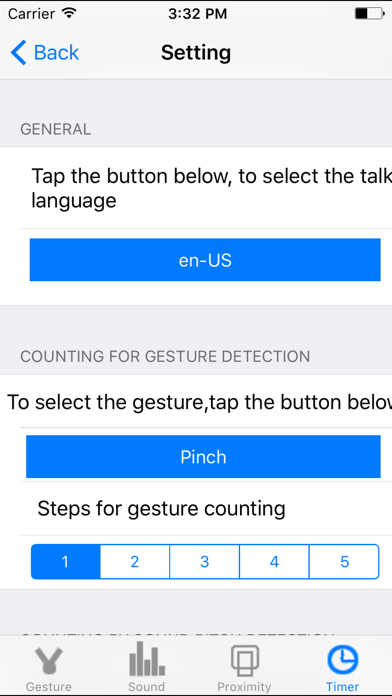
About Talking Counter
The description on the store listing
Simple and powerful, Count in different ways, Talking in many international languages.
This App includes:
1)13 gesture talking counters
2)one talking counter by sound detection
3)one talking counter by proximity sensor detection (only available for iPhone)
4)every minute count down talking counter.
5)every minute count up talking counter.
6)every second count down talking counter.
7)every second count up talking counter.
In many situations, we need to count one by one. two by two or three by three. For example, we exercise in the work out room, we cook in our kitchen, we do our experiments in the laboratory, we study in the classroom. With the help of this App, we could count easily.
If …
Read the full description
Simple and powerful, Count in different ways, Talking in many international languages. This App includes: 1)13 gesture talking counters 2)one talking counter by sound detection 3)one talking counter by proximity sensor detection (only available for iPhone) 4)every minute count down talking counter. 5)every minute count up talking counter. 6)every second count down talking counter. 7)every second count up talking counter. In many situations, we need to count one by one. two by two or three by three. For example, we exercise in the work out room, we cook in our kitchen, we do our experiments in the laboratory, we study in the classroom. With the help of this App, we could count easily. If we travel to other countries, we have to learn to count in some international language. With the help of this App, we could learn to count in new language quickly. If we have the event to do after several minutes, we could use the timer counter to count down by talking. Also we could select the talking unit between the second unit and the minute unit. Some times, we like to tap our screen to count. Some times, we like to use other gestures to count such as pinch, double tap or swipe. Sometimes, we like to count when we are acting or walking, in this case, we could use the proximity sensor detection in this App to count. (Proximity sensor is only available in iPhone) Sometimes, we like to count when our iOS devices are two meters away from us, in this case, we could use the sound detection in this App. The gesture could be : 1 Single Tap 2 Double Tap 3 Pinch 4 Rotation 5 Pan 6 Long Press 7 Swipe Up 8 Swipe Down 9 Swipe Left 10 Swipe Right 11 Swipe Up or Swipe Down 12 Swipe Left or Swipe Right 13 Swipe Up or Down or Left or Right The default talking language in this App is US English. But we could select the following languages from the setting view: 1 Thai 2 Portuguese BR 3 Slovak 4 French CA 5 Romanian 6 Norwegian 7 (fi-FI) Finnish 8 (pl-PL) Polish 9 (de-DE) German 10 (nl-NL) Netherlands 11 (id-ID) Indonesian 12 (tr-TR) Turkish 13 (it-IT) Italian 14 (pt-PT) Portuguese 15 (fr-FR) French FR 15 (ru-RU) Russian 16 (es-MX) Spanish MX 17 (zh-HK) Chinese HK 18 (sv-SE) Salvador SE 19 (hu-HU) Hungarian 20 (zh-TW) Chinese TW 21 (es-ES) Spanish ES 22 (zh-CN) Chinese CN 23 (nl-BE) Dutch BE 24 (en-GB) English GB 25 (ar-SA) Argentina SA 26 (ko-KR) Korean 27 (cs-CZ) Czech 28 (en-ZA) English ZA 29 (en-AU) English AU 30 (da-DK) Danish DK 31 (en-US) English US 32 (en-IE) English IE 33 (hi-IN) Hindi IN 34 (el-GR) Greek GR 35 (ja-JP) Japanese The default counting step is One, but we could update the step to other numbers such as 2,3,4,5. In the timer counter, we could select to count up or count down. In the proximity sensor counter, we just cover the left top of the iPhone for one seconds or two seconds, the iPhone will talk the counting. In the sound detection counter, we need to update the sound pitch level in order to make our sound be detected by the device. If we enable to talk when counting, this App will start detecting for the next count only after the talking for the first counting is finished.If we disable the talking, this App will start detecting for the next count about one second later after the first counting is finished. This edition could talk to the upcoming phone call with the phone. The iOS version should be 13.0 or newer. 1: accept the coming phone call, 2: when this App start talking, the other could hear the talking of this app from his or her phone. This feature is not available for sound counter. Question:How to make the counting down job for gesture, sound or proximity counting? Answer: In the setting view, make the steps of counting less than zero. The same for the counter in watch. Question:How to start the counting job from the number different from zero? Answer: in iOS, set the reset value. For watch, set the clear value in the setting view, tap reset button in the main view.
Installs
Apple does not publish download counts. Estimates are in testing.
We publish iOS estimates only after they pass a back-test against real numbers. Chart history below is measured.
Estimated store revenue Estimated Beta
App Store, worldwide, monthly rate from the last 13 chart days to 20 Nov 2026
Below the top 100 grossing apps in the markets we calibrate. In the United States that usually means under about $6.4M a month. App Store purchases and subscriptions only, before Apple's 15 to 30% fee. Ads and web payments are not included.
Ratings
1 ratings, 1 reviews
No rating breakdown published for this app.
Recent reviews
Latest public reviews from the store
No reviews in our sample for this app yet.
Top chart positions
Latest App Store chart ranks by country, last 10 days
- Countries ranked
- 2 of 50
- Best rank
- #10
- Top 10 placements
- 1
- of 3 chart placements
- Average rank
- #53.3
Best countries on App Store
- 🇫🇮 Finland · Top paid, Utilities#10
- 🇳🇱 Netherlands · Top paid, Utilities#72
Talking Counter history
Release, install milestones, listing and store changes
- First released on the store 26 Apr 2017
Update frequency
How often Talking Counter ships a new version, month by month
0 updates in the last 12 months. Less often than most similar apps: they shipped a median of 1 updates in the same year.
Recent versions
Current version 2.4.9
- Version 2.4.918 Jun 2024
Increase the speed of talking for gesture counter. At this edition, the talking for gesture counter will be a little faster than before. so it is easy to be accepted.
Listing keywords
Words and phrases Talking Counter repeats most in its store listing
Top phrases: talking counter (7), count down (4), proximity sensor (4), setting view (3), sound detection (3).
Highlighted words also appear in the title. Counts cover the title, short description and description.
Compliance
What the listing and the app package show
- Store status
- Live
- Upkeep
- No update since 18 Jun 2024
- Age rating
- 4+
Apps like Talking Counter
 Library of AviationNazmi Yavuz★ 4.82
 MyNOVECNorthern Virginia Electric Cooperative★ 2.28
 打工人小组件光翔 卓★ 4.96
 TruckbaysTruckbays LLC★ 4.3
 Tornado PRO PlayerMohammed Altam★ 4.44
 VDX - Video ManagerARISEPEAK LP★ 1.74
 TV CastingZeasn Info Technology Co., Ltd.★ 1.86
 Mil-Dot BallisticsTom Holsten★ 3.82
 MySontiqSontiq, Inc.★ 2.4
Talking Counter: questions and answers
Who makes Talking Counter?
Talking Counter is published by 方 沈.
When was Talking Counter last updated?
The latest version (2.4.9) was released on 18 Jun 2024.
Is Talking Counter free?
No. Talking Counter is a paid app priced at $0.99.
Is Talking Counter still available?
Yes. Talking Counter is live on App Store as of 1 Jul 2026.
Track Talking Counter and its competitors
Watch any app for new versions, rating drops, chart moves and removals. Free plan, no card.