
- Installs
- —
- Apple does not publish download counts
- Rating
- 4.69
- Ratings
- 13
- 13 reviews
- Version
- 1.09
- Updated 9 Dec 2025
- Released
- 26 Aug 2022
- Tracked since 16 May 2026
- Size
- 15 MB
- Needs 13
Screenshots
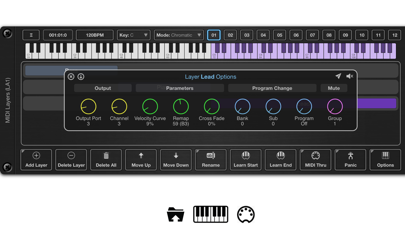
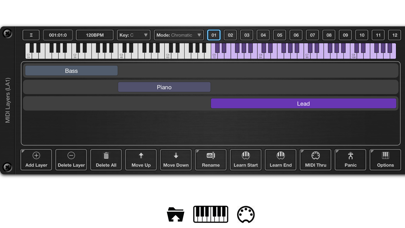
About MIDI Layers
The description on the store listing
MIDI Layers is an AUv3 MIDI plugin designed to allow sophisticated routing of MIDI data in hosts such as AUM or Cubasis.
Have you ever wanted to play multiple instruments from a single master keyboard during a live performance? Would you like to be able to set up keyboard splits, crossfade layers or create an ensemble of layered instruments? If you answered yes to either of those questions, then MIDI Layers may be your solution.
Layers allows you to create up to 12 scenes, each with up to 127 layers, spanning your entire master keyboard. These scenes allow you to seamlessly switch between various layer mappings at any time during a performance.
Each layer controls the MIDI output, which …
Read the full description
MIDI Layers is an AUv3 MIDI plugin designed to allow sophisticated routing of MIDI data in hosts such as AUM or Cubasis. Have you ever wanted to play multiple instruments from a single master keyboard during a live performance? Would you like to be able to set up keyboard splits, crossfade layers or create an ensemble of layered instruments? If you answered yes to either of those questions, then MIDI Layers may be your solution. Layers allows you to create up to 12 scenes, each with up to 127 layers, spanning your entire master keyboard. These scenes allow you to seamlessly switch between various layer mappings at any time during a performance. Each layer controls the MIDI output, which can be routed to one of MIDI Layers 16 output ports and 16 channels. So if you have 5 layers in your scene, each layer is able to divert MIDI key input to 5 destinations, allowing you to control 5 instruments from one master keyboard. Layers can overlap, meaning you can create an ensemble of two or more instruments. Layers can also have cross fades so that you can fade from one instrument to another across a specified range. You can also control the velocity curves of a layer if you need to emphasize note velocity at a certain set of octaves. Each layer can also be remapped so that you can target a different key range on the destination instrument. This allows you to have several single note layers that can target specific drum machine samples for instance. You can assign a song per scene, or have several scenes containing parts of the same song. Switching scenes is simple, using the on screen scene buttons, via AU parameters, or you can even add a special control layer to a scene which can then be triggered via your master keyboard. It is also possible to assign a Program Changes to a layer. When you switch scenes, each layer can fire off its own program change to your destination instruments. Each scene can be assigned its own scale, which enables you to play using only the white notes so say goodbye to wrong notes. Finally, layers can be assigned to mute groups, allowing you to quickly turn on/off groups of layers with a single key or button press. Features: ○ Up to 127 layers per scene. ○ 12 scenes per preset. ○ Supports 16 output ports and 16 channels. ○ Remote switching of scenes using MIDI or AU. ○ Supports layer mutes and mute groups. ○ Named scenes with large scene selection mode. ○ Supports scales per scene which can be played using white notes only. ○ Each layer can define a Program Change that is sent when scenes are switched. ○ Supports per layer velocity curve. ○ Supports per layer remapping of notes on output. ○ Each layer can have a cross fade settings assigned. ○ Definable Master Keyboard size (6, 7, 8 or 10 octave). ○ Scene and mute control layers. ○ Provides default custom layouts. Please Note: This product will not work with GarageBand since it cannot load AUv3 MIDI plugins.
Installs
Apple does not publish download counts. Estimates are in testing.
We publish iOS estimates only after they pass a back-test against real numbers. Chart history below is measured.
Estimated store revenue Estimated Beta
App Store, worldwide, monthly rate from the last 12 chart days to 19 Nov 2026
Below the top 100 grossing apps in the markets we calibrate. In the United States that usually means under about $6.4M a month. App Store purchases and subscriptions only, before Apple's 15 to 30% fee. Ads and web payments are not included.
Ratings
13 ratings, 13 reviews
No rating breakdown published for this app.
Recent reviews
Latest public reviews from the store
No reviews in our sample for this app yet.
Top chart positions
Latest App Store chart ranks by country, last 10 days
Not in any tracked top chart in the last 10 days.
MIDI Layers history
Release, install milestones, listing and store changes
- First released on the store 26 Aug 2022
Update frequency
How often MIDI Layers ships a new version, month by month
1 updates in the last 12 months. More often than most similar apps: they shipped a median of 0 updates in the same year.
Recent versions
Current version 1.09
- Version 1.099 Dec 2025
1.09 B75 Fixes a small UI issue on iOS26.1/2
Listing keywords
Words and phrases MIDI Layers repeats most in its store listing
Top phrases: master keyboard (5), midi layers (4), create an ensemble (2), ports and channels (2), supports per layer (2).
Highlighted words also appear in the title. Counts cover the title, short description and description.
Compliance
What the listing and the app package show
- Store status
- Live
- Upkeep
- Updated 9 Dec 2025
- Age rating
- 4+
Apps like MIDI Layers
 Pyware 3D ViewerPygraphics, Inc.★ 2.86
 WNGC Your Georgia CountryCox Media Group★ 4.54
 Rhythm Necklace - Geometric SequencerSam Tarakajian★ 4.64
 JPLAYMarcin Ostapowicz★ 4.3
 MS Vinyl - Music WidgetDinh Dong Nguyen★ 4.26
 Radio TEDDYIR MediaAd GmbH★ 4.56
 Arpeggionome Pro | matrix arpeggiatorAlexandernaut★ 4.56
 Guitar & Ukulele Tuner 2025Aleksandr Kulaga★ 4.44
 Abdul Rahman MossadRashid Zia★ 4.04
MIDI Layers: questions and answers
Who makes MIDI Layers?
MIDI Layers is published by 4Pockets.com.
When was MIDI Layers last updated?
The latest version (1.09) was released on 9 Dec 2025.
Is MIDI Layers free?
No. MIDI Layers is a paid app priced at $9.99.
Is MIDI Layers still available?
Yes. MIDI Layers is live on App Store as of 1 Jul 2026.
Track MIDI Layers and its competitors
Watch any app for new versions, rating drops, chart moves and removals. Free plan, no card.