
- Installs
- —
- Apple does not publish download counts
- Rating
- 4.73
- Ratings
- 936
- 936 reviews
- Version
- 17.5
- Updated 20 May 2026
- Released
- 22 Mar 2013
- Tracked since 10 May 2026
- Size
- 207 MB
- Needs 18.2
Screenshots


About QuickPlan, Project Gantt Chart
The description on the store listing
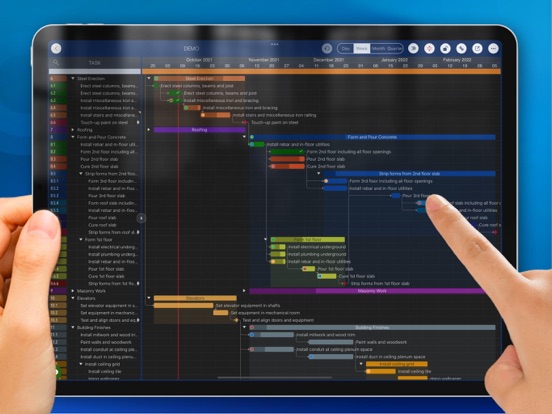
QuickPlan makes project planning easier than ever before. Project management with natural gestures on the Gantt chart, sync and share projects across multiple devices and teams, and support integration with Microsoft Project Plan.
## PRIVACY FOCUSED
User-created projects are stored on the user's device or in iCloud Drive.
## ACTIVE UPDATING
- Continually evolves based on best practices from experts and ideas from users.
- App-Liv.jp Top10 Project Management Apps of 2019 - 1st Place.
- BestApp Ever Awards 2014 "Best Business App" - 3rd place.
* QuickPlan is now available for macOS. *
Download the free 15-day trial from https://quickplan.app/trial.
With NATURAL GESTUREs on a clean and …
Read the full description
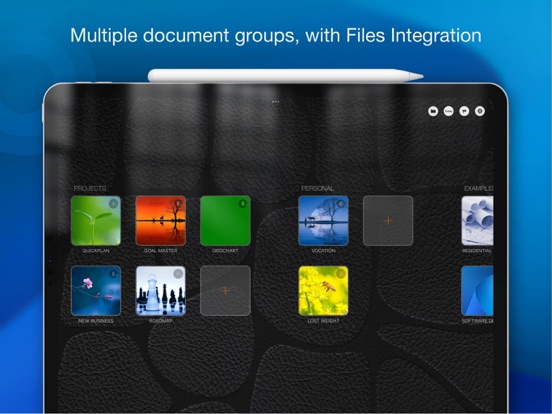
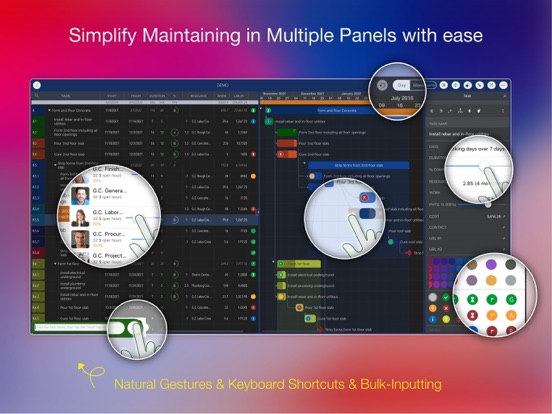
QuickPlan makes project planning easier than ever before. Project management with natural gestures on the Gantt chart, sync and share projects across multiple devices and teams, and support integration with Microsoft Project Plan. ## PRIVACY FOCUSED User-created projects are stored on the user's device or in iCloud Drive. ## ACTIVE UPDATING - Continually evolves based on best practices from experts and ideas from users. - App-Liv.jp Top10 Project Management Apps of 2019 - 1st Place. - BestApp Ever Awards 2014 "Best Business App" - 3rd place. * QuickPlan is now available for macOS. * Download the free 15-day trial from https://quickplan.app/trial. With NATURAL GESTUREs on a clean and elegant interface, project management is more accessible, faster and more efficient than ever before. Visualize, manage and simplify projects flexibly and efficiently with Gantt charts, outline list and property editor, create tasks, organize your project calendar and resources, track status. It's easier than you think, with a minimum of effort and learning. QuickPlan App supports exporting projects to image, Excel, PDF, Microsoft Project and WBS files. AND to import projects from Microsoft Project, WBS and Mind-map files. The app supports synchronization of project plans between the same user's macOS and iOS devices and supports team collaboration via iCloud Drive. And it supports syncing and sharing via OneDrive and Dropbox. QuickPlan also supports duplicating projects by members for better teamwork. QuickPlan fine-tunes the best features of Microsoft Project Plan and re-purposes them to work for iPad - without the complexity - providing users of all experience levels with an INTUITIVE and discoverable project management experience. ## EFFICIENT MAINTENANCE - Gestures for tasks: Create, remove, move, indent and outdent, change order. - Gestures to zoom in and out, collapse and expand. - Keyboard shortcuts. - Batch input. - The most fluid Gantt chart app on a clean interface. ## STRONG PLAN - Multiple Projects. - Supports duplication of the entire project and duplication by specific members. - Organize tasks into REAL task groups and sub-projects. - Task color, icon, contact, and required task fields. - Five levels of outline (plus sub-project, for a total of ten levels of outline). - Gesture-based management of task links. - Lock editing, row height. - Integration with the iOS Files app. - Manual and automatic project backup. - Project currency, charge rate, project resources, calendar, task date policy. ## TREE and LIST - Display as tree with support for displaying cirtical path. - Display as list with support for sorting and filtering. ## UI CUSTOMISATION - Customization of the task column title and visibility. - Style of the task bar. ## REPORTING - Export as image, PDF and Microsoft Excel (including three sheets). - With options to customize the output. ## SYNC - Sync projects between iOS and Mac devices via iCloud Drive, OneDrive and Dropbox. ## TEAM COLLABORATION - Sync between team members via iCloud Drive. ## INTEGRATION - Export and import Microsoft Project XML files. - Import and export SwiftApp WBS files. - Import from Microsoft Excel files. - Import from iThought Map files. ## SHARE - Supports Airdrop, OneDrive, Dropbox. ## TEAMWORK - Create a new project by exporting tasks for the selected project members. ## NOTIFICATION - Widget to track ongoing tasks. - Today widget and local notification. QuickPlan simplifies the complexity of project planning that puts ease as the ultimate goal in organizing your professional projects, plans, efforts, goals and life. The best project planning app for iPad. - Initialize, discuss, present and share your plan. - Export it to Microsoft Project Plan for further editing on PC. - Strategic Planning. - Import MS Project XML file and reports, tracking. - Schedule actions in meetings, confirm. - Track progress. - Guide employees.
Installs since 29 Aug 2026
Apple does not publish download counts. Estimates are in testing.
Estimated store revenue Estimated Beta
App Store, worldwide, monthly rate from the last 12 chart days to 19 Nov 2026
Below the top 100 grossing apps in the markets we calibrate. In the United States that usually means under about $6.4M a month. App Store purchases and subscriptions only, before Apple's 15 to 30% fee. Ads and web payments are not included.
Ratings
936 ratings, 936 reviews
No rating breakdown published for this app.
Recent reviews
Latest public reviews from the store
- 1 Apr 2024
Great program!
I bought this program on my iPad several years ago. I work full time, and give violin lessons in the evenings. I have two community orchestras, one adult and one youth, that I direct. I am a member of a band that plays gigs on mostly weekend evenings. I am also involved in my church. Needless to say, I am very busy. At the time I bought it, I I did not have enough time to really sit down and learn QuickPlan in a way that would really help me. It was placed on the back burner. A few weeks ago, I came across the icon on my iPad again and decided to take the time to learn how to use its features. I’m still learning some best practices for ME, but I have to say I am obsessed! Thank you for a great productivity tool!
- 6 Feb 2023
Ok for high-level/quick planning
The app provides pretty good functionality for high-level “quick planning” that can be exported to different formats. What could be better is are the options for customizing exports (to export exactly the columns you want in the order that you want them), there are no custom fields to capture data you may need for grouping or filtering and you can’t change the sequence of the columns, and the URL fields that are provided don’t support call-back links so you can’t link to content in other apps on your iPad (for example to an EverNote note or a NotePlan note, etc.). Last, you can’t hide the gantt view - so there is no option to just work in a tabular format. I can see the app being used for initial planning but I could not see myself effectively running a complex project given the functionality limitations.
- 2 May 2021
Critical shortfalls - not a serious tool
App looks good and the user interface works well. Unfortunately the scheduling logic is sorely lacking some basic features for a project management tool. First, while the app allows you to assign resources to a task, it doesn’t prevent you from having multiple simultaneous tasks all using the same resource. App provides no indication that there’s a conflict, and no way to auto-schedule activities to remove the conflict. Second, the app does not respect task dependencies. If you create a two tasks and make one a predecessor of the other then the app won’t properly enforce start-before-finish when start or duration changes, and won’t remove float if predecessor duration shortens or task finishes early. Critical path calculations become meaningless. Third, app assumes that you have a known start and want to compute the finish. No provision to specify end and compute latest start date. No way to set tasks to start as early as possible vs. start as late as possible. Finally, metrics and project stats are really lacking. No float computation or reporting. Poor resource usage metrics. It’s okay if you are satisfied with manually managing task dependencies and resource con
- 16 May 2020
Very useful planning tool. Excellent software
Looking for a userfriendly and easy to handle tool, I found Quick Plan. After working with for my first construction project I can conclude, that this is an excellent tool to plan and control a project. Handling it on an iPad is maybe the best adoption of a program from a desktop to tablet. It is very intuitive and fits to my needs. Printout via PDF is also very practice oriented. Integration with contacts is also a very good idea. I am using the iPhone App as well and also the Mac version. So thanks to iCloud integration it can be handled with all three devices. Sharing with collaborators works fine too, respecting the caveats not using the project at the same time. Reaction of the software people is amazing fast and competent. And they are open for any suggestion which makes sense to them. I tested and worked with planning software for a long time, this is probably the best concept of user friendliness and ease of usage I ever used. Sorry if this sounds too positive. But it has to be said. I recommended it to several of my friends and the architects who were always reluctant to such a tool, are very interested and starting to get into too.
What reviewers bring up
Topics mentioned in the latest 8 reviews, by how many reviews mention them
Liked in good reviews (6 reviews)
- project 5
- other 4
- tool 4
- plan 4
- chart 3
- ipad 3
- fits 3
- such 3
Raised in bad reviews (0 reviews)
No topic comes up twice.
Top chart positions
Latest App Store chart ranks by country, last 10 days
Not in any tracked top chart in the last 10 days.
QuickPlan, Project Gantt Chart history
Release, install milestones, listing and store changes
- First released on the store 22 Mar 2013
Update frequency
How often QuickPlan, Project Gantt Chart ships a new version, month by month
2 updates in the last 12 months. About as often as similar apps, which shipped a median of 2 updates in the same year.
Recent versions
Current version 17.5
- Version 17.520 May 2026
Bug fixes and performance improvements.
- Version 17.315 Feb 2026
This update contains bug fixes and performance improvements.
Listing keywords
Words and phrases QuickPlan, Project Gantt Chart repeats most in its store listing
Top phrases: microsoft project (6), icloud drive (4), project management (4), microsoft project plan (3), files import (3).
Highlighted words also appear in the title. Counts cover the title, short description and description.
Compliance
What the listing and the app package show
- Store status
- Live
- Upkeep
- Updated 20 May 2026
- Age rating
- 4+
Apps like QuickPlan, Project Gantt Chart
 SecurityLab VPN: SpeedPro Security Lab, TOO★ 4.52
 PDF Voice Reader - Docs AloudStorch★ 4.1
 Text to Speech •Spore AI, Inc.★ 4.69
 Amare BuilderAmare Global★ 4.91
 Instant Voice TranslatorAlmus j.d.o.o.★ 4.5
 AR Ruler: Digital Tape MeasureGrymala sp. z o.o.★ 4.65
 Realm Shepherd - for PastorsACS Technologies Group, Inc.★ 4.49
 ALPACA - delete photos efficiently, organize camera roll and save memoryyuki tanabe★ 4.83
 Wi-Fi SweetSpotsAXON Networks★ 4.07
QuickPlan, Project Gantt Chart: questions and answers
Who makes QuickPlan, Project Gantt Chart?
QuickPlan, Project Gantt Chart is published by 皓 李.
When was QuickPlan, Project Gantt Chart last updated?
The latest version (17.5) was released on 20 May 2026.
Is QuickPlan, Project Gantt Chart free?
No. QuickPlan, Project Gantt Chart is a paid app priced at $19.99.
Is QuickPlan, Project Gantt Chart still available?
Yes. QuickPlan, Project Gantt Chart is live on App Store as of 14 Nov 2026.
Track QuickPlan, Project Gantt Chart and its competitors
Watch any app for new versions, rating drops, chart moves and removals. Free plan, no card.