
- Installs
- —
- Apple does not publish download counts
- Rating
- 4.71
- Ratings
- 147
- 147 reviews
- Version
- 6.5
- Updated 23 Apr 2023
- Released
- 24 May 2014
- Tracked since 11 May 2026
- Size
- 58 MB
- Needs 12.0
Screenshots


About WBS - Project Work Breakdown
The description on the store listing
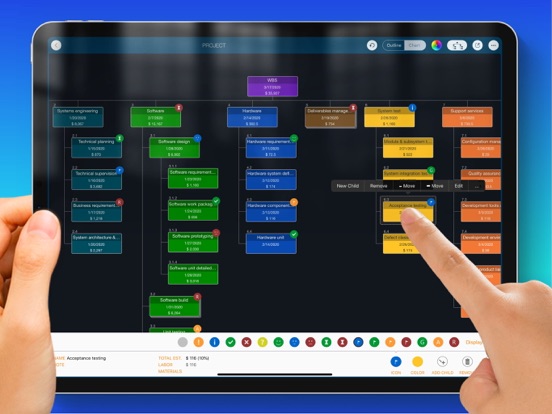
Manage the work breakdown structure (WBS) in the list and tree diagram. Construct the work package tree and update the estimate; import work items from MS Excel and export the work breakdown structure to PDF, Excel, and image files. Also, we can convert a work breakdown structure to a project plan file in the QuickPlan app.
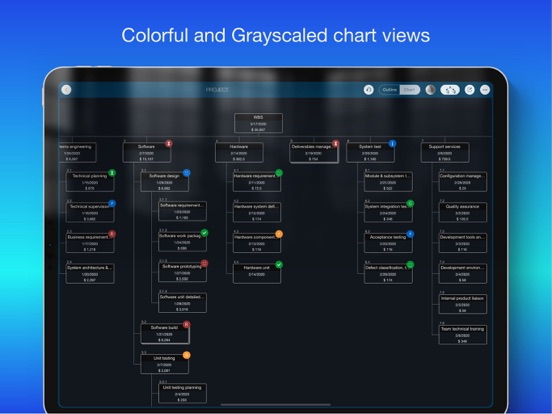
The WBS is a hierarchical and incremental decomposition of the project into phases, deliverables, and work packages. It is a tree structure that shows a breakdown of the effort required to achieve a goal, such as a program, a project, and a contract.
Mobilinked WBS is THE easy-to-use WBS management app for the iPad. Using natural gestures on a clean interface makes WBS …
Read the full description
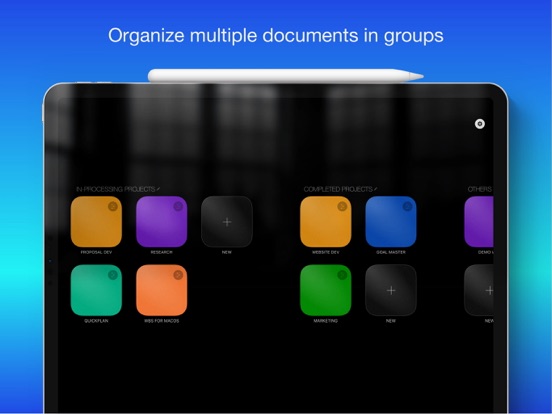
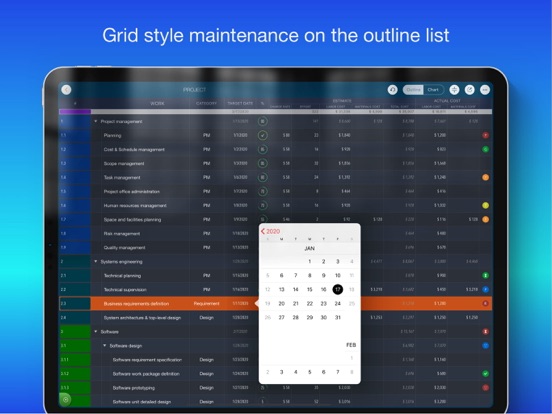
Manage the work breakdown structure (WBS) in the list and tree diagram. Construct the work package tree and update the estimate; import work items from MS Excel and export the work breakdown structure to PDF, Excel, and image files. Also, we can convert a work breakdown structure to a project plan file in the QuickPlan app. The WBS is a hierarchical and incremental decomposition of the project into phases, deliverables, and work packages. It is a tree structure that shows a breakdown of the effort required to achieve a goal, such as a program, a project, and a contract. Mobilinked WBS is THE easy-to-use WBS management app for the iPad. Using natural gestures on a clean interface makes WBS management more convenient, faster, and more efficient than ever before. Visualize and simplify the work breakdown structure in the outline and diagram view to break down work elements and determine labor, material, and total costs for each component. The app automatically adds costs up to the element hierarchy, and supports continuous and mass tracking. The WBS can be exported to image, Excel, and PDF files AND converted to QuickPlan (https://itunes.apple.com/app/id621375878) as a project plan. The WBS supports mass entry of work items and import of work items from an MS Excel file. - Feature video - https://youtu.be/FZ7puht7Nao - Support - at http://wbs.mbl.app WBS provides a fast, intuitive and discoverable experience for users in a clean and elegant interface - Work package maintenance - natural gestures, continuous and batch input in outline and diagram views. - Project costing - support labor and material costs for work packages Communication - export the work breakdown structure as an image/PDF and Excel file. - Collaboration - Share the work breakdown structure across multiple devices via email, airdrop, and third-party cloud apps. - Project plan integration - Export to a project plan for QuickPlan. FEATURES - Manage work items in a text outline view and a graphical tree diagram view. - Continuous and batch entry of work items. - Import from MS Excel file - Three chart layouts, AND Display as color or grayscale style. - Color and icon - Supports large projects (smooth interaction for 1000 task packages) - Natural gestures (swipe left/right to adjust outline levels, tap with two fingers to collapse/expand all groups, hold and move to change order). - Create project quotes with labor and material costs; labor costs can be entered as expenses. - Adjust project fee rate, currency, and work package category. - Collapse/expand specific or all groups; zoom in on a chart view. - User interface customization options - Share the work breakdown structure with other devices via email, airdrop, and third-party cloud apps. - Export the outline with costs to a new project plan to QuickPlan (https://itunes.apple.com/app/id621375878). - Export the entire work breakdown structure or a selected workgroup to an Excel file. - Export the entire work breakdown structure or a selected workgroup to a PDF file with export customization options. - Export the entire work breakdown structure or a selected workgroup to an image file. - Undo and toast with voice output - Duplicate work breakdown structure Work breakdown structure makes work planning easy and fast, and helps estimate future project schedule by easily viewing work items and costs. The best project management app for your business on iPad.
Installs since 29 Aug 2026
Apple does not publish download counts. Estimates are in testing.
Estimated store revenue Estimated Beta
App Store, worldwide, monthly rate from the last 13 chart days to 20 Nov 2026
Below the top 100 grossing apps in the markets we calibrate. In the United States that usually means under about $6.4M a month. App Store purchases and subscriptions only, before Apple's 15 to 30% fee. Ads and web payments are not included.
Ratings
147 ratings, 147 reviews
No rating breakdown published for this app.
Recent reviews
Latest public reviews from the store
- 7 Jun 2021
Bottom chopped off on iPad Pro 11” widescreen
Hello Team, I’ve just purchased WBS app for iPad and noticed that the bottom of the screen is chopped off on iPad Pro 11” widescreen format when I select an item. The menu on the bottom is chopped off and I’m not able to fully use the app. Please optimize the app for 11” widescreen format and release an update ASAP. FYI, the new iPad 10.9” is also widescreen and may have similar issue. Also, your other apps may have similar issues with widescreens. 2. It badly needs drag and drop boxes across columns in the layout screen. Currently, it seems deleting and re-adding the boxes is the only way to reorganize. 3. Category is not available for some boxes. Great app, will give 5 stars on resolving these issues.
- 29 Apr 2020
Excellent Program
This program is a valuable asset to and Project Management Suite. The program makes creation of a WBS an easy task as it should be.
- 6 Dec 2017
Well Done
This is a great tool. Almost perfect. I’d love keyboard shortcuts, but this tool is great! Keep up the great work developer!
- 24 Jan 2017
Powerful and Flexible
A surprisingly powerful tool that supports a robust and dynamic project planning phase. Changes and adjustments are easy to make, budgets are quickly defined, and it has pretty seamless integration with the other apps in the package to create the final plan. Well worth the investment. Paid back the first time.
What reviewers bring up
Topics mentioned in the latest 8 reviews, by how many reviews mention them
Liked in good reviews (7 reviews)
- project 4
- wbs 4
- currently 2
- interface 2
- powerful 2
- planning 2
- release 2
- quickly 2
Raised in bad reviews (1 reviews)
No topic comes up twice.
Top chart positions
Latest App Store chart ranks by country, last 10 days
Not in any tracked top chart in the last 10 days.
WBS - Project Work Breakdown history
Release, install milestones, listing and store changes
- First released on the store 24 May 2014
Update frequency
How often WBS - Project Work Breakdown ships a new version, month by month
0 updates in the last 12 months. Less often than most similar apps: they shipped a median of 2 updates in the same year.
Recent versions
Current version 6.5
- Version 6.523 Apr 2023
Thank you for using WBS! This update contains minor bug fixes to improve your experience. We have fixed some minor issues reported by our users to ensure the app runs smoothly. As always, we value your feedback and are committed to providing you with the best experience possible.
Listing keywords
Words and phrases WBS - Project Work Breakdown repeats most in its store listing
Top phrases: work breakdown (13), work breakdown structure (12), breakdown structure (12), work items (6), project plan (5).
Highlighted words also appear in the title. Counts cover the title, short description and description.
Compliance
What the listing and the app package show
- Store status
- Live
- Upkeep
- No update since 23 Apr 2023
- Age rating
- 4+
Apps like WBS - Project Work Breakdown
 Voices Talent CompanionVoices.com Inc.★ 2.66
 Alon Dictaphone-Voice RecorderALON Software★ 4.23
 mySecurity SAOAramco Services Company★ 4.45
 McLeod AnywhereMcLeod Software★ 1.8
 NACANational Association for Campus Activities★ 4.89
 SAMACO MotorsSamaco★ 4.43
 RC.PayRC LLC★ 3.99
 MawaridRoyal Commission In Jubail★ 4.59
 GO! Dice RewardsKantilal Surani★ 4.4
WBS - Project Work Breakdown: questions and answers
Who makes WBS - Project Work Breakdown?
WBS - Project Work Breakdown is published by 皓 李.
When was WBS - Project Work Breakdown last updated?
The latest version (6.5) was released on 23 Apr 2023.
Is WBS - Project Work Breakdown free?
No. WBS - Project Work Breakdown is a paid app priced at $8.99.
Is WBS - Project Work Breakdown still available?
Yes. WBS - Project Work Breakdown is live on App Store as of 14 Nov 2026.
Track WBS - Project Work Breakdown and its competitors
Watch any app for new versions, rating drops, chart moves and removals. Free plan, no card.