- Installs
- —
- Apple does not publish download counts
- Rating
- 3.0
- Ratings
- 1
- 1 reviews
- Version
- 4.7.6
- Updated 30 Jan 2024
- Released
- 12 Nov 2014
- Tracked since 10 May 2026
- Size
- 1 MB
- Needs 10.0
Screenshots



About Talking Location
The description on the store listing
The app will provide six kinds of solutions for talking the location information. The cover solution is only available for iPhone.
1 Talk by the timer
2 Talk by pinch gesture
3 Talk by shaking the device
4 Talk by covering the top screen of iPhone. (use the iPhone proximity sensor) not available for iPad
5 Talk by tapping the Add button at the bottom right corner.
6 Talk by using wizard solution. With the wizard solution, the timer solution, pinch solution,shake solution and cover solution could work at the same time. The user could customise the action of wizard solution. For example, only enable timer and pinch solution work at the same time
7 Use the default language of device as the …
Read the full description
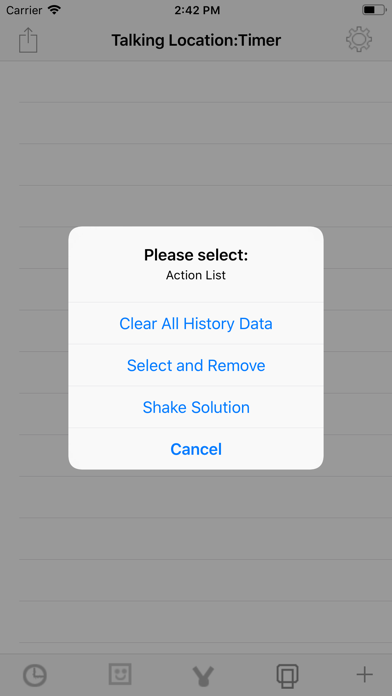
The app will provide six kinds of solutions for talking the location information. The cover solution is only available for iPhone. 1 Talk by the timer 2 Talk by pinch gesture 3 Talk by shaking the device 4 Talk by covering the top screen of iPhone. (use the iPhone proximity sensor) not available for iPad 5 Talk by tapping the Add button at the bottom right corner. 6 Talk by using wizard solution. With the wizard solution, the timer solution, pinch solution,shake solution and cover solution could work at the same time. The user could customise the action of wizard solution. For example, only enable timer and pinch solution work at the same time 7 Use the default language of device as the main talking language. 8 In the main list view, tap the single cell, the detail information about the location will be displayed. The app will could talk the location longitude, latitude or the detail information such as the location name,locality,Thorough fare, sub locality, sub thorough fare. From the setting view, we could select the timer interval from 1 minutes or more. We could also select the talking speed rate. And decide whether to talk the longitude,latitude or the detail location information. The user could indict which detail items could be talked. The user also could select the different talking order. Usage: Tap the left first button in the bottom toolbar, the app will talk the location on the timer interval. Tap the left second button in the bottom toolbar, the app will be the wizard solution. In this situation, the shake, pinch, proximity (iPhone only)detection and timer could work at the same time.The user could customise the action of wizard solution from the setting view. Tap the left third button in the bottom toolbar, the app will talk the location when the user pinch on the table list view. In iPhone,tap the right second button in the bottom toolbar, the app will talk the location when the user covers the iPhone screen by hands or by other objects such as one book.In iPad,shake the device, the app will talk the location. Tap the right first button in the bottom toolbar, the app will talk the location at once. The top left item is the action menu button. It includes the Clear All Data item and Edit Data Item. When tap the Edit Data item, the list data will be editable status. After that, tap the action menu button, the list data will be normal status. For iPhone, the shake solution item move to the action menu list. If the user uses the proximity solution or enable the proximity feature of the wizard solution, then the APP will talk the location information when the user covers the top screen of iPhone from the main view, the setting view or the detail information view. If the user uses the pinch solution, shake solution or the timer solution, then the APP will talk the location information when the App is in the main view. Notice for the first time usage: From the setting view, select the timer interval for the timer solution if 1 minute interval is not acceptable.Then,indict which detail items we want the APP to talk. This edition could talk the current location information to the upcoming phone call with the iphone. The iOS version should be 13.0 or newer. First , accept the coming phone call, after that when this app is talking, the phone owner could hear the talking from the phone. The people in the calling could hear the talking in the call.
Installs
Apple does not publish download counts. Estimates are in testing.
We publish iOS estimates only after they pass a back-test against real numbers. Chart history below is measured.
Estimated store revenue Estimated Beta
App Store, worldwide, monthly rate from the last 13 chart days to 20 Nov 2026
Below the top 100 grossing apps in the markets we calibrate. In the United States that usually means under about $6.4M a month. App Store purchases and subscriptions only, before Apple's 15 to 30% fee. Ads and web payments are not included.
Ratings
1 ratings, 1 reviews
No rating breakdown published for this app.
Recent reviews
Latest public reviews from the store
No reviews in our sample for this app yet.
Top chart positions
Latest App Store chart ranks by country, last 10 days
Not in any tracked top chart in the last 10 days.
Talking Location history
Release, install milestones, listing and store changes
- First released on the store 12 Nov 2014
Update frequency
How often Talking Location ships a new version, month by month
0 updates in the last 12 months. Less often than most similar apps: they shipped a median of 1 updates in the same year.
Recent versions
Current version 4.7.6
- Version 4.7.630 Jan 2024
Bug fixes. Fix the bug about talking in the phone call. After fixing this bug, when a phone call is coming and is accepted, then, start the talking, both sides could hear the same talking contents in the same speed. The phone owner could hear the talking from the phone. The people in the calling could hear the talking in the call.
Listing keywords
Words and phrases Talking Location repeats most in its store listing
Top phrases: talk the location (8), wizard solution (6), bottom toolbar (5), location information (5), setting view (4).
Highlighted words also appear in the title. Counts cover the title, short description and description.
Compliance
What the listing and the app package show
- Store status
- Live
- Upkeep
- No update since 30 Jan 2024
- Age rating
- 4+
Apps like Talking Location
 Canals.UKMARK MANSER★ 4.74
 Chevron Car WashDigital Mosaic Corporation★ 1.62
 hitta.sehittapunktse AB★ 4.6
 NextStop - NYC SubwayPliable Matter LLC★ 3.74
 E-Charge HKHong Kong EV Power Limited★ 4.34
 Simply NorthBusyBytes GmbH★ 4.08
 Doyle GuidesChris Doyle Publishing Limited★ 4.32
 Speedometer Speed MPH TrackerRihab Mehboob★ 4.62
 Property Line Finder - ParcelHealth & Wellness Apps Limited★ 4.28
Talking Location: questions and answers
Who makes Talking Location?
Talking Location is published by 方 沈.
When was Talking Location last updated?
The latest version (4.7.6) was released on 30 Jan 2024.
Is Talking Location free?
Yes. Talking Location is free to download.
Is Talking Location still available?
Yes. Talking Location is live on App Store as of 1 Jul 2026.
Track Talking Location and its competitors
Watch any app for new versions, rating drops, chart moves and removals. Free plan, no card.