
- Installs
- —
- Apple does not publish download counts
- Rating
- 4.42
- Ratings
- 31
- 31 reviews
- Version
- 4.7.1
- Updated 9 Apr 2026
- Released
- 28 Feb 2012
- Tracked since 10 May 2026
- Size
- 45 MB
- Needs 12.0
Screenshots


About WritePDF
The description on the store listing
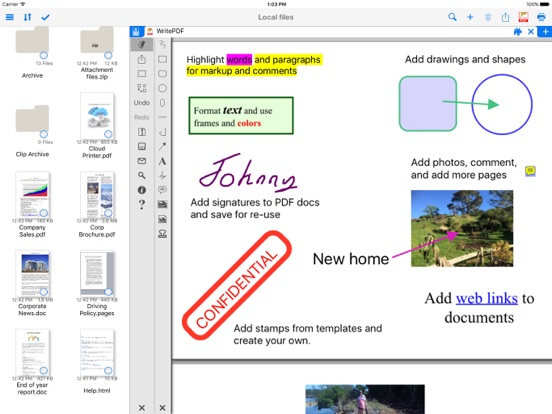
WritePDF is more than just a common annotation tool, it is a powerful PDF modification/printing tool that is usually reserved for computers. Move beyond ordinary PDF viewing, form filling, PDF modification & annotation. WritePDF is the first app that brings together both ease of use and the sophistication needed for managing PDFs, word files, spreadsheets and many other documents on the iPad. WritePDF is also the first app to be fully compatible with PDF readers on Mac & PC, any changes made to a PDF on an iPad will be reflected when opened on a computer and vice versa. With the most powerful PDF modification and viewing engine ever made, WritePDF stands heads and shoulders above the rest! …
Read the full description
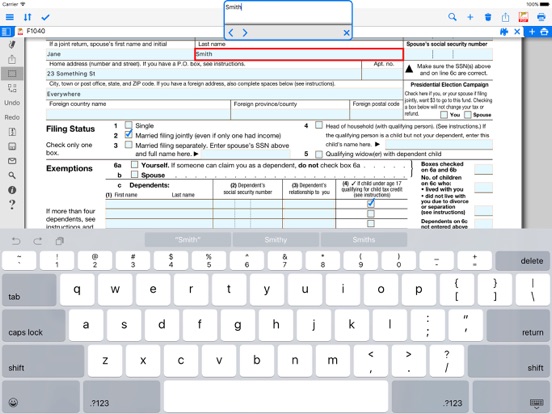
WritePDF is more than just a common annotation tool, it is a powerful PDF modification/printing tool that is usually reserved for computers. Move beyond ordinary PDF viewing, form filling, PDF modification & annotation. WritePDF is the first app that brings together both ease of use and the sophistication needed for managing PDFs, word files, spreadsheets and many other documents on the iPad. WritePDF is also the first app to be fully compatible with PDF readers on Mac & PC, any changes made to a PDF on an iPad will be reflected when opened on a computer and vice versa. With the most powerful PDF modification and viewing engine ever made, WritePDF stands heads and shoulders above the rest! One of the most powerful and security focused features of WritePDF is the ability to read, convert and annotate PDFs in the Cloud without having to download them first. This means that you can keep all of your documents and files in the Cloud and access them on demand in a very secure environment when away from the office. It also give organisations control on documents and files. WritePDF is created & bought to you by one of the top business app companies - with years of iOS app experience from 2008, EuroSmartz is unrivaled when it comes to apps for use in business. - "Being able to quickly highlight text ready for revision is awesome" - "The ability to search for a word or phrase over all of the PDFs & files I have without opening them is something I can't even do on my PC" - "Form filling is made so easy with WritePDF, I have just applied for a new bank account using my iPad" - "The ability to quickly access a document in the cloud and modify it is the #1 feature in my book" - "I can now edit my PDF and print it to my old printer that is not AirPrint enabled, just magic!" Main Features √ Modifying PDFs > Add arrows, circles, squares and other shapes to a PDF > Fill in PDF forms & add text > Use Highlighter to highlight single words or entire sections > Add web page links to words or sections of text > Transfer PDFs to & from other apps using "Open in.." > Fully compatible with most PC, Mac & iOS App PDF viewers, shows all changes > Insert pictures to a PDF > Quickly & seamlessly transfer PDFs or files from Pages, Numbers or Keynote using Open in √ Global Search > Search for keywords or phrases in ALL files stored within WPDF without opening them > Search results displayed as tapable links √ Cloud Services > Annotate, read and convert files & PDFs directly in the Cloud without downloading > Securely access documents and files and keep control of where they are stored > CloudMe, Sharefile, Box.net, Dropbox, Google Docs, iDisk, FTP, WebDAV all supported √ PDF Page Organization > Move, delete or add pages > Add, delete, rotate, copy/paste & rearrange pages > Add selected pages to an existing PDF from docs, spreadsheets or other files √ Form Filling > Easily fill in PDF forms, even with multiple fields and boxes > Save your signature in the app and reuse when needed > Email/print completed form right from within the app √ PDF Conversion & Merging View/Convert/Merge Microsoft Office files, Photos, PDFs, Contacts, Web Pages, Email & Email attachments as well as many more file formats > Create a single PDF from multiple files even if they are a different format (i.e. merge a Word file with a Pages document with an existing PDF etc) > Print or convert PDFs from other apps using Open in or other methods √ Full featured Printing > Print direct to most existing WiFi or shared printers, or use the free printer software for ALL printers. > Print from Pages, Numbers or Keynote extremely quickly & easily without the need for an AirPrint printer using Open in > Print remotely via 3G/EDGE or Google Cloud Print √ Reminders & Keywords > Set a reminder for a file, PDF or document > Add keywords to any file for easy searching
Installs
Apple does not publish download counts. Estimates are in testing.
We publish iOS estimates only after they pass a back-test against real numbers. Chart history below is measured.
Estimated store revenue Estimated Beta
App Store, worldwide, monthly rate from the last 13 chart days to 20 Nov 2026
Below the top 100 grossing apps in the markets we calibrate. In the United States that usually means under about $6.4M a month. App Store purchases and subscriptions only, before Apple's 15 to 30% fee. Ads and web payments are not included.
Ratings
31 ratings, 31 reviews
No rating breakdown published for this app.
Recent reviews
Latest public reviews from the store
No reviews in our sample for this app yet.
Top chart positions
Latest App Store chart ranks by country, last 10 days
Not in any tracked top chart in the last 10 days.
WritePDF history
Release, install milestones, listing and store changes
- First released on the store 28 Feb 2012
Update frequency
How often WritePDF ships a new version, month by month
1 updates in the last 12 months. About as often as similar apps, which shipped a median of 1 updates in the same year.
Recent versions
Current version 4.7.1
- Version 4.7.19 Apr 2026
Improvements for iOS 26.4 Support our hard working team - support regular updates and new features with a quick review on the App Store, thanks!
Listing keywords
Words and phrases WritePDF repeats most in its store listing
Top phrases: documents and files (3), form filling (3), pdf modification (3), fill in pdf (2), numbers or keynote (2).
Highlighted words also appear in the title. Counts cover the title, short description and description.
Compliance
What the listing and the app package show
- Store status
- Live
- Upkeep
- Updated 9 Apr 2026
- Age rating
- 17+
Apps like WritePDF
 Robin - Mobile AppRobin Powered, Inc★ 3.32
 Bright AisleMedia Solutions Corp★ 2.52
 Rhingie: phone call 2nd numberDating onlain, ooo★ 3.96
 PayClockLathem Time Corporation★ 2.08
 云电话-网络电话虚拟隐私小号国辉 李★ 4.74
 QuicklynQuicklyn★ 4.86
 Diligent BoardsDiligent Corporation★ 3.32
 DATABASICSDATABASICS★ 3.8
 vMEyeSuperGuangzhou Kedi Intelligence Technology Co., Ltd.★ 3.14
WritePDF: questions and answers
Who makes WritePDF?
WritePDF is published by EuroSmartz Ltd.
When was WritePDF last updated?
The latest version (4.7.1) was released on 9 Apr 2026.
Is WritePDF free?
No. WritePDF is a paid app priced at $2.99.
Is WritePDF still available?
Yes. WritePDF is live on App Store as of 1 Jul 2026.
Track WritePDF and its competitors
Watch any app for new versions, rating drops, chart moves and removals. Free plan, no card.