
BLE MIDI Engineer
MIDI controller/bridge. Send MIDI and SysEx commands over bluetooth BLE and USB.
- Installs
- 166
- Measured
- Rating
- —
- Ratings
- —
- Version
- Varies with device
- Released
- 15 Jul 2025
- Tracked since 12 May 2026
- Size
- —
Screenshots



About BLE MIDI Engineer
The description on the store listing
BLE MIDI Engineer is a MIDI controller and MIDI bridge Android app for sending MIDI and SysEx commands to MIDI devices using Bluetooth Low Energy (BLE) or USB cable connection. Perfect for musicians, producers, and MIDI enthusiasts, this app turns your device into a powerful MIDI controller with customizable buttons and knobs controls.
App Features:
- Bluetooth BLE and USB MIDI Connectivity: Connect to MIDI devices like synthesizers, keyboards, and DAW and send MIDI and SysEx commands.
- Customizable Controls: Create your own interface with controls set as buttons or knobs:
– Button – define MIDI messages for button press and release.
– Button switch – define MIDI messages …
Read the full description
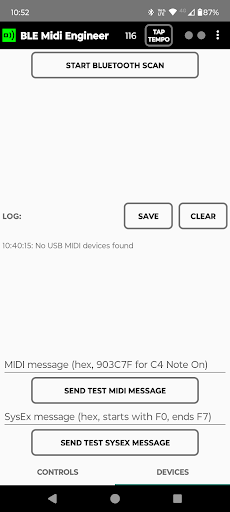
BLE MIDI Engineer is a MIDI controller and MIDI bridge Android app for sending MIDI and SysEx commands to MIDI devices using Bluetooth Low Energy (BLE) or USB cable connection. Perfect for musicians, producers, and MIDI enthusiasts, this app turns your device into a powerful MIDI controller with customizable buttons and knobs controls. App Features: - Bluetooth BLE and USB MIDI Connectivity: Connect to MIDI devices like synthesizers, keyboards, and DAW and send MIDI and SysEx commands. - Customizable Controls: Create your own interface with controls set as buttons or knobs: – Button – define MIDI messages for button press and release. – Button switch – define MIDI messages for button ON and OFF state – Knob – assign a main MIDI message, with the app sending values from min to max based on knob position for dynamic control. - Send MIDI and SysEx commands - Use predefined SysEx templates consisting of keys, messages and labels for knobs and buttons to send easily SysEx commands and customize controls. - Save and load your custom control layouts and MIDI/SysEx setups. - MIDI Creator for creating MIDI commands. - Process bluetooth logs for exporting SysEx commands. Connection to MIDI device can be done with Bluetooth or USB cable: Bluetooth (BLE) 1.Turn ON bluetooth on your device. 2. In DEVICES tab press [START BUTTON SCAN] button. 3. Wait till your MIDI device is shown and press [CONNECT] button. 4. After device is connected the button will turn in blue color. 5. Then you can send test commands using buttons [SEND TEST MIDI MESSAGE] and [SEND TEST SYSEX MESSAGE]. USB cable: 1. Connect your MIDI device with USB cable. 2. When device is connected on top of DEVICES tab the MIDI device name will be shown. 3. Then you can send test commands using buttons [SEND TEST MIDI MESSAGE] and [SEND TEST SYSEX MESSAGE]. The app has buttons, button switches and knobs controls. For each control command message is defined. Multiple commands can be defined for control by setting messages separated by comma[,]. On control action (press, release or rotation) MIDI commands are sent. BUTTON - On button press send command defined with MESSAGE DOWN - On button release send command defined with MESSAGE UP BUTTON SWITCH - On button click sends command defined with MESSAGE ON - On another button click sends command defined with MESSAGE OFF Button switch has switch icon below button text used to differentiate between buttons and button switches. In active state button switch background is brighter. KNOB - On rotation consecutively sends command defined with MESSAGE and knob value [MIN VALUE – MAX VALUE]. Knobs are rotated using horizontall scroll. How to set command messages for controls: 1. Go to Menu and turn EDIT MODE on 2. Press control to go to control settings 3. Select control type – button or knob 4. Input the command messages that will be sent: - for buttons there are two commands. One on button press and second on button release - MSG DOWN and MSG UP - for knobs there is one command message (MESSAGE) and it is sent along with knob value. 5. For SysEx messages - check SysEx message check box 6. Exit the EDIT MODE using Menu – EDIT MODE or by pressing back button. How to set command messages for controls: 1. Go to Menu and turn EDIT MODE on. In edit mode the app background is red. 2. Press control to go to control settings 3. Select control type – button, button switch or knob 4. Input the command messages that will be sent: - for buttons there are two commands. One on button press and second on button release – MSG DOWN and MSG UP - for button switches there are two commands. One on switch ON and one on switch OFF – MSG ON and MSG OFF - for knobs there is one command message (MESSAGE) and it is sent along with knob value. 5. For SysEx messages – check SysEx message check box 6. Exit the EDIT MODE using Menu – EDIT MODE or by pressing back button. App manual - https://gyokovsolutions.com/manual-blemidiengineer
Installs since 26 Aug 2026 Measured
Exact Google Play install counts, collected daily
Ratings
- 5 ★0.0%
- 4 ★0.0%
- 3 ★0.0%
- 2 ★0.0%
- 1 ★0.0%
Recent reviews
Latest public reviews from the store
- 2 May 2026
Very basic app, yet good enough for me
- 27 Aug 2023
👍
- 12 Aug 2023
With the latest update, the app is now perfect for my needs, and I've changed my rating to reflect this. Thank you to the developers.
- 29 Jun 2023
Very cool. So glad this exists. I use this method for songwriting but it's very time consuming. This really helps.
What reviewers bring up
Topics mentioned in the latest 12 reviews, by how many reviews mention them
Liked in good reviews (7 reviews)
- words 2
- bowie 2
- yet 2
- cut 2
Raised in bad reviews (3 reviews)
- hard 2
Top chart positions
Latest Google Play chart ranks by country, last 10 days
Not in any tracked top chart in the last 10 days.
BLE MIDI Engineer history
Release, install milestones, listing and store changes
- First released on the store 15 Jul 2025
Listing keywords
Words and phrases BLE MIDI Engineer repeats most in its store listing
Top phrases: edit mode (7), send test (6), sysex commands (6), defined with message (5), button switch (5).
Highlighted words also appear in the title. Counts cover the title, short description and description.
Business model and tech
From the store listing and declared permissions
- Business model
- Paid, $6.89
- Sensitive access
- LocationPhotos, videos and filesNearby devicesDraws over other apps
19 permissions
1 special access, 8 sensitive, 10 standard
- Draw over other appsSpecial access
- Change or delete shared storageSensitive
- Read shared storageSensitive
- Approximate locationSensitive
- Precise locationSensitive
- Advertise to nearby Bluetooth devicesBLUETOOTH_ADVERTISESensitive
- Connect to paired Bluetooth devicesBLUETOOTH_CONNECTSensitive
- Find nearby Bluetooth devicesBLUETOOTH_SCANSensitive
- Show notificationsPOST_NOTIFICATIONSSensitive
- Foreground service (connected device)FOREGROUND_SERVICE_CONNECTED_DEVICEStandard
- Keep the phone awakeStandard
- Run a foreground serviceFOREGROUND_SERVICEStandard
Compliance
What the listing and the app package show
- Store status
- Live
- Registered in
- Bulgaria
- Privacy policy
- Linked on the listing
- Advertising
- No ads declared
- In-app purchases
- None declared
- Age rating
- Everyone
- Sensitive permissions
- 8 sensitive, 1 special access of 19
- Location access
- Yes, while in use
- Camera and microphone
- Neither
Apps like BLE MIDI Engineer
들어서 화면켜기Won3.5K installs★ 4.0
Height PredictionEcliptic App Ventures45.9K installs★ 2.4
Speicers`Pro VPNEldiablolucifer202021.2K installs★ 4.14
Lightning Tracker with AlertsYaksh Software4.3K installs★ 3.0
Mana Pathi (Unit Converter)Shirish Koirala2.2K installs★ 4.6
Multi-tab Calc - A simple app.Naoyuki Rikiji1.3K installs★ 5.0
Photo Recovery PlusBillApps7.1K installs★ 4.53
Just Silence. Scheduled.Akid Soft1.6K installs★ 5.0
- WoWp AssistantВиталий Робиновский2K installs★ 4.2
BLE MIDI Engineer: questions and answers
How many downloads does BLE MIDI Engineer have?
BLE MIDI Engineer has 166 installs on Google Play, measured from the store's own count on 18 Nov 2026.
Who makes BLE MIDI Engineer?
BLE MIDI Engineer is published by GyokovSolutions, a developer based in BG.
Is BLE MIDI Engineer free?
No. BLE MIDI Engineer is a paid app priced at $6.89.
Is BLE MIDI Engineer still available?
Yes. BLE MIDI Engineer is live on Google Play as of 18 Nov 2026.
Track BLE MIDI Engineer and its competitors
Watch any app for new versions, rating drops, chart moves and removals. Free plan, no card.