
Braina PC Remote Voice Control
Use Android device to control PC wirelessly using voice commands and dictation.
- Installs
- 64.62K
- Measured
- Rating
- 3.59
- Ratings
- 339
- 40 reviews
- Version
- Varies with device
- Updated 27 Mar 2025
- Released
- 12 May 2014
- Tracked since 11 May 2026
- Size
- 8 MB
- Needs 4.0
Screenshots


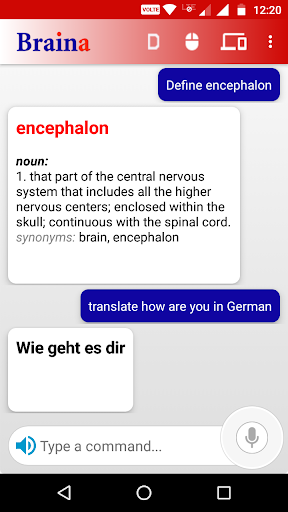


About Braina PC Remote Voice Control
The description on the store listing
Braina for Android App lets you turn your Android device into a external wireless microphone to use voice commands for your Windows PC over a WiFi network or Internet. Speak commands in your android device to <b>remote control your computer!</b> To use voice commands you will also need to install Braina assistant for PC on your computer from this link:
<b>https://www.brainasoft.com/braina/</b>.
Braina (Brain Artificial) is an intelligent personal assistant software for Windows PC that has both text to speech and speech to text (speech recognition) features.
<b>What can Braina do?</b>
• <b>Play Songs</b> - No need to search songs on your computer. For example just say, Play Hips …
Read the full description
Braina for Android App lets you turn your Android device into a external wireless microphone to use voice commands for your Windows PC over a WiFi network or Internet. Speak commands in your android device to <b>remote control your computer!</b> To use voice commands you will also need to install Braina assistant for PC on your computer from this link: <b>https://www.brainasoft.com/braina/</b>. Braina (Brain Artificial) is an intelligent personal assistant software for Windows PC that has both text to speech and speech to text (speech recognition) features. <b>What can Braina do?</b> • <b>Play Songs</b> - No need to search songs on your computer. For example just say, Play Hips Don't Lie or Play Akon and Braina will play it for you from anywhere in your computer or even the web. • <b>Dictate to any Software or Website</b> - Use speech to text feature in third party programs like Microsoft Word using Dictation mode. • <b>Remote Control Mouse and Keyboard</b> - Turn your Android phone or tablet into wireless mouse and keyboard and remote control your PC over a WiFi network or hotspot. Slide your finger on phone's screen to make the PC/Laptop mouse cursor make movement. Tap on the touchscreen to click. Left click, right click, double click, drag and drop support. • <b>Play Videos</b> - If you want to watch a video or movie, say Play video , for example Play video Godfather. • <b>Calculator</b> - Do calculations by speaking. - e.g 45 plus 20 minus 10 . Braina can even help you in mathematics. • <b>Dictionary and Thesaurus</b> - See definition of any word.- e.g. Define encephalon, What is intelligence? • <b>Open and Close any Programs</b> - e.g. Open notepad, Close notepad • <b>Open and Search Files and Folders 10 times faster</b> - e.g. Open file studynotes.txt, Search folder program • <b>Control Powerpoint Presentation</b> - Say next or previous slide (in Dictation mode) • <b>See News and Weather Information</b> - e.g. Weather in London , Show news about Obama • <b>Search Information on the Internet</b> - e.g. Find information on Thalassemia disease, Search Real Madrid score on Google, Search for Albert Einstein on Wikipedia, Search images of cute puppies • <b>Set Alarms</b> - e.g. Set alarm at 7:30 am • <b>Remotely Shutdown Computer</b> • <b>Notes</b> - Braina can remember notes for you. e.g. Note I have given 550 dollars to John. and much more.. <b>How to Connect App with PC via WiFi?</b> Just tap on the "Connect via WLAN/Wifi " button on the right side of your PC device name to connect automatically or follow below mentioned steps manually: 1) Ensure that your PC and Android device are connected to the same WiFi network. If you don't have a WiFi router, you can also use WiFi Hotspot facility to connect. Also make sure that Braina is running on your PC. You can download Braina for PC from here: http://www.brainasoft.com/braina/ 2) Now in order to connect, you will need IP address of your PC on the WiFi network. To get IP, go to Tools menu->Settings->Speech Recognition from Braina on PC. From the "Speech Option" drop-down select "Use Braina for Android". 3) You will see a list of IP addresses. Enter the first IP address on the list in Android App and click connect. If you get an error, then try entering the remaining IP addresses in the list one by one until you get connected. (Note: IP address will generally start with 192.168) <b>How to Connect App with PC via Internet?</b> Just click on "Connect via Internet" button on the right side of your PC device name. Important: If there are firewalls in your network, the app might not connect successfully with Braina assistant on your computer. See Frequently Asked Questions for more information: https://www.brainasoft.com/braina/android/faq.html
Installs since 29 Aug 2026 Measured
Exact Google Play install counts, collected daily
Ratings
339 ratings, 40 reviews
- 5 ★50%
- 4 ★7.5%
- 3 ★7.5%
- 2 ★17%
- 1 ★17%
Recent reviews
Latest public reviews from the store
No reviews in our sample for this app yet.
Top chart positions
Latest Google Play chart ranks by country, last 10 days
Not in any tracked top chart in the last 10 days.
Braina PC Remote Voice Control history
Release, install milestones, listing and store changes
- Reached 50,000+ installs 17 Jun 2022
- Reached 10,000+ installs 6 Sep 2015
- Reached 5,000+ installs 3 Mar 2015
- Reached 1,000+ installs 25 Aug 2014
- Reached 500+ installs 12 Jul 2014
- Reached 100+ installs 4 Jun 2014
- Reached 50+ installs 24 May 2014
- Reached 10+ installs 16 May 2014
Update frequency
How often Braina PC Remote Voice Control ships a new version, month by month
0 updates in the last 12 months. Less often than most similar apps: they shipped a median of 1 updates in the same year.
Recent versions
Current version Varies with device
- Version 327 Mar 2025
- Version 3.722 Jan 2023
- Version 3.67 Apr 2022
- Version 3.55 Jan 2022
Listing keywords
Words and phrases Braina PC Remote Voice Control repeats most in its store listing
Top phrases: android device (4), wifi network (4), ip address (3), remote control (3), voice commands (3).
Highlighted words also appear in the title. Counts cover the title, short description and description.
Business model and tech
From the store listing, the SDKs in the app package and its declared permissions
- Business model
- Free to download
- Built with
- No cross-platform framework or game engine detected
- Ad networks (0)
- None detected
- Sensitive access
- MicrophonePhotos, videos and files
0 ad, attribution and analytics SDKs detected. SDKs are read from the app package and permissions from the store listing, so code that loads later is not seen.
Technology
12 SDKs found in the app package
8 permissions
0 special access, 3 sensitive, 5 standard
- Record audioSensitive
- Change or delete shared storageSensitive
- Read shared storageSensitive
- Connect to and disconnect from Wi-FiStandard
- Full internet accessStandard
- See network connectionsStandard
- See Wi-Fi connectionsStandard
- Internal app permissionDYNAMIC_RECEIVER_NOT_EXPORTED_PERMISSIONStandard
Compliance
What the listing and the app package show
- Store status
- Live
- Upkeep
- Updated 27 Mar 2025
- Registered in
- India
- Privacy policy
- Linked on the listing
- Advertising
- No ads declared
- In-app purchases
- None declared
- Age rating
- Everyone
- Sensitive permissions
- 3 sensitive of 8
- Location access
- No
- Camera and microphone
- Microphone
Apps like Braina PC Remote Voice Control
Cash Calculator -Money CounterBibhu Man Rajbhandari123K installs★ 3.92
iPro Habit Tracker - ProIntelliPro5.1K installs★ 4.0
DevDuo IDE: AI Code EditorDevDuo Apps11K installs★ 4.21
VIP NotesOgroman3K installs★ 4.43
Simple Progress TrackerQookie Games44.8K installs★ 3.68
Linas MatkasseCheffelo75.1K installs★ 1.7
PanoptoPanopto242K installs★ 2.02
GESC StudentGESC74.3K installs★ 4.0
AutoApp For Pebblejoaomgcd32.5K installs★ 3.93
Braina PC Remote Voice Control: questions and answers
How many downloads does Braina PC Remote Voice Control have?
Braina PC Remote Voice Control has 64,620 installs on Google Play, measured from the store's own count on 14 Nov 2026.
Who makes Braina PC Remote Voice Control?
Braina PC Remote Voice Control is published by Brainasoft, a developer based in IN.
When was Braina PC Remote Voice Control last updated?
The latest version (Varies with device) was released on 27 Mar 2025.
Is Braina PC Remote Voice Control free?
Yes. Braina PC Remote Voice Control is free to download.
Is Braina PC Remote Voice Control still available?
Yes. Braina PC Remote Voice Control is live on Google Play as of 14 Nov 2026.
Track Braina PC Remote Voice Control and its competitors
Watch any app for new versions, rating drops, chart moves and removals. Free plan, no card.