
Button Mapper: Remap your keys
Remap hardware buttons to launch any app, shortcut or action
- Installs
- 7.07M
- Measured
- Rating
- 3.44
- Ratings
- 21.1K
- 1.7K reviews
- Version
- Varies with device
- Updated 23 Oct 2026
- Released
- 22 Oct 2016
- Tracked since 13 May 2026
- Size
- —
Screenshots



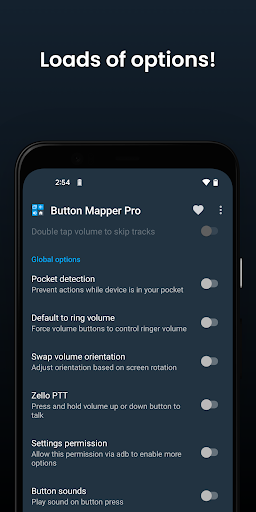
About Button Mapper: Remap your keys
The description on the store listing
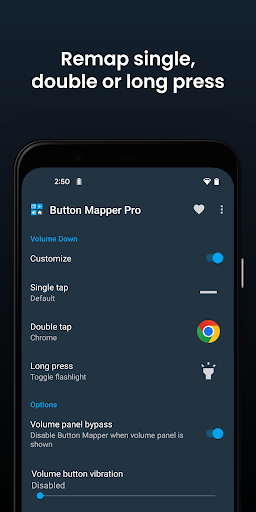
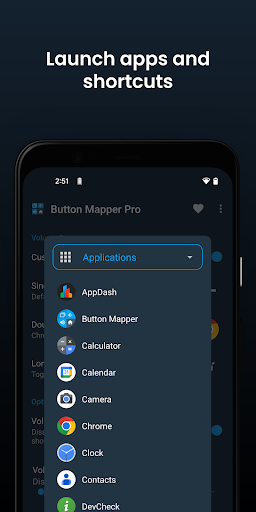
Button Mapper makes it easy to remap custom actions to your volume buttons and other hardware buttons. Remap buttons to launch any app, shortcut or custom action with a single, double press or long press.
Button Mapper can remap most physical or capacitive keys and buttons, such as volume buttons, some assist buttons, and capacitive home, back and recent apps keys. Button Mapper can also remap buttons on many gamepads, remotes and other peripheral devices.
Root is not required for most actions, however some require an adb command from a connected PC if not rooted. Button Mapper does not work when the screen is off unless your device is rooted or you run an adb command.
A few …
Read the full description
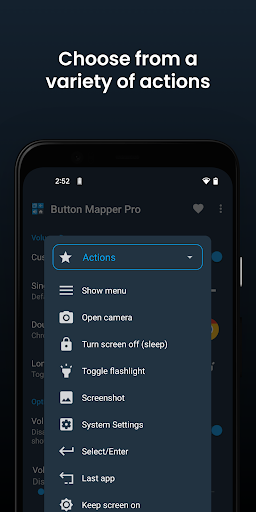
Button Mapper makes it easy to remap custom actions to your volume buttons and other hardware buttons. Remap buttons to launch any app, shortcut or custom action with a single, double press or long press. Button Mapper can remap most physical or capacitive keys and buttons, such as volume buttons, some assist buttons, and capacitive home, back and recent apps keys. Button Mapper can also remap buttons on many gamepads, remotes and other peripheral devices. Root is not required for most actions, however some require an adb command from a connected PC if not rooted. Button Mapper does not work when the screen is off unless your device is rooted or you run an adb command. A few examples of remapping you can do with Button Mapper: -long press to toggle your flashlight -remap your TV remote control -press to broadcast custom intents, scripts or commands -long press to open camera and take a photo -double tap to launch your favorite app or shortcut -double tap to open your notifications -swap your back and recent apps keys (capacitive buttons only!) -use your volume buttons to adjust screen brightness -long press to toggle "do not disturb" mode -and much more Additional features unlocked in the pro version: -Simulate keycodes (requires adb command or root) -Swap volume keys on orientation change -Default to ring volume on Pie or later -Pocket detection -Themes -Change back and recents buttons -Customization of haptic feedback (vibration) on button press and long press Actions that can be mapped to buttons or keys: -Launch any app or shortcut -Disable the button -Broadcast intents (PRO) -Run scripts (PRO) -Camera shutter -Turn screen off -Toggle flashlight -Quick settings -Show notifications -Power dialog -Take screenshot -Music: previous/next track and play/pause -Adjust volume or mute -Last app switch -Toggle do not disturb -Adjust brightness -Now on tap (root) -Menu button (root) -Choose custom keycode (root and PRO) -Root command (root and PRO) -Toggle WiFi -Toggle Bluetooth -Toggle rotation -Clear notifications -Split screen -Scroll up/down (root) -And many more... Buttons supported: -Physical home, back and recent apps/menu buttons -Volume up -Volume down -Most camera buttons -Many headset buttons -Custom buttons: add other buttons (active, mute, etc) on your phone, headphones, gamepads, TV remote and other peripheral devices Additional options: -change the long press or double tap duration -delay initial button press for better double tap operation -disable Button Mapper while using specific apps -plus many more customizations Troubleshooting: -Make sure Button Mapper accessibility service is enabled and allowed to run in the background -Button Mapper does not work with onscreen buttons (such as soft keys or the navigation bar) or the power button. -The options shown in the app depend on the buttons available on your phone. Not all phones have home, back and recents buttons! This app uses Accessibility services. Accessibility is used to detect when the physical or capacitive buttons are pressed on your device so they can be remapped to custom actions to accommodate your needs. It is not used to see what you type. Button Mapper does not collect or share any of your personal information, it is safe and your privacy is respected. This app uses the Device Administrator permission. (BIND_DEVICE_ADMIN) This permission is used to lock the screen if the "Turn screen off" action is chosen. If you want to remove this permission, open Button Mapper, click on the menu (three dots in the upper right corner) and select "Uninstall"
Installs, last 30 days Measured
Exact Google Play install counts, collected daily
Ratings
21,056 ratings, 1,683 reviews
- 5 ★50%
- 4 ★9.4%
- 3 ★7.0%
- 2 ★7.0%
- 1 ★27%
Recent reviews
Latest public reviews from the store
No reviews in our sample for this app yet.
Top chart positions
Latest Google Play chart ranks by country, last 10 days
- Countries ranked
- 10
- Best rank
- #47
- Top 10 placements
- 0
- of 11 chart placements
- Average rank
- #87
Best countries on Google Play
- 🇺🇸 United States · Top grossing, Personalization#47
- 🇦🇺 Australia · Top free, Personalization#68
- 🇮🇳 India · Top grossing, Personalization#69
- 🇲🇽 Mexico · Top grossing, Personalization#73
- 🇯🇵 Japan · Top free, Personalization#73
- 🇨🇦 Canada · Top free, Personalization#75
| Country | Chart | Category | Rank | Best (10 days) | Date |
|---|---|---|---|---|---|
| 🇺🇸 United States | Top grossing | Personalization | #47 | #38 | 20 Nov 2026 |
| 🇦🇺 Australia | Top free | Personalization | #68 | #51 | 20 Nov 2026 |
| 🇮🇳 India | Top grossing | Personalization | #69 | #68 | 19 Nov 2026 |
| 🇲🇽 Mexico | Top grossing | Personalization | #73 | #72 | 20 Nov 2026 |
| 🇯🇵 Japan | Top free | Personalization | #73 | #73 | 20 Nov 2026 |
| 🇨🇦 Canada | Top free | Personalization | #75 | #75 | 20 Nov 2026 |
| 🇰🇷 South Korea | Top free | Personalization | #99 | #99 | 20 Nov 2026 |
| 🇩🇪 Germany | Top free | Personalization | #101 | #96 | 20 Nov 2026 |
| 🇫🇷 France | Top free | Personalization | #110 | #89 | 20 Nov 2026 |
| 🇬🇧 United Kingdom | Top free | Personalization | #111 | #100 | 20 Nov 2026 |
Button Mapper: Remap your keys history
Release, install milestones, listing and store changes
- Reached 5,000,000+ installs 27 Dec 2024
- Reached 1,000,000+ installs 7 Jul 2018
- Reached 500,000+ installs 6 Nov 2017
- First released on the store 22 Oct 2016
Update frequency
How often Button Mapper: Remap your keys ships a new version, month by month
2 updates in the last 12 months. Less often than most similar apps: they shipped a median of 3 updates in the same year.
Recent versions
Current version Varies with device
- Version 4.088 May 2026
- Version 4.0621 Mar 2026
- Version 3.3530 Sep 2024
- Version 3.345 Sep 2024
Listing keywords
Words and phrases Button Mapper: Remap your keys repeats most in its store listing
Top phrases: button mapper (11), long press (6), double tap (4), adb command (3), volume buttons (3).
Highlighted words also appear in the title. Counts cover the title, short description and description.
Business model and tech
From the store listing and declared permissions
- Business model
- Free to downloadIn-app purchases
- Subscriptions and payments
- Google Play billing
- Sensitive access
- CameraPhone and callsPhotos, videos and filesNearby devices
34 permissions
6 special access, 6 sensitive, 22 standard
- Ask to uninstall appsREQUEST_DELETE_PACKAGESSpecial access
- Change Do Not DisturbACCESS_NOTIFICATION_POLICYSpecial access
- Change system settingsSpecial access
- Read sensitive log dataSpecial access
- See every installed appQUERY_ALL_PACKAGESSpecial access
- See which apps are usedPACKAGE_USAGE_STATSSpecial access
- Take photos and videosSensitive
- Change or delete shared storageSensitive
- Read shared storageSensitive
- Connect to paired Bluetooth devicesBLUETOOTH_CONNECTSensitive
- Show notificationsPOST_NOTIFICATIONSSensitive
- Call phone numbersSensitive
Compliance
What the listing and the app package show
- Store status
- Live
- Upkeep
- Updated 23 Oct 2026
- Registered in
- Canada
- Privacy policy
- Linked on the listing
- Advertising
- No ads declared
- In-app purchases
- Offered
- Age rating
- Everyone
- Sensitive permissions
- 6 sensitive, 6 special access of 34
- Location access
- No
- Camera and microphone
- Camera
Apps like Button Mapper: Remap your keys
Nougat - Icon PackHydrOs Launcher UI Labs™715K installs★ 4.57
Photo Caller Screen DialerVasundhara Infotech LLC10.9M installs★ 3.96
Control Widget: Theme & PanelsWECHOICE MOBILE11.9M installs★ 4.29
Memoji Cartoon Stickers for WhCrewlett1.9M installs★ 3.98
Fast Charging AnimationWallet Passes Alliance2.6M installs★ 4.7
Aesthetic Wallpaper – KawaiiEmpower softTechnology1.2M installs★ 4.43
Transparent Live WallpaperMobi Softech10.5M installs★ 4.16
- Energy Ring - Universal Edition!IJP3.9M installs★ 3.62
Emoji Up genmoji sticker makerMobile entertainment s.r.l3.5M installs★ 4.35
Button Mapper: Remap your keys: questions and answers
How many downloads does Button Mapper: Remap your keys have?
Button Mapper: Remap your keys has 7,072,001 installs on Google Play, measured from the store's own count on 20 Nov 2026.
Who makes Button Mapper: Remap your keys?
Button Mapper: Remap your keys is published by flar2, a developer based in CA.
When was Button Mapper: Remap your keys last updated?
The latest version (Varies with device) was released on 23 Oct 2026.
Is Button Mapper: Remap your keys free?
Yes. Button Mapper: Remap your keys is free to download and offers in-app purchases.
Is Button Mapper: Remap your keys still available?
Yes. Button Mapper: Remap your keys is live on Google Play as of 20 Nov 2026.
Track Button Mapper: Remap your keys and its competitors
Watch any app for new versions, rating drops, chart moves and removals. Free plan, no card.