EdgeBlock: Block screen edges
Prevent accidental touches on phones with curved screen edges or thin bezels
- Installs
- 49.54K
- Measured
- Rating
- 3.92
- Ratings
- 477
- 39 reviews
- Version
- 2.03
- Updated 13 Jul 2024
- Released
- 16 Apr 2020
- Tracked since 13 May 2026
- Size
- 2 MB
- Needs 6.0
Screenshots

About EdgeBlock: Block screen edges
The description on the store listing
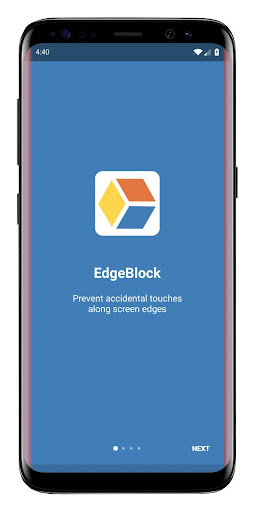
EdgeBlock protects the edge of your screen from accidental touches. Great for phones with curved screen edges, thin bezels or infinity displays.
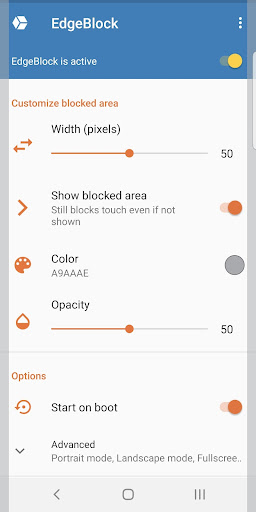
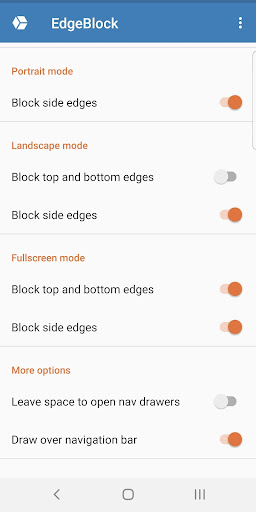
The touch-protected area is adjustable and can be made invisible or any color you like! Adjust the color, opacity and width of the blocked area and specify which edges should be blocked. You can set which edges are blocked separately for portrait, landscape and fullscreen modes.
There are many ways to control EdgeBlock. You can temporarily disable (pause) blocking by tapping the notification. You can turn EdgeBlock on or off with a Quick Settings tile. And finally, you pause/resume or start/stop the service using public intents compatible …
Read the full description
EdgeBlock protects the edge of your screen from accidental touches. Great for phones with curved screen edges, thin bezels or infinity displays. The touch-protected area is adjustable and can be made invisible or any color you like! Adjust the color, opacity and width of the blocked area and specify which edges should be blocked. You can set which edges are blocked separately for portrait, landscape and fullscreen modes. There are many ways to control EdgeBlock. You can temporarily disable (pause) blocking by tapping the notification. You can turn EdgeBlock on or off with a Quick Settings tile. And finally, you pause/resume or start/stop the service using public intents compatible with automation apps such as Tasker (be sure to specify the package name, flar2.edgeblock) Public Intents: flar2.edgeblock.PAUSE_RESUME_SERVICE flar2.edgeblock.START_STOP_SERVICE EdgeBlock has no ads and does not collect any of your data. EdgeBlock is lightweight and does not require invasive permissions. It only needs permission to draw or display over other apps. The free version is fully functional. The only option that requires payment is "Apply on boot." If you want EdgeBlock to automatically start at boot, then you must buy EdgeBlock Pro. If you do not wish to pay, you can start it manually at each boot and still enjoy all other features, ad-free.
Installs since 29 Aug 2026 Measured
Exact Google Play install counts, collected daily
Ratings
477 ratings, 39 reviews
- 5 ★62%
- 4 ★6.3%
- 3 ★9.5%
- 2 ★6.3%
- 1 ★16%
Recent reviews
Latest public reviews from the store
No reviews in our sample for this app yet.
Top chart positions
Latest Google Play chart ranks by country, last 10 days
Not in any tracked top chart in the last 10 days.
EdgeBlock: Block screen edges history
Release, install milestones, listing and store changes
- Removed from the store 4 Jul 2026
- Reached 10,000+ installs 19 Feb 2021
- Reached 5,000+ installs 15 Sep 2020
- Reached 1,000+ installs 19 Jun 2020
- Reached 500+ installs 5 Jun 2020
- Reached 100+ installs 4 May 2020
- Reached 50+ installs 1 May 2020
- First released on the store 16 Apr 2020
Update frequency
How often EdgeBlock: Block screen edges ships a new version, month by month
0 updates in the last 12 months. Less often than most similar apps: they shipped a median of 2 updates in the same year.
Recent versions
Current version 2.03
- Version 2.0313 Jul 2024
2.03: -update for Android 15 2.02: -bug fixes 2.01: -independent control of each screen edge -remove overlapping views in corners -target latest Android API -bug fixes and optimizations
- Version 2.0220 Nov 2023
- Version 2.0118 Oct 2022
- Version 1.0924 Jun 2020
Listing keywords
Words and phrases EdgeBlock: Block screen edges repeats most in its store listing
Top phrases: flar2 edgeblock (3), screen edges (3), curved screen edges (2), phones with curved (2), accidental touches (2).
Highlighted words also appear in the title. Counts cover the title, short description and description.
Business model and tech
From the store listing, the SDKs in the app package and its declared permissions
- Business model
- Free to downloadIn-app purchases
- Built with
- No cross-platform framework or game engine detected
- Ad networks (0)
- None detected
- Subscriptions and payments
- Google Play billing
- Sensitive access
- Draws over other apps
0 ad, attribution and analytics SDKs detected. SDKs are read from the app package and permissions from the store listing, so code that loads later is not seen.
Technology
11 SDKs found in the app package
10 permissions
1 special access, 1 sensitive, 8 standard
- Draw over other appsSpecial access
- Show notificationsPOST_NOTIFICATIONSSensitive
- Ask to skip battery optimisationREQUEST_IGNORE_BATTERY_OPTIMIZATIONSStandard
- Foreground service (special use)FOREGROUND_SERVICE_SPECIAL_USEStandard
- Run a foreground serviceFOREGROUND_SERVICEStandard
- Start when the phone turns onStandard
- Full internet accessStandard
- See network connectionsStandard
- Internal app permissionDYNAMIC_RECEIVER_NOT_EXPORTED_PERMISSIONStandard
- In-app purchases with Google PlayStandard
Compliance
What the listing and the app package show
- Store status
- Removed (4 Jul 2026)
- Upkeep
- No update since 13 Jul 2024
- Registered in
- Canada
- Privacy policy
- Linked on the listing
- Advertising
- No ads declared
- In-app purchases
- Offered
- Age rating
- Everyone
- Sensitive permissions
- 1 sensitive, 1 special access of 10
- Location access
- No
- Camera and microphone
- Neither
Apps like EdgeBlock: Block screen edges
LDPlayer: Gaming ToolsFUNEASE TECH LTD.203K installs★ 3.73
H Wash MobileKioSoft Technologies LLC41.3K installs★ 3.2
SMS Backup ProMohammed Malhas22.9K installs★ 4.43
Compass - Photo & Video LockerJeilleeiJoubM79.1K installs★ 4.8
Cool FlashlightChengdu Baoya Rabbit Network Technology Co., Ltd649K installs★ 2.5
BraytechTom Chapman100K installs★ 4.18
Document Reader 2026TinaApps.arc67K installs★ 4.31
Board Money for MonopolyNiklas Baudy55K installs★ 4.58
Tonnenticker Proregio iT100K installs★ 2.5
EdgeBlock: Block screen edges: questions and answers
How many downloads does EdgeBlock: Block screen edges have?
EdgeBlock: Block screen edges has 49,540 installs on Google Play, measured from the store's own count on 14 Nov 2026.
Who makes EdgeBlock: Block screen edges?
EdgeBlock: Block screen edges is published by flar2, a developer based in CA.
When was EdgeBlock: Block screen edges last updated?
The latest version (2.03) was released on 13 Jul 2024.
Is EdgeBlock: Block screen edges free?
Yes. EdgeBlock: Block screen edges is free to download and offers in-app purchases.
Is EdgeBlock: Block screen edges still available?
No. EdgeBlock: Block screen edges is no longer listed on Google Play. We first saw it missing around 4 Jul 2026.
Track EdgeBlock: Block screen edges and its competitors
Watch any app for new versions, rating drops, chart moves and removals. Free plan, no card.