
EX Kernel Manager
Tweak kernel settings on your rooted device
- Installs
- 104K
- Measured
- Rating
- 4.4
- Ratings
- 5.4K
- 599 reviews
- Version
- 6.04
- Updated 6 Oct 2025
- Released
- 13 May 2015
- Tracked since 13 May 2026
- Size
- 11 MB
- Needs 4.2
Screenshots



About EX Kernel Manager
The description on the store listing
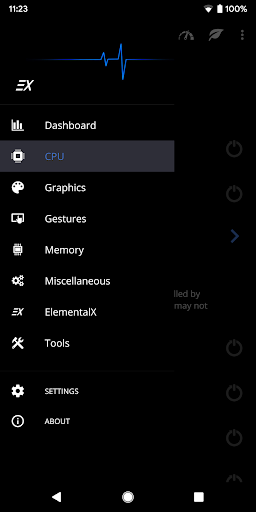
EX Kernel Manager (EXKM) is the ultimate root tool for backup and flashing kernels, tweaking color, sound, gestures and other kernel settings. EXKM gives you total control over your hardware with premium features and a simple and modern user interface.
** Your device must be ROOTED to fully use this app
** This app works with ALL devices and kernels. ElementalX is not required.
** Some advanced features such as wake gestures, color and sound control require a compatible custom kernel
<b>Dashboard:</b> your homepage within the app, Dashboard summarizes your current settings and shows real-time CPU and GPU frequencies, temperatures, memory usage, uptime, deep sleep, battery …
Read the full description
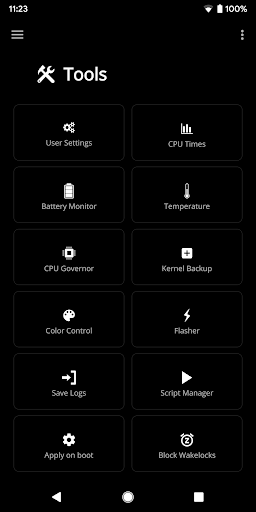
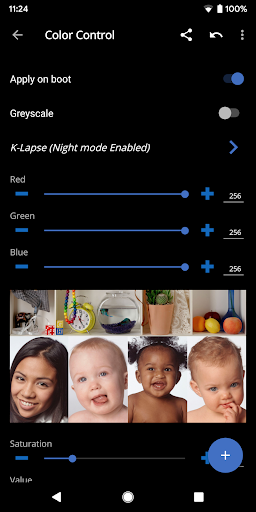
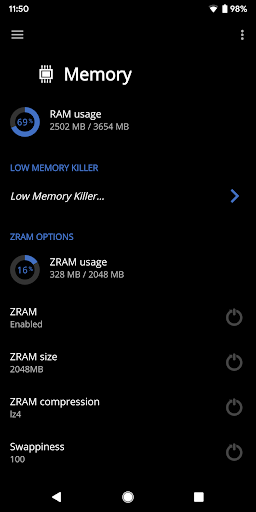
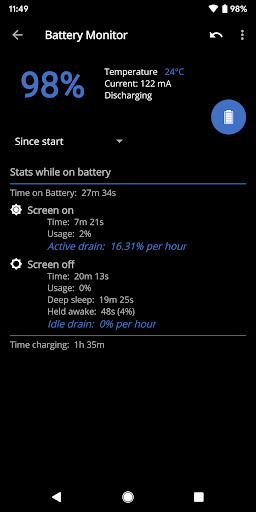
EX Kernel Manager (EXKM) is the ultimate root tool for backup and flashing kernels, tweaking color, sound, gestures and other kernel settings. EXKM gives you total control over your hardware with premium features and a simple and modern user interface. ** Your device must be ROOTED to fully use this app ** This app works with ALL devices and kernels. ElementalX is not required. ** Some advanced features such as wake gestures, color and sound control require a compatible custom kernel <b>Dashboard:</b> your homepage within the app, Dashboard summarizes your current settings and shows real-time CPU and GPU frequencies, temperatures, memory usage, uptime, deep sleep, battery level and temperature, governors, and i/o settings. <b>Battery Monitor:</b> the most accurate way to measure battery life. EXKM's Battery Monitor is designed to show battery statistics that you can use to optimize battery life scientifically. EXKM Battery Monitor measures % battery use per hour and gives separate statistics for screen off (idle drain) and screen on (active drain). It automatically measures only when the battery is discharging so you never have to remember to reset the stats or create markers. <b>Script Manager:</b> easily create, share , edit, execute and test shell scripts (requires SuperSU or Magisk) <b>Flash and Backup</b>: save and restore kernel and recovery backups, flash any boot.img, recovery zip, Magisk module or AnyKernel zip. Import custom kernel JSON configs <b>CPU Settings:</b> easily create, share and load CPU governor profiles for maximum battery life. Adjust max frequency, min frequency, CPU governor, CPU boost, hotplugging, thermals and voltage (if supported by kernel/hardware) <b>Graphics Settings:</b> Max frequency, min frequency, GPU governor and more. <b>Advanced Color Control:</b> RGB controls, saturation, value, contrast, hue and K-Lapse. Save, load and share custom profiles. (requires kernel support) <b>Wake Gestures:</b> sweep2wake, doubletap2wake, sweep2sleep, haptic feedback, camera gesture, wake timeout and more (requires kernel support). <b>Custom User Settings:</b> This feature allows you to add any kernel setting you want. Kernel settings are located in the /proc and /sys directories. Navigate to the desired path and quickly and easily add the setting to the app where it can be changed on the fly or applied at boot. Plus you can easily import/export your custom settings and share with other users. <b>Memory Settings:</b> adjust zRAM, KSM, lowmemorykiller, and virtual memory settings <b>Sound Control:</b> adjust speaker, headphone and mic gain. Supports elementalx, fauxsound, franco sound control, and others (requires kernel support). <b>CPU Times:</b> Show CPU frequency usage and deep sleep, and optionally sort by most used frequencies. <b>Update or Install ElementalX:</b> Get notified and quickly download and install the ElementalX Kernel on supported devices. <b>Many other settings:</b> i/o scheduler, readahead kb, fsync, zRAM, KSM, USB fastcharge, TCP congestion algorithm, last kernel log, magnetic cover control, memory settings, entropy settings, Vox Populi and much more! ElementalX custom kernel is available for the Samsung Galaxy S9/9+, Google Pixel 4a, Pixel 4/4XL, Pixel 3/3 XL, Pixel 3a/3a XL,Pixel 2/2 XL, Pixel/Pixel XL, Nexus 5, Nexus 6, Nexus 5X, Nexus 6P, Nexus 7 (2013), Nexus 9, OnePlus Nord, OnePlus 8 Pro, OnePlus 7 Pro, OnePlus 6/6T, OnePlus 5/5T, OnePlus 3/3T, Essential PH-1, HTC One m7/m8/m9, HTC 10, HTC U11, Moto G4/G4 Plus, Moto G5 Plus, Moto Z, and Xiaomi Redmi Note 3.
Installs, last 30 days Measured
Exact Google Play install counts, collected daily
Ratings
5,423 ratings, 599 reviews
- 5 ★73%
- 4 ★10.0%
- 3 ★9.0%
- 2 ★4.0%
- 1 ★4.0%
Recent reviews
Latest public reviews from the store
- 19 Jan 2026
good
- 19 Jun 2024
Good
Top chart positions
Latest Google Play chart ranks by country, last 10 days
Not in any tracked top chart in the last 10 days.
EX Kernel Manager history
Release, install milestones, listing and store changes
- Reached 100,000+ installs 6 Oct 2025
- First released on the store 13 May 2015
Update frequency
How often EX Kernel Manager ships a new version, month by month
0 updates in the last 12 months. Less often than most similar apps: they shipped a median of 3 updates in the same year.
Recent versions
Current version 6.04
- Version 6.0925 Aug 2024
- Version 6.0812 Aug 2024
- Version 6.042 Nov 2023
6.04: -support new hardware -init_boot backup -more s2s options -update translations 6.03: -update for Android 14 -minor bug fixes and improvements -update translations 5.98: -support themed icon 5.90: -update for Android 13 5.86: -new Flash Center, import and create custom kernel JSON configs -new Storage screen -improve Temperature sensors -bug fixes and optimizations 5.83: -improve vendor_dlkm backup/restore -fix block wakelocks on newer devices 5.81: -backup and restore vendor_dlkm
- Version 6.0318 Sep 2023
Listing keywords
Words and phrases EX Kernel Manager repeats most in its store listing
Top phrases: requires kernel support (3), battery life (3), battery monitor (3), custom kernel (3), kernel settings (3).
Highlighted words also appear in the title. Counts cover the title, short description and description.
Business model and tech
From the store listing, the SDKs in the app package and its declared permissions
- Business model
- Paid, $2.49
- Built with
- No cross-platform framework or game engine detected
- Ad networks (0)
- None detected
- Sensitive access
- No sensitive permission declared
0 ad, attribution and analytics SDKs detected. SDKs are read from the app package and permissions from the store listing, so code that loads later is not seen.
Technology
10 SDKs found in the app package
11 permissions
0 special access, 1 sensitive, 10 standard
- Show notificationsPOST_NOTIFICATIONSSensitive
- Add home screen shortcutsStandard
- Control vibrationStandard
- Keep the phone awakeStandard
- Run a foreground serviceFOREGROUND_SERVICEStandard
- Start when the phone turns onStandard
- Full internet accessStandard
- See network connectionsStandard
- Internal app permissionDYNAMIC_RECEIVER_NOT_EXPORTED_PERMISSIONStandard
- Set an alarmStandard
- Google Play license checkStandard
Compliance
What the listing and the app package show
- Store status
- Live
- Upkeep
- Updated 6 Oct 2025
- Registered in
- Canada
- Privacy policy
- Linked on the listing
- Advertising
- No ads declared
- In-app purchases
- None declared
- Age rating
- Everyone
- Sensitive permissions
- 1 sensitive of 11
- Location access
- No
- Camera and microphone
- Neither
Apps like EX Kernel Manager
Samsung TV RemoteNew World Apps964K installs★ 3.86
e-ProcessoServiços e Informações do Brasil743K installs★ 4.57
Urdu Pana Flex - Banner MakerU&S-Soft221K installs★ 4.55
Grapher - Equation PlotterBasile Van Hoorick1.5M installs★ 4.12
TiviMate CompanionArmobsoft FZE2.3M installs★ 3.23
My BTBhutan Telecom Ltd.686K installs★ 3.97
GalleryMV Gallery761K installs★ 4.5
SQCOMShenzhen SHANGQING INDUSTRIAL CO., LTD419K installs★ 3.74
Mi Band 4 WatchFacesWallet Passes Alliance3.3M installs★ 3.78
EX Kernel Manager: questions and answers
How many downloads does EX Kernel Manager have?
EX Kernel Manager has 104,268 installs on Google Play, measured from the store's own count on 20 Nov 2026.
Who makes EX Kernel Manager?
EX Kernel Manager is published by flar2, a developer based in CA.
When was EX Kernel Manager last updated?
The latest version (6.04) was released on 6 Oct 2025.
Is EX Kernel Manager free?
No. EX Kernel Manager is a paid app priced at $2.49.
Is EX Kernel Manager still available?
Yes. EX Kernel Manager is live on Google Play as of 20 Nov 2026.
Track EX Kernel Manager and its competitors
Watch any app for new versions, rating drops, chart moves and removals. Free plan, no card.