
Drums Engineer
Drums Engineer is an app for drum beats composition.
- Installs
- 13.42K
- Measured
- Rating
- 4.13
- Ratings
- 94
- Version
- 5.6
- Updated 20 Sep 2025
- Released
- 6 Apr 2019
- Tracked since 12 May 2026
- Size
- 3 MB
- Needs 5.0
Screenshots




About Drums Engineer
The description on the store listing
Drums Engineer is an app for drum beats composition. You can save the composed beats as midi file and use it for production with your DAW software.
There are two ways to create drum beats:
- manual - check notes for each drum instrument
- automatic - press COMPOSE and the algorithm creates a drum groove or drum fill.
Drums Engineer features:
- auto compose drum grooves and drum fills
- use up to 64 notes
- select note length
- set tempo via tapping
- swing mode
- use up to 45 different drum instruments
- save created beats as midi file
- open beats file
- change meter signature
- change instruments volume
When you open the app there are three panes. On left is …
Read the full description
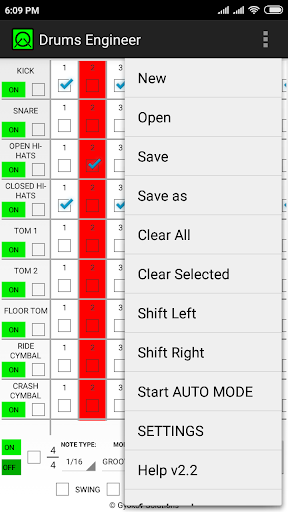
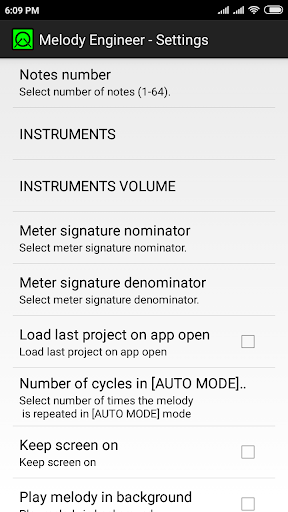
Drums Engineer is an app for drum beats composition. You can save the composed beats as midi file and use it for production with your DAW software. There are two ways to create drum beats: - manual - check notes for each drum instrument - automatic - press COMPOSE and the algorithm creates a drum groove or drum fill. Drums Engineer features: - auto compose drum grooves and drum fills - use up to 64 notes - select note length - set tempo via tapping - swing mode - use up to 45 different drum instruments - save created beats as midi file - open beats file - change meter signature - change instruments volume When you open the app there are three panes. On left is INSTRUMENTS CONTROL pane. On the right is BEATS pane and below is APP CONTROL pane. INSTRUMENTS CONTROL pane: For every instrument you have: - instruments name - when you click on it you can hear sound sample - ON/OFF switch - switches on/off the instrument - select checkbox - use it select/deselect instrument. This is used when you press COMPOSE or Shift Left/Right BEATS pane: For every instrument you have predefined number of notes. You can change number of notes in Settings. If checkbox is checked the sound is on. If it is unchecked there is no sound. By checking and unchecking checkboxes you create the instrument beat. APP CONTROL pane: - ON/OFF switch - switches all instruments on/off - select checkbox - selects/deselects all instruments - MODE - select drum groove or drum fill for COMPOSER to create - COMPOSE button when you press it then drum groove or fill is created for selected instruments. If no instrument is selected then all instruments are used - tempo - change tempo in beats per minute - PLAY button - plays/stops the drum beat MENU: - New - creates new drum template - Open - open saved drums text file - Save - saves current drum beats as midi and text file - Save as - saves current drum beats as midi and text file with specified name - Clear All - clear all instruments - Clear selected - clears only selected (with checked checkbox) instruments - Shift Left - shifts selected instruments one position to the left - Shift Right - shifts selected instrument one position to the right - Start/Stop AUTO MODE - starts/stops AUTO MODE where drums are continuously played and recomposed - SETTINGS - opens Settings - Help - opens app manual - facebook page - opens app facebook page - Exit - exits app SETTINGS: - Notes number - select number of notes (1-64) - INSTRUMENTS - select which instruments to include - INSTRUMENTS VOLUME - set volume for instruments - Meter signature nominator - nominator for meter signature - if time signature is 3/4 then this is 3 - Meter signature denominator - denominator for meter signature - if time signature is 3/4 then this 4 - Load last project on app open - when this is on then the last project will be loaded when you open the app - Number of cycles in AUTO MODE - sets how many times to play the drum beat before it is recomposed - Keep screen on - keeps screen on while the app is in foreground - Play melody in background - when this is on then beat will be played in background. You can use this when adjusting the instruments volume. App privacy policy - https://sites.google.com/view/gyokovsolutions/drums-engineer-privacy-policy
Installs since 27 Aug 2026 Measured
Exact Google Play install counts, collected daily
Ratings
94 ratings
- 5 ★51%
- 4 ★38%
- 3 ★0.0%
- 2 ★0.0%
- 1 ★12%
Recent reviews
Latest public reviews from the store
- 27 Aug 2023
👍
- 23 Aug 2021
Cool app 😎
Top chart positions
Latest Google Play chart ranks by country, last 10 days
Not in any tracked top chart in the last 10 days.
Drums Engineer history
Release, install milestones, listing and store changes
- Reached 10,000+ installs 4 Oct 2020
- Reached 5,000+ installs 2 Sep 2020
- Reached 10+ installs 19 Jul 2019
- Reached 5+ installs 11 May 2019
- Reached 1+ installs 19 Apr 2019
- First released on the store 6 Apr 2019
Recent versions
Current version 5.6
- Version 5.620 Sep 2025
Drums Engineer is an app for drums composition. v5.6 - Android 15 ready v4.8 - option in Settings to use more accessible device documents folder as app folder v4.5 - improved sounds and timing - option to calibrate in Menu - Calibrate
- Version 5.529 Aug 2025
- Version 5.01 Aug 2024
- Version 4.925 Sep 2023
Listing keywords
Words and phrases Drums Engineer repeats most in its store listing
Top phrases: drum beats (5), meter signature (5), beats as midi (4), control pane (4), drums engineer (4).
Highlighted words also appear in the title. Counts cover the title, short description and description.
Business model and tech
From the store listing, the SDKs in the app package and its declared permissions
- Business model
- Paid, $3.89
- Built with
- No cross-platform framework or game engine detected
- Ad networks (0)
- None detected
- Analytics and crash reports
- Firebase
- Sensitive access
- Photos, videos and files
1 ad, attribution and analytics SDKs detected. SDKs are read from the app package and permissions from the store listing, so code that loads later is not seen.
Technology
13 SDKs found in the app package
6 permissions
0 special access, 2 sensitive, 4 standard
- Change or delete shared storageSensitive
- Read shared storageSensitive
- Full internet accessStandard
- See network connectionsStandard
- Internal app permissionDYNAMIC_RECEIVER_NOT_EXPORTED_PERMISSIONStandard
- Google Play license checkStandard
Compliance
What the listing and the app package show
- Store status
- Live
- Upkeep
- Updated 20 Sep 2025
- Registered in
- Bulgaria
- Privacy policy
- Linked on the listing
- Advertising
- No ads declared
- In-app purchases
- None declared
- Age rating
- Everyone
- Sensitive permissions
- 2 sensitive of 6
- Location access
- No
- Camera and microphone
- Neither
Apps like Drums Engineer
Mega 94Agência RF / App Content11.9K installs★ 4.8
StereoLimaStrawberry.pe789 installs★ 5.0
Quran Portuguese TranslationAMSApps18.1K installs★ 4.5
Радио ВоскресениеБайбаков Дмитрий13K installs★ 4.6
JAMMATESJAMMATES1.7K installs★ 3.56
- Learn Notes SheetAtakan ARSLAN41.2K installs★ 3.8
Erazno y la Chocolata app showRadio FM apps10.7K installs★ 4.54
Stem Player (Stems)sxdev16.7K installs★ 1.6
آهنگ های فیض کاریزیDevCmsApp10.9K installs★ 4.8
Drums Engineer: questions and answers
How many downloads does Drums Engineer have?
Drums Engineer has 13,423 installs on Google Play, measured from the store's own count on 19 Nov 2026.
Who makes Drums Engineer?
Drums Engineer is published by GyokovSolutions, a developer based in BG.
When was Drums Engineer last updated?
The latest version (5.6) was released on 20 Sep 2025.
Is Drums Engineer free?
No. Drums Engineer is a paid app priced at $3.89.
Is Drums Engineer still available?
Yes. Drums Engineer is live on Google Play as of 19 Nov 2026.
Track Drums Engineer and its competitors
Watch any app for new versions, rating drops, chart moves and removals. Free plan, no card.