
LightPDF Scanner: Scan & OCR
Portable document scanner with OCR, scan PDF and extract texts from photo scans
- Installs
- 230K
- Measured
- Rating
- 3.77
- Ratings
- 299
- 6 reviews
- Version
- Varies with device
- Updated 26 Apr 2026
- Released
- 12 May 2021
- Tracked since 11 May 2026
- Size
- 13 MB
- Needs 4.4
Screenshots




About LightPDF Scanner: Scan & OCR
The description on the store listing
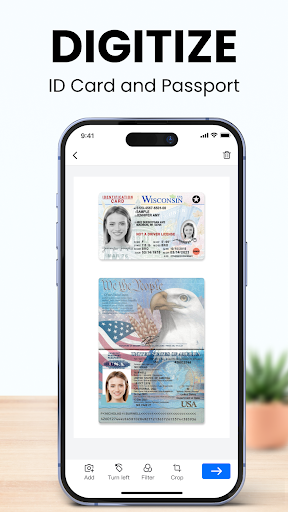
LightPDF Scanner is a tiny yet professional document scanner app, which includes digitalizing documents, OCR text recognition, merging PDF, and signing PDF features. Using the app, you could get rid of the huge copy machine, turn your mobile camera into a portable PDF scanner, and put all your paper work in your pocket with one click.
☑️Must-have app for productivity
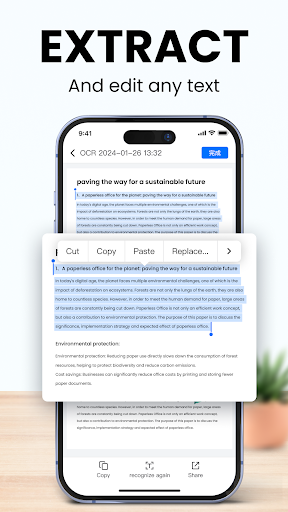
With LightPDF Scanner, you just need to capture the image of the documents, the app will automatically scan it to PDF or JPG format. The app can also recognize(OCR) and extract text from the photo scan or PDF scan for you, and allow you to share the file with others. Moreover, you can sign PDFs inside the app. This …
Read the full description
LightPDF Scanner is a tiny yet professional document scanner app, which includes digitalizing documents, OCR text recognition, merging PDF, and signing PDF features. Using the app, you could get rid of the huge copy machine, turn your mobile camera into a portable PDF scanner, and put all your paper work in your pocket with one click. ☑️Must-have app for productivity With LightPDF Scanner, you just need to capture the image of the documents, the app will automatically scan it to PDF or JPG format. The app can also recognize(OCR) and extract text from the photo scan or PDF scan for you, and allow you to share the file with others. Moreover, you can sign PDFs inside the app. This all-in-one PDF scanner helps you complete work without leaving your seat. Download LightPDF Scanner for free and let's make document processing easy! ⭐️<b>INTELLIGENT SCANNER APP</b> The camera scanner app allows you to scan files by taking a picture as well as importing from the mobile photo gallery. After that, it will automatically scan the files for you. It can recognize the documents edges and provide suitable enhancing solutions according to the photographing environment, which ensures you a high quality scanned document. ⭐️<b>SCAN ANYTHING</b> This powerful document scanner app supports scanning anything you want to digitalize, such as books, transcripts, study notes, test papers, certificates, bank statements, bills, receipts, ID card, business cards, bank cards, licenses, passport and more, and can export as HD images and PDFs. ⭐️<b>RECOGNIZE TEXT (OCR)</b> Equipped with Optical Character Recognition(OCR) technology, this PDF scanner app could recognize texts in images and convert the scanned file to TXT, Word and Excel. It also allows you to preview the recognition results, copy, paste, edit and share the extracted texts. LightPDF Scanner supports recognition in over 20 languages. Better yet, it could do multiple languages recognition, thus if the paper document includes more than one language, you could make use of this scanner app to recognize the text with one click. ⭐️<b>SIGN PDF</b> After creating a photo scan or PDF scan, you can add signature to the scan with ease. ⭐️<b>OPTIMIZE SCAN QUALITY</b> The document scanner is able to adjust scanning results by cropping, rotating, and color enhancing. It provides lighten, grayscale, black & white options to ensure the output texts and graphics are clear. ⭐️<b>BATCH SCAN & MERGE PDF</b> LightPDF Scanner supports taking multiple photos or uploading several images and scanning them in batch. And it could combine the batch scan files to a PDF. ⭐️<b>MANAGE DOCUMENTS</b> You could go to "My Docs" to view the scanned files, re-optimize, OCR, share and delete the scans. ⭐️<b>SHARE SCANNED FILES</b> The scanned PDF or JPG images could be shared with your colleagues, partners and other people via WhatsApp, Messenger and other third-party apps. 🙌<b>Highlights</b> - Fast processing speed, and user-friendly experience. - High quality. The scanned files are clear. - Accurate recognition. Smart border detection and OCR feature. - Time & money saving and productive. - Batch processing document. Batch scan and export multiple pages at once. We’d love to hear your feedback: [email protected] Follow us on Twitter: @LightPdf Like us on Facebook: Lightpdf If you think this scanner app helps you, your positive review would be much appreciated.
Installs since 29 Aug 2026 Measured
Exact Google Play install counts, collected daily
Ratings
299 ratings, 6 reviews
- 5 ★67%
- 4 ★0.0%
- 3 ★0.0%
- 2 ★8.3%
- 1 ★25%
Recent reviews
Latest public reviews from the store
- 22 Jul 2025
fine fine
- 27 May 2025
Loves It ❤️
- 24 May 2025
simple and powerful
- 15 Apr 2025
I love it it's great
What reviewers bring up
Topics mentioned in the latest 50 reviews, by how many reviews mention them
Liked in good reviews (8 reviews)
No topic comes up twice.
Raised in bad reviews (39 reviews)
- connect 9
- mirror 4
- problem 3
- same 3
- wifi 3
- uninstalled 2
- samsung 2
- scanner 2
Top chart positions
Latest Google Play chart ranks by country, last 10 days
Not in any tracked top chart in the last 10 days.
LightPDF Scanner: Scan & OCR history
Release, install milestones, listing and store changes
- Reached 50,000+ installs 19 Feb 2022
- Reached 10,000+ installs 27 Nov 2021
- Reached 5,000+ installs 13 Nov 2021
- Reached 500+ installs 30 Oct 2021
- Reached 100+ installs 19 Aug 2021
- Reached 50+ installs 20 Jun 2021
- First released on the store 12 May 2021
Update frequency
How often LightPDF Scanner: Scan & OCR ships a new version, month by month
1 updates in the last 12 months. Less often than most similar apps: they shipped a median of 2 updates in the same year.
Recent versions
Current version Varies with device
- Version 2.1.526 Apr 2026
- Version 2.1.424 Jul 2025
- Version 2.1.319 Mar 2025
- Version 2.1.213 Jan 2025
Listing keywords
Words and phrases LightPDF Scanner: Scan & OCR repeats most in its store listing
Top phrases: lightpdf scanner (6), document scanner (4), batch scan (3), pdf scanner (3), scanned files (3).
Highlighted words also appear in the title. Counts cover the title, short description and description.
Business model and tech
From the store listing, the SDKs in the app package and its declared permissions
- Business model
- Free to downloadIn-app purchases
- Built with
- No cross-platform framework or game engine detected
- Ad networks (0)
- None detected
- Subscriptions and payments
- Google Play billing
- Attribution and measurement
- AppsFlyer
- Analytics and crash reports
- Firebase
- Sign-in and social
- FacebookTwitter Kit
- Sensitive access
- CameraPhone and callsPhotos, videos and files
2 ad, attribution and analytics SDKs detected. SDKs are read from the app package and permissions from the store listing, so code that loads later is not seen.
Technology
41 SDKs found in the app package
Ad networks
Advertising and install-attribution SDKs found in the app package
- AppsFlyer
23 permissions
0 special access, 6 sensitive, 17 standard
- Take photos and videosSensitive
- Change or delete shared storageSensitive
- Read photosREAD_MEDIA_IMAGESSensitive
- Read shared storageSensitive
- Show notificationsPOST_NOTIFICATIONSSensitive
- Read phone status and identitySensitive
- Read how it was installed (install referrer)BIND_GET_INSTALL_REFERRER_SERVICEStandard
- Control vibrationStandard
- Keep the phone awakeStandard
- Run a foreground serviceFOREGROUND_SERVICEStandard
- Change network connectivityStandard
- Connect to and disconnect from Wi-FiStandard
Compliance
What the listing and the app package show
- Store status
- Live
- Upkeep
- Updated 26 Apr 2026
- Registered in
- Hong Kong SAR China
- Privacy policy
- Linked on the listing
- Advertising
- No ads declared
- In-app purchases
- Offered
- Age rating
- Everyone
- Sensitive permissions
- 6 sensitive of 23
- Location access
- No
- Camera and microphone
- Camera
Apps like LightPDF Scanner: Scan & OCR
ADV ResidencialADV SEGURIDAD111K installs★ 3.63
Region 6 NS RecyclesRegion 6 Solid Waste Management6.7K installs★ 4.8
Kalendarz Polski ze ŚwiętamiAkstar Mobile70.2K installs★ 3.9
Ai AnalyzerJLP Creation Studio165K installs★ 4.0
Servientrega ColombiaServientrega S.A.144K installs★ 1.83
JigglyPaint: Draw/Shake/Share!KunLun.Co7.4K installs★ 4.06
Taxi CalculatorLeonardo Javier Russo65.1K installs★ 4.11
Supernotes – Notes & JournalSupernotes28.4K installs★ 4.19
FileCloudFileCloud76.5K installs★ 3.66
LightPDF Scanner: Scan & OCR: questions and answers
How many downloads does LightPDF Scanner: Scan & OCR have?
LightPDF Scanner: Scan & OCR has 230,099 installs on Google Play, measured from the store's own count on 14 Nov 2026.
Who makes LightPDF Scanner: Scan & OCR?
LightPDF Scanner: Scan & OCR is published by WangxuTech, a developer based in HK.
When was LightPDF Scanner: Scan & OCR last updated?
The latest version (Varies with device) was released on 26 Apr 2026.
Is LightPDF Scanner: Scan & OCR free?
Yes. LightPDF Scanner: Scan & OCR is free to download and offers in-app purchases.
Is LightPDF Scanner: Scan & OCR still available?
Yes. LightPDF Scanner: Scan & OCR is live on Google Play as of 14 Nov 2026.
Track LightPDF Scanner: Scan & OCR and its competitors
Watch any app for new versions, rating drops, chart moves and removals. Free plan, no card.