
Lyrics Engineer
Lyrics Engineer helps writing song lyrics by matching melody and lyric accent.
- Installs
- 2.74K
- Measured
- Rating
- —
- Ratings
- —
- Version
- Varies with device
- Updated 16 Sep 2025
- Released
- 17 Oct 2017
- Tracked since 12 May 2026
- Size
- 1 MB
- Needs 3.0
Screenshots


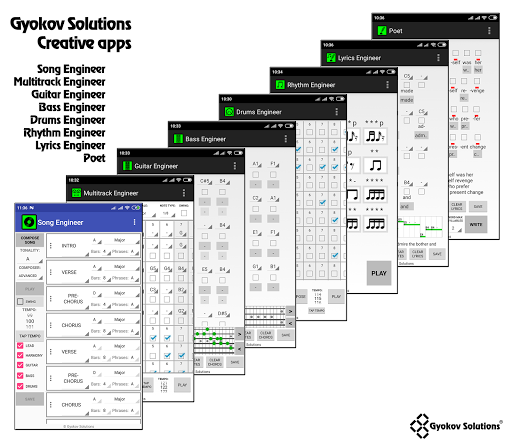

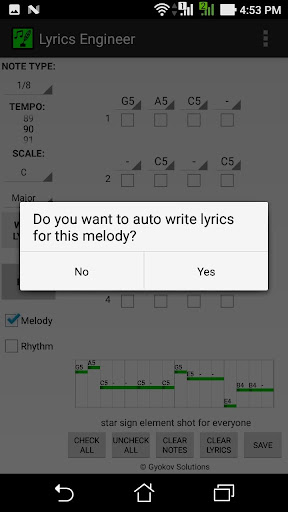


About Lyrics Engineer
The description on the store listing
Lyrics Engineer helps you writing song lyrics. The app selects suitable words in order to match the melody accent to lyrics accent to achieve prosody and lyrics to fit comfortably the melody.
This is full version of Lyrics Engineer Lite - https://play.google.com/store/apps/details?id=com.gyokovsolutions.lyricsengineerlite
with extended features:
- more words available
- option to load custom prepared dictionary
- option to save the work
- option to open saved files
- option to use medium stress in words
You can use the app to:
- Write lyrics over existing melody
- Write lyrics only (without melody)
Writing lyrics over existing melody:
1. Start with a melody - input …
Read the full description
Lyrics Engineer helps you writing song lyrics. The app selects suitable words in order to match the melody accent to lyrics accent to achieve prosody and lyrics to fit comfortably the melody. This is full version of Lyrics Engineer Lite - https://play.google.com/store/apps/details?id=com.gyokovsolutions.lyricsengineerlite with extended features: - more words available - option to load custom prepared dictionary - option to save the work - option to open saved files - option to use medium stress in words You can use the app to: - Write lyrics over existing melody - Write lyrics only (without melody) Writing lyrics over existing melody: 1. Start with a melody - input melody notes by selecting notes in needed octave (C5 - note C from 5th octave) 2. Select the maximum number of syllables in a word. 3. Press WRITE LYRICS button. The app will choose suitable words. You can choose between the other suitable words in drop down menu under the word start note. 4. Once you have some lyrics you can change a part of them by selecting some syllables and pressing WRITE LYRICS button. Then only selected syllables will be rewritten. Writing lyrics only (without melody) 1. Check syllables where you want to put some lyrics 2. Select the maximum number of syllables in a word. 3. You can hear the lyric rhythm by checking RHYTHM checkbox and pressing PLAY button. 4. Press WRITE LYRICS button - the lyrics are auto written. You can change them by selecting words from suitable words list in drop down menu 5. Once you have some lyrics you can change a part of them by selecting some syllables and pressing WRITE LYRICS button. Then only selected syllables will be rewritten. In directory [Lyrics_Engineer/dictionaries] you have an example file for custom dictionary that can be loaded from MENU - LOAD DICTIONARY. In custom dictionary you can put any word or combination of words. You have to provide word hyphenation and stress in format: syllable1:syllable2;stress1:stress2 If the syllable is stressed stress=1 else stress=0. For example: a:wake;0:1 take;1 take:ad:vice:from:you;1:0:1:1:1 if there is syllable with medium stress you can put 2 instead of 1. In this case check option for medium stress usage in settings.
Installs since 31 Aug 2026 Measured
Exact Google Play install counts, collected daily
Ratings
- 5 ★0.0%
- 4 ★0.0%
- 3 ★0.0%
- 2 ★0.0%
- 1 ★0.0%
Recent reviews
Latest public reviews from the store
- 27 Aug 2023
👍
- 19 Feb 2023
Unable to use this app on Friday and today. Can help to check? Location enabled. Checked App Permission. Uninstalled and reinstalled a few times. Android 10 in Oppo R17. Another Android phone Huawei also unable to use. Cannot launch app at all. When I tried to launch a few times, a pop up message "G-NetWiFi failed to start several times. Restore it by clearing history?" I pressed "Clear immediately". After that, still unable to launch the app. Wow! Fast response. Yes it is working now. Thanks.
- 24 Mar 2020
Good
- 21 Mar 2019
i guess the question is whats the date and do i get to pick the stripper
Top chart positions
Latest Google Play chart ranks by country, last 10 days
Not in any tracked top chart in the last 10 days.
Lyrics Engineer history
Release, install milestones, listing and store changes
- Reached 1,000+ installs 15 Jul 2020
- Reached 50+ installs 30 Sep 2019
- Reached 10+ installs 28 Apr 2018
- Reached 5+ installs 28 Jan 2018
- First released on the store 17 Oct 2017
Recent versions
Current version Varies with device
- Version 2.516 Sep 2025
- Version 2.41 Aug 2024
- Version 2.26 Nov 2023
- Version 2.129 Sep 2022
Listing keywords
Words and phrases Lyrics Engineer repeats most in its store listing
Top phrases: write lyrics (6), lyrics engineer (5), write lyrics button (4), lyrics button (4), suitable words (4).
Highlighted words also appear in the title. Counts cover the title, short description and description.
Business model and tech
From the store listing, the SDKs in the app package and its declared permissions
- Business model
- Paid, $3.89
- Built with
- No cross-platform framework or game engine detected
- Ad networks (0)
- None detected
- Analytics and crash reports
- Google Analytics
- Sensitive access
- Photos, videos and files
1 ad, attribution and analytics SDKs detected. SDKs are read from the app package and permissions from the store listing, so code that loads later is not seen.
Technology
8 SDKs found in the app package
6 permissions
0 special access, 2 sensitive, 4 standard
- Change or delete shared storageSensitive
- Read shared storageSensitive
- Full internet accessStandard
- See network connectionsStandard
- Internal app permissionDYNAMIC_RECEIVER_NOT_EXPORTED_PERMISSIONStandard
- Google Play license checkStandard
Compliance
What the listing and the app package show
- Store status
- Live
- Upkeep
- Updated 16 Sep 2025
- Registered in
- Bulgaria
- Privacy policy
- Linked on the listing
- Advertising
- No ads declared
- In-app purchases
- None declared
- Age rating
- Everyone
- Sensitive permissions
- 2 sensitive of 6
- Location access
- No
- Camera and microphone
- Neither
Apps like Lyrics Engineer
Salsa Son TimbaLa Esquina Mundial1.9K installs★ 4.4
Texas Radio Stations - USAManoloWorks4K installs★ 4.0
Victory 91.5RadioReformation, LLC3.1K installs★ 3.91
Radio AlexNuova Factory7.3K installs★ 3.6
Rádio Kiss FMDigitalRM Broadcast8.5K installs★ 4.3
MP InstallQSC Audio, LLC15K installs★ 2.6
Radio Camino Al CieloRuley Technologies860 installs★ 5.0
Radio Mais 88.5 FMAPPRADIO.PRO - Radio Digital Connecting People23.7K installs★ 4.6
Vinyl CastAllen Schober5.8K installs★ 3.89
Lyrics Engineer: questions and answers
How many downloads does Lyrics Engineer have?
Lyrics Engineer has 2,742 installs on Google Play, measured from the store's own count on 9 Nov 2026.
Who makes Lyrics Engineer?
Lyrics Engineer is published by GyokovSolutions, a developer based in BG.
When was Lyrics Engineer last updated?
The latest version (Varies with device) was released on 16 Sep 2025.
Is Lyrics Engineer free?
No. Lyrics Engineer is a paid app priced at $3.89.
Is Lyrics Engineer still available?
Yes. Lyrics Engineer is live on Google Play as of 9 Nov 2026.
Track Lyrics Engineer and its competitors
Watch any app for new versions, rating drops, chart moves and removals. Free plan, no card.