Morse Code Engineer Pro
Morse code audio/light decoder, transmitter and morse code <-> text translator
- Installs
- 335
- Measured
- Rating
- —
- Ratings
- —
- Version
- Varies with device
- Updated 16 Dec 2025
- Released
- 30 Apr 2023
- Tracked since 12 May 2026
- Size
- —
Screenshots
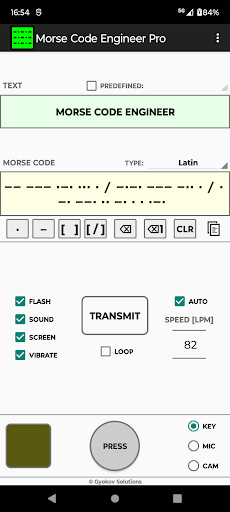
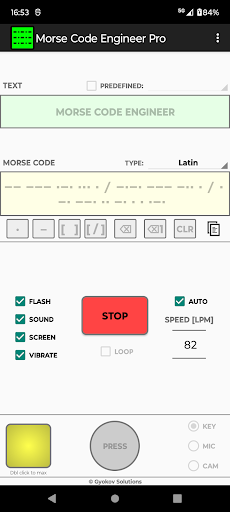
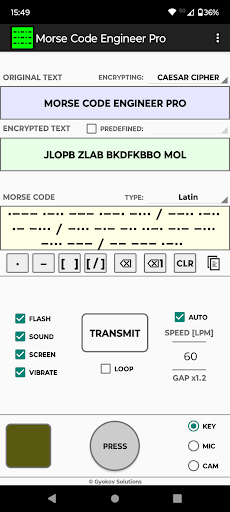

About Morse Code Engineer Pro
The description on the store listing
Morse code audio and light decoder, transmitter and morse code <-> text translator. Decode morse code transmission audio or light. Transmit using sound, flash, screen and vibration.
This is app pro version. Compared to free Morse Code Engineer version it has following advantages:
- no ads
- encrypt/decrypt messages
- export morse code to audio file
- export morse code to animated gif
- adjust gap between characters and words
- customize morse code transmission sound
App features:
- morse code audio/light detection using microphone and camera
- morse code transmission using flash, sound, screen and vibration
- morse code transmission over bluetooth
- morse code to text …
Read the full description
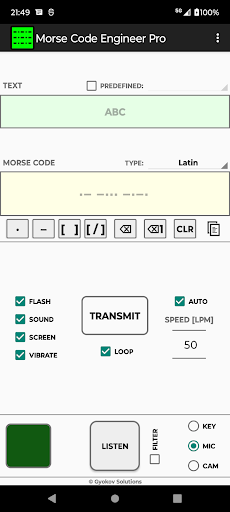
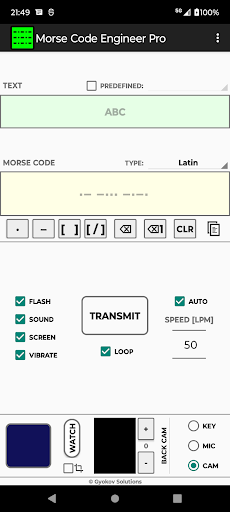
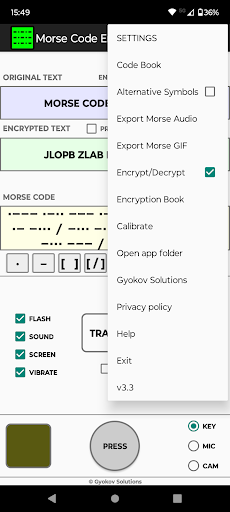
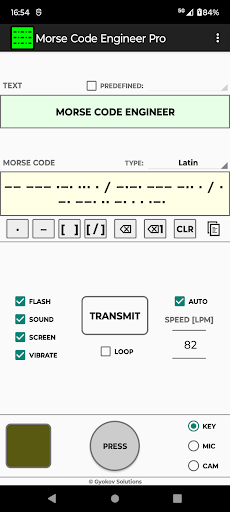
Morse code audio and light decoder, transmitter and morse code <-> text translator. Decode morse code transmission audio or light. Transmit using sound, flash, screen and vibration. This is app pro version. Compared to free Morse Code Engineer version it has following advantages: - no ads - encrypt/decrypt messages - export morse code to audio file - export morse code to animated gif - adjust gap between characters and words - customize morse code transmission sound App features: - morse code audio/light detection using microphone and camera - morse code transmission using flash, sound, screen and vibration - morse code transmission over bluetooth - morse code to text automatic translation - text to morse code automatic translation - input morse code using button or using buttons for dot, dash and space - input predefined words - export morse code to audio file - add your own predefined words - calibration for correct speed of the transmission - different code books - Latin (ITU), Cyrillic, Greek, Arabic, Hebrew, Persian, Japanese, Korean, Thai, Devangari How to use: TEXT -> MORSE CODE Input text in text box. In morse code box the text will be automatically translated to morse code. You can change code book from drop down menu. MORSE CODE ->TEXT Input morse code in morse code box using: - button key [PRESS] - by doing short and long inputs. By default the input speed is auto detected and [SPEED] spinner (letters per minute) is updated. You can turn on/off speed autodetection in [SETTINGS - Auto detect speed]. If it is turned off you can use the [SPEED] spinner to adjust the speed of your input for better symbol recognition. - buttons below morse code box - [ . ] for dot and [ - ] for dash. Use [ ] button to input space between letters. Use [ / ] for spaces between words. You can clear symbols using backspace button or clear whole letter using backspace button for letters. Using [CLR] button you can clear bot text and morse code boxes. The morse code will be automatically translated to text and filled in text box. You can change code book from drop down menu. MORSE CODE TRANSMISSION Transmission is started with [START] button and is using: - flash - sound - screen - vibration You can control different options using corresponding check boxes. When screen option is used then double click on small screen while transmission is running will turn full screen transmission. Double click will return to app screen. You can change speed of transmission using speed spinner (letters per minute). You can loop the transmission by selectiong [LOOP] checkbox. MORSE CODE AUDIO DETECTION The app can listen and decode morse code transmission. To turn listening on select [MIC] on input panel and press [LISTEN] button. The app listens and detects morse code transmission and writes morse code in morse code box and translated text in text box. MORSE CODE LIGHT DETECTION The app can watch and decode morse code transmission using light. To turn listening on select [CAMERA] on input panel and press [WATCH] button. The app watches and detects morse code light transmission and writes morse code in morse code box and translated text in text box. By default the input speed is auto detected and [SPEED] spinner (letters per minute) is updated. You can turn on/off speed autodetection in [SETTINGS - Auto detect speed]. If it is turned off you can use the [SPEED] spinner to adjust the speed of morse code transmission for better symbol recognition. MENU OPTIONS: - Settings - open app settings - Code Book - shows selected codebook with letters and their morse code - Alternative symbols - if checked then alternative symbols are used. Set them in Settings. - Export Morse Audio - ExportMorse GIF - Encrypt/Decrypt - activates encryption - Encryption book - shows encryption book - Calibrate - runs calibration and sets correction time App privacy policy - https://sites.google.com/view/gyokovsolutions/morse-code-engineer-pro-privacy-policy
Installs since 16 Nov 2026 Measured
Exact Google Play install counts, collected daily
Daily history starts once this app is in our daily install sample.
Ratings
- 5 ★0.0%
- 4 ★0.0%
- 3 ★0.0%
- 2 ★0.0%
- 1 ★0.0%
Recent reviews
Latest public reviews from the store
- 14 Nov 2025
Good
- 10 Jan 2025
Tbh this was such a specific thing I was looking for and I am greatfull that someone actually did it thanks
Top chart positions
Latest Google Play chart ranks by country, last 10 days
Not in any tracked top chart in the last 10 days.
Morse Code Engineer Pro history
Release, install milestones, listing and store changes
- Reached 100+ installs 24 May 2024
- Reached 50+ installs 27 Oct 2023
- First released on the store 30 Apr 2023
Update frequency
How often Morse Code Engineer Pro ships a new version, month by month
2 updates in the last 12 months. More often than most similar apps: they shipped a median of 0 updates in the same year.
Recent versions
Current version Varies with device
- Version 6.116 Dec 2025
- Version 5.626 Nov 2025
- Version 5.518 Sep 2025
- Version 5.27 May 2025
Listing keywords
Words and phrases Morse Code Engineer Pro repeats most in its store listing
Top phrases: morse code (39), morse code transmission (9), code transmission (9), morse code box (5), code box (5).
Highlighted words also appear in the title. Counts cover the title, short description and description.
Business model and tech
From the store listing and declared permissions
- Business model
- Paid, $7.49
- Sensitive access
- CameraMicrophonePhotos, videos and filesNearby devices
15 permissions
0 special access, 7 sensitive, 8 standard
- Record audioSensitive
- Take photos and videosSensitive
- Change or delete shared storageSensitive
- Read music and audioREAD_MEDIA_AUDIOSensitive
- Read shared storageSensitive
- Connect to paired Bluetooth devicesBLUETOOTH_CONNECTSensitive
- Show notificationsPOST_NOTIFICATIONSSensitive
- Control the flashlightStandard
- Control vibrationStandard
- Pair with Bluetooth devicesStandard
- Full internet accessStandard
- See network connectionsStandard
Compliance
What the listing and the app package show
- Store status
- Live
- Upkeep
- Updated 16 Dec 2025
- Registered in
- Bulgaria
- Privacy policy
- Linked on the listing
- Advertising
- No ads declared
- In-app purchases
- None declared
- Age rating
- Everyone
- Sensitive permissions
- 7 sensitive of 15
- Location access
- No
- Camera and microphone
- Both
Apps like Morse Code Engineer Pro
들어서 화면켜기Won3.5K installs★ 4.0
Height PredictionEcliptic App Ventures45.9K installs★ 2.4
Speicers`Pro VPNEldiablolucifer202021.2K installs★ 4.14
Lightning Tracker with AlertsYaksh Software4.3K installs★ 3.0
Mana Pathi (Unit Converter)Shirish Koirala2.2K installs★ 4.6
Multi-tab Calc - A simple app.Naoyuki Rikiji1.3K installs★ 5.0
Photo Recovery PlusBillApps7.1K installs★ 4.53
Just Silence. Scheduled.Akid Soft1.6K installs★ 5.0
- WoWp AssistantВиталий Робиновский2K installs★ 4.2
Morse Code Engineer Pro: questions and answers
How many downloads does Morse Code Engineer Pro have?
Morse Code Engineer Pro has 335 installs on Google Play, measured from the store's own count on 16 Nov 2026.
Who makes Morse Code Engineer Pro?
Morse Code Engineer Pro is published by GyokovSolutions, a developer based in BG.
When was Morse Code Engineer Pro last updated?
The latest version (Varies with device) was released on 16 Dec 2025.
Is Morse Code Engineer Pro free?
No. Morse Code Engineer Pro is a paid app priced at $7.49.
Is Morse Code Engineer Pro still available?
Yes. Morse Code Engineer Pro is live on Google Play as of 16 Nov 2026.
Track Morse Code Engineer Pro and its competitors
Watch any app for new versions, rating drops, chart moves and removals. Free plan, no card.