
Multitrack Player Pro
Play multitrack songs on your device
- Installs
- 526
- Measured
- Rating
- —
- Ratings
- —
- Version
- Varies with device
- Updated 28 Mar 2026
- Released
- 11 May 2023
- Tracked since 12 May 2026
- Size
- —
Screenshots

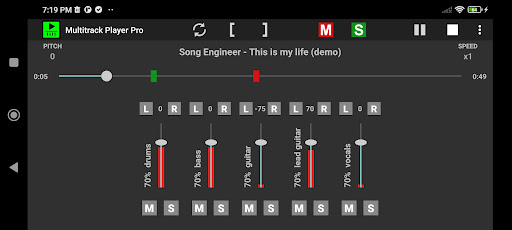
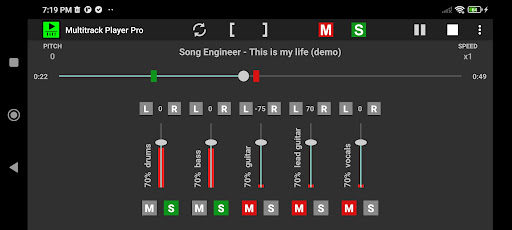

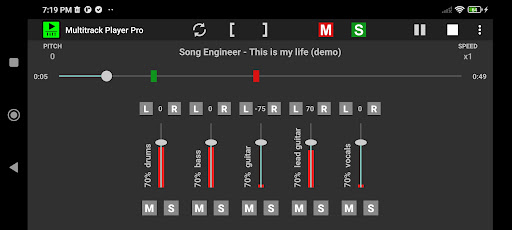


About Multitrack Player Pro
The description on the store listing
Multitrack Player is simple multitrack songs player. Just select folder that contains song instrument files and play it. You can solo/mute instrument tracks and change their balance and loudness level.
This is pro version of free app Multitrack Player. Compared to free version pro version has following advantages:
- no ads
- balance control
- pitch and speed knob controls with continuous values
- save/open multitrack
- load/play next/previous multitrack in folder.
- autoplay next multitrack
- audio preview (loop/scrub)
- zoom
App features:
- play multitrack song (several audio files for different instruments)
- adjust track loudness
- solo/mute track
- loop feature
- …
Read the full description
Multitrack Player is simple multitrack songs player. Just select folder that contains song instrument files and play it. You can solo/mute instrument tracks and change their balance and loudness level. This is pro version of free app Multitrack Player. Compared to free version pro version has following advantages: - no ads - balance control - pitch and speed knob controls with continuous values - save/open multitrack - load/play next/previous multitrack in folder. - autoplay next multitrack - audio preview (loop/scrub) - zoom App features: - play multitrack song (several audio files for different instruments) - adjust track loudness - solo/mute track - loop feature - change speed - change pitch How to use: 1. Download multitrack songs on your device. Search internet for "free multitracks". Multitrack song contains several audio files for instrument tracks. 2. Open app. Select Menu - Open multitrack and point to folder that contains multitrack song. 3. The app loads multitrack song. 4. Press buttons PLAY and STOP to play song. 5. Using track fader you can control instrument track loudness. 6. Use track button [S] to solo track and button [M] to mute track. 7. Use header button [S] to activate all tracks and button [M] to mute all tracks. How to activate loop feature: 1. Press loop button. It will change color to white and will activate (start loop ) and (end loop) buttons ( [ ) and ( ] ). 2. Play song or move progress slider to start loop position. 3. Press ( [ ) button to set start loop position. 4. Move progress slider to loop end position. 5. Press ( ] ) button to set end loop position. 6. PRO VERSION ONLY) Adjust markers position by dragging them. If audio preview is enabled in app settings you will hear short sound preview. If using waveform is enabled in app settings you will see zoom window with audio waveform for precise adjustment. Use zoom window to zoom around markers for more precise adjustment. 7. Press play button to play the song. How to change speed and pitch: In pro version there is options to use knobs or spinners in Settings – Pitch and speed controls – Use knobs for pitch and speed controls. If knob is used for pitch adjustment then the knob can be set to discrete semitones or continuous change. 1. Use speed spinner or drag speed knob horizontally to set playback speed. 2. Use pitch spinner or drag pitch knob horizontally to change pitch. The step is one semitone. How to use zoom controls: 1. Zoom controls are available when audio waveform is activated in Settings – Audio waveform – Show audio waveform. 2. Activate zoom by clicking zoom button in app action bar. 3. Use (+) and (-) buttons to zoom in and out. 4. Zoom is centered around playhead or loop markers based on which one was last touched. For better performance use wav files. If mp3 files are used then it is better to use CBR (constant bitrate) mp3. Playing in background requires notifications permission. App manual - https://gyokovsolutions.com/multitrack-player-manual
Installs since 1 Sep 2026 Measured
Exact Google Play install counts, collected daily
Ratings
- 5 ★0.0%
- 4 ★0.0%
- 3 ★0.0%
- 2 ★0.0%
- 1 ★0.0%
Recent reviews
Latest public reviews from the store
- 4 Sep 2023
What a producer always wanted but never knew until it was created. This is an amazingly simple but powerful way to quickly generate usable idea data (midi data) by just humming a melodic idea. It's probably the best thing I've tried on Android since koala, but this is so simple. I can't believe I haven't seen anything like it before.
Top chart positions
Latest Google Play chart ranks by country, last 10 days
Not in any tracked top chart in the last 10 days.
Multitrack Player Pro history
Release, install milestones, listing and store changes
- Reached 100+ installs 8 Dec 2023
- Reached 50+ installs 14 Aug 2023
- First released on the store 11 May 2023
Update frequency
How often Multitrack Player Pro ships a new version, month by month
1 updates in the last 12 months. More often than most similar apps: they shipped a median of 0 updates in the same year.
Recent versions
Current version Varies with device
- Version 6.028 Mar 2026
- Version 5.612 Nov 2025
- Version 5.020 Oct 2025
- Version 2.531 Mar 2025
Listing keywords
Words and phrases Multitrack Player Pro repeats most in its store listing
Top phrases: audio waveform (4), multitrack song (4), pro version (4), pitch and speed (3), loop position (3).
Highlighted words also appear in the title. Counts cover the title, short description and description.
Business model and tech
From the store listing and declared permissions
- Business model
- Paid, $7.49
- Sensitive access
- MicrophonePhotos, videos and files
11 permissions
0 special access, 5 sensitive, 6 standard
- Record audioSensitive
- Change or delete shared storageSensitive
- Read music and audioREAD_MEDIA_AUDIOSensitive
- Read shared storageSensitive
- Show notificationsPOST_NOTIFICATIONSSensitive
- Foreground service (media playback)FOREGROUND_SERVICE_MEDIA_PLAYBACKStandard
- Run a foreground serviceFOREGROUND_SERVICEStandard
- Full internet accessStandard
- See network connectionsStandard
- Internal app permissionDYNAMIC_RECEIVER_NOT_EXPORTED_PERMISSIONStandard
- Google Play license checkStandard
Compliance
What the listing and the app package show
- Store status
- Live
- Upkeep
- Updated 28 Mar 2026
- Registered in
- Bulgaria
- Privacy policy
- Linked on the listing
- Advertising
- No ads declared
- In-app purchases
- None declared
- Age rating
- Everyone
- Sensitive permissions
- 5 sensitive of 11
- Location access
- No
- Camera and microphone
- Microphone
Apps like Multitrack Player Pro
Salsa Son TimbaLa Esquina Mundial1.9K installs★ 4.4
Texas Radio Stations - USAManoloWorks4K installs★ 4.0
Victory 91.5RadioReformation, LLC3.1K installs★ 3.91
Radio AlexNuova Factory7.3K installs★ 3.6
Rádio Kiss FMDigitalRM Broadcast8.5K installs★ 4.3
MP InstallQSC Audio, LLC15K installs★ 2.6
Radio Camino Al CieloRuley Technologies860 installs★ 5.0
Radio Mais 88.5 FMAPPRADIO.PRO - Radio Digital Connecting People23.7K installs★ 4.6
Vinyl CastAllen Schober5.8K installs★ 3.89
Multitrack Player Pro: questions and answers
How many downloads does Multitrack Player Pro have?
Multitrack Player Pro has 526 installs on Google Play, measured from the store's own count on 10 Nov 2026.
Who makes Multitrack Player Pro?
Multitrack Player Pro is published by GyokovSolutions, a developer based in BG.
When was Multitrack Player Pro last updated?
The latest version (Varies with device) was released on 28 Mar 2026.
Is Multitrack Player Pro free?
No. Multitrack Player Pro is a paid app priced at $7.49.
Is Multitrack Player Pro still available?
Yes. Multitrack Player Pro is live on Google Play as of 10 Nov 2026.
Track Multitrack Player Pro and its competitors
Watch any app for new versions, rating drops, chart moves and removals. Free plan, no card.