
- Installs
- —
- Apple does not publish download counts
- Rating
- 5.0
- Ratings
- 4
- 4 reviews
- Version
- 1.4
- Updated 25 Aug 2024
- Released
- 22 Oct 2023
- Tracked since 10 May 2026
- Size
- 9 MB
- Needs 16.0
Screenshots




About PLIST Editor Mobile
The description on the store listing
PLIST Editor allows you to create, visualize, modify and save property list (.plist) documents.
PLIST Editor is probably the only "source control friendly" property list editor that you can find on the market (except Xcode, of course). For all plist types (XML, Binary and OpenStep/ASCII), it maintains the order of dictionary elements and the editing capabilities are on parity with Xcode, so you don't see a difference between a file edited in PLIST Editor and one edited in Xcode.
IMPORTANT: PLIST Editor is available as free to download, but there are a few features not available: i.e. Save documents, Find & Replace, Sort.
In order to get the most out of the app, and to enable the …
Read the full description
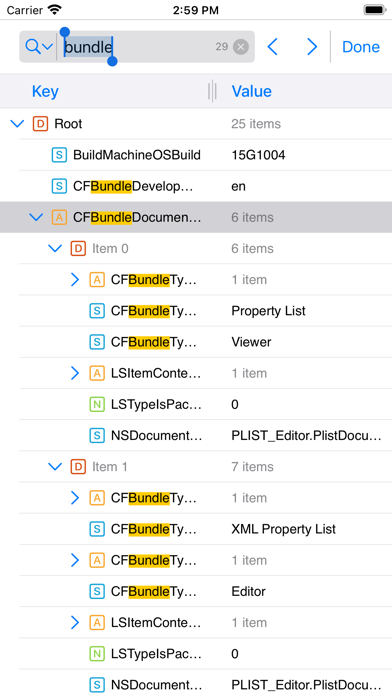
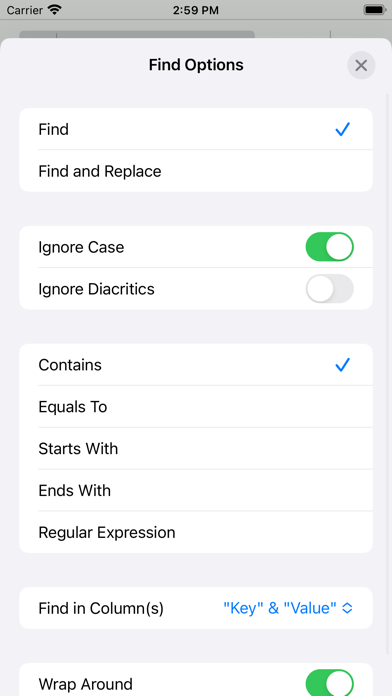
PLIST Editor allows you to create, visualize, modify and save property list (.plist) documents. PLIST Editor is probably the only "source control friendly" property list editor that you can find on the market (except Xcode, of course). For all plist types (XML, Binary and OpenStep/ASCII), it maintains the order of dictionary elements and the editing capabilities are on parity with Xcode, so you don't see a difference between a file edited in PLIST Editor and one edited in Xcode. IMPORTANT: PLIST Editor is available as free to download, but there are a few features not available: i.e. Save documents, Find & Replace, Sort. In order to get the most out of the app, and to enable the aforementioned features, "Premium" is recommended to be purchased ("Premium" is a one-time in-app purchase). Core features of the app: • Open and save property list files in XML, Binary and OpenStep/ASCII format. • Cut, copy, paste, duplicate, delete and reorder elements • "Source control" friendly - the order of dictionary elements is preserved, showing them in the same order as they are defined in the file. Similarly, when the property list is written to disk, the order of items from a dictionary written to disk is the same as the one seen on screen. This is especially useful when you keep the files in a repository, because only the relevant changes will be shown when diff-ing the edited files. • Find & Replace text in the property list elements. You can choose where the Find (and Replace) will take place: in "Key" column or "Value" column or both. • Find & Replace also lets you configure where in the text to look for matches: "Contains", "Equals To", "Starts With", "Ends With" and "Regular Expression" • Sort children or siblings by key, type, value or sub-key • Edit the elements of a property list by double tapping a key or value. • Open and edit the files created using NSKeyedArchiver without any loss of information • Copy elements as Swift objects • Copy elements as JSON data, both readable and compact JSON • Copy elements as XML, Binary (Base 64 encoded) and OpenStep/ASCII plists • Embed selected elements in array or dictionary • Shift elements to left or right • Move elements up or down by pressing a row and then moving it to the desired location • Resize the columns for better readability by dragging the separator • Open and edit the files created using NSKeyedArchiver without any loss of information • Export files as JSON (compact or readable) and PLIST (XML, Binary, OpenStep/ASCII) • Option, in Settings to choose the default font, along with the font size • Option, in Settings, to enable (or disable) Auto Save • Undo & Redo • Dark mode • Portrait & landscape • Split view and slide over for iPad • Keyboard support if you have an external keyboard connected or use “Universal control” If you're also interested in the Mac version of this app visit https://vdt-labs.com/plist-editor
Installs
Apple does not publish download counts. Estimates are in testing.
We publish iOS estimates only after they pass a back-test against real numbers. Chart history below is measured.
Estimated store revenue Estimated Beta
App Store, worldwide, monthly rate from the last 13 chart days to 20 Nov 2026
Below the top 100 grossing apps in the markets we calibrate. In the United States that usually means under about $6.4M a month. App Store purchases and subscriptions only, before Apple's 15 to 30% fee. Ads and web payments are not included.
Ratings
4 ratings, 4 reviews
No rating breakdown published for this app.
Recent reviews
Latest public reviews from the store
No reviews in our sample for this app yet.
Top chart positions
Latest App Store chart ranks by country, last 10 days
- Countries ranked
- 8 of 50
- Best rank
- #21
- Top 10 placements
- 0
- of 8 chart placements
- Average rank
- #57
Best countries on App Store
- 🇧🇷 Brazil · Top free, Developer Tools#21
- 🇸🇬 Singapore · Top free, Developer Tools#25
- 🇯🇵 Japan · Top grossing, Developer Tools#41
- 🇻🇳 Vietnam · Top free, Developer Tools#53
- 🇵🇹 Portugal · Top free, Developer Tools#69
- 🇦🇷 Argentina · Top free, Developer Tools#72
| Country | Chart | Category | Rank | Best (10 days) | Date |
|---|---|---|---|---|---|
| 🇧🇷 Brazil | Top free | Developer Tools | #21 | #21 | 20 Nov 2026 |
| 🇸🇬 Singapore | Top free | Developer Tools | #25 | #25 | 20 Nov 2026 |
| 🇯🇵 Japan | Top grossing | Developer Tools | #41 | #28 | 20 Nov 2026 |
| 🇻🇳 Vietnam | Top free | Developer Tools | #53 | #44 | 20 Nov 2026 |
| 🇵🇹 Portugal | Top free | Developer Tools | #69 | #69 | 13 Nov 2026 |
| 🇦🇷 Argentina | Top free | Developer Tools | #72 | #72 | 14 Nov 2026 |
| 🇪🇸 Spain | Top free | Developer Tools | #85 | #85 | 14 Nov 2026 |
| 🇫🇮 Finland | Top free | Developer Tools | #90 | #51 | 14 Nov 2026 |
PLIST Editor Mobile history
Release, install milestones, listing and store changes
- First released on the store 22 Oct 2023
Recent versions
Current version 1.4
- Version 1.425 Aug 2024
Improvements • Settings now has an additional option which can sort all the children of all dictionaries by key, either ascending or descending, when a document is openend or reverted. This option is available under "File Opening" section, as is titled "Sort Children of Dictionaries by Key". ――― If you enjoy PLIST Editor Mobile and find it useful, please also consider PLIST Editor, the sibling app specifically made for Mac. We constantly want to improve the quality of our apps. For any feedback, questions and ideas please contact us at [email protected]
Listing keywords
Words and phrases PLIST Editor Mobile repeats most in its store listing
Top phrases: property list (6), plist editor (5), openstep ascii (4), xml binary (4), copy elements (3).
Highlighted words also appear in the title. Counts cover the title, short description and description.
Compliance
What the listing and the app package show
- Store status
- Live
- Upkeep
- No update since 25 Aug 2024
- Age rating
- 4+
Apps like PLIST Editor Mobile
 iProxy - Sys admin toolsN-Lab★ 4.06
 WA Virtual Number - WANoMarkakod Reklam Tasarim ve Yazilim Hizmetleri Ticaret Limited★ 4.44
 C/C++ LLVM Clang小文 黄★ 4.32
 StoreView: App Screenshot ToolElshan Aliyev★ 4.53
 Yomo: Docker & Portainer春晖 杜★ 4.79
 Termux -TERMUX LIMITED LIABILITY COMPANY★ 4.4
 Debug Anywhere浩鑫 庄★ 4.62
 Easy SSHArgsment Limited★ 4.55
 SSL CheckerOrave Technologies★ 4.61
PLIST Editor Mobile: questions and answers
Who makes PLIST Editor Mobile?
PLIST Editor Mobile is published by VDT LABS S.R.L..
When was PLIST Editor Mobile last updated?
The latest version (1.4) was released on 25 Aug 2024.
Is PLIST Editor Mobile free?
Yes. PLIST Editor Mobile is free to download.
Is PLIST Editor Mobile still available?
Yes. PLIST Editor Mobile is live on App Store as of 1 Jul 2026.
Track PLIST Editor Mobile and its competitors
Watch any app for new versions, rating drops, chart moves and removals. Free plan, no card.